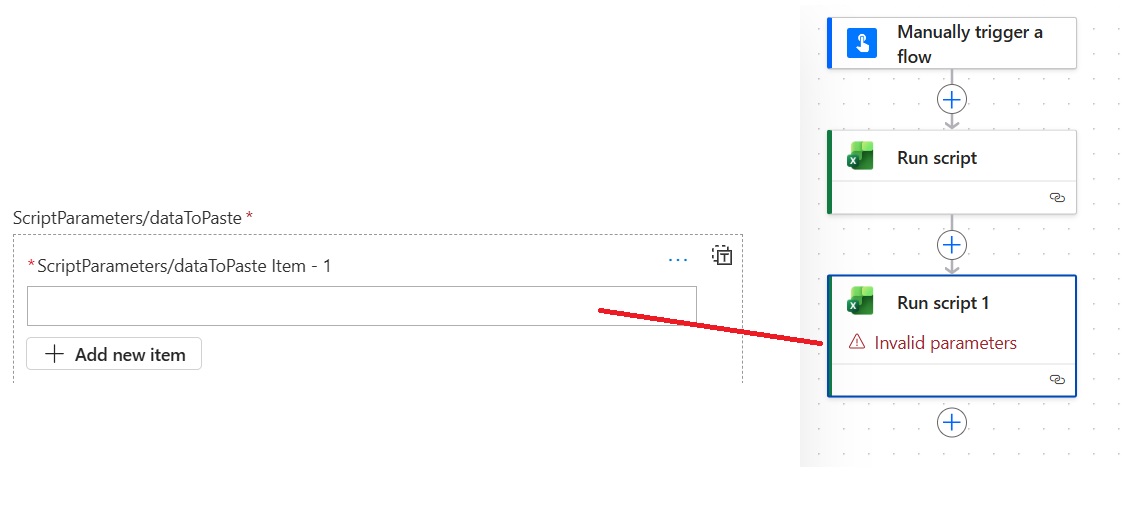
Hello everyone, @frago, @rzaneti
Here are the steps I’ve taken today :
Step 1: Creation of a manual trigger with no parameters
Step 2: Creation of a first ‘Run script’ action
In step 2 with the following parameters:
Location = I copied the path of the A.xlsx file and shortened it to the root. This worked (thanks to Frago for suggesting this solution)
Document Library = Folder name
File = file A.xlsx
Script = Name of the script I had named ‘FromSource’ in the first script provided by Frago
Step 3: Create a second ‘Run script 1’ action
With the following parameters:
Location = Same as Step 2
Document Library = Same as Step 2
File = file B.xlsx
Script = Name of the script I had named ‘ToDestination’ in the second script provided by Frago
ScriptParameters/dataToPaste = This is where I’m stuck. I don’t know what to enter (see screenshot)
I have a few more questions :
1- In the scripts provided by Frago, what do the following correspond to:
let table = workbook.getTable(‘Table1’) = The name of the worksheet (tab) or the name of a structured table?
let sheet = workbook.getWorksheet(‘ToDestination’) = Similarly, the name of the worksheet?
2- Would both scripts work equally well with tables and ranges?
Thanks in advance for your support
Best regards