web
You’re offline. This is a read only version of the page.
close
Skip to main content

Announcements

News and Announcements icon
Community site session details

Community site session details

Session Id :
Power Platform Community / Forums / Power Automate / Which Condition expres...
Power Automate
Suggested Answer

Which Condition expression should I use to branch correctly?

(0) ShareShare
ReportReport
Posted on by 56

Hi
I've got a Flow which triggers when an item is added to a SharePoint list. 
 
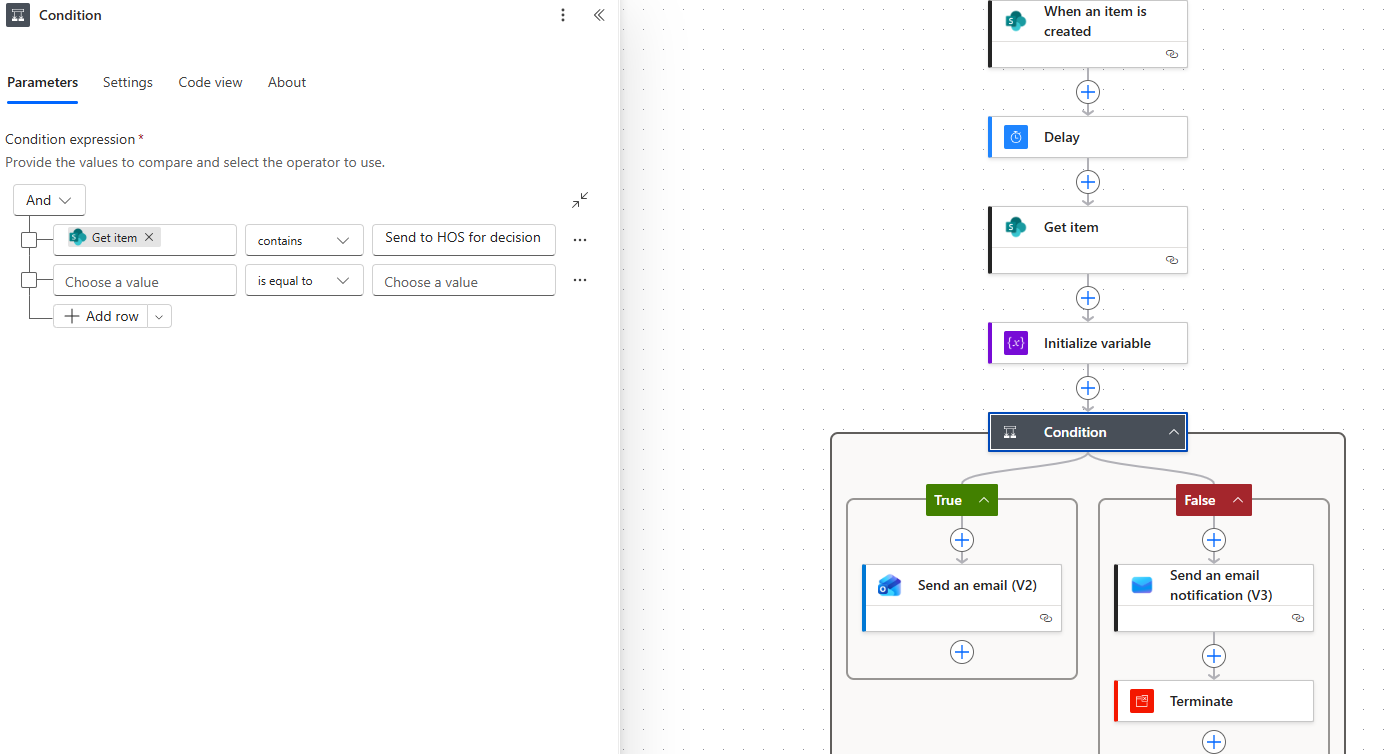
There's a choice field where the default is 'Send to HOS for decision'. There's a three day delay and if the choice remains at the default the Flow should branch to the left and True to send an email to an internal team.
 
While the Flow to delayed the choice could be changed to 'Send to relevant CLS' or Send to XXX' which should then branch to the right and False to end the Flow. I've added an email action to alert me that this is what's happening.
 
I initialized a string variable using the choice field option and that didn't seem to do anything (although I have noticed that in the alert email email that comes to me it shows the up to date choice but with a '/' in front of it)
 
I added the Get Item after the Delay to get the latest choice value, but now regardless of the choice the Flow always branches to the right and False, even if the choice is still the default of 'Send to HOS for decision'.
 
Any suggestions on what's going wrong? All help appreciated. 
PowerAutomateFlow.PNG
Categories:
I have the same question (0)
  • Kalathiya Profile Picture
    2,456 Super User 2026 Season 1 on at

    After the Get item action, add a Switch action.

    Select the choice column from Dynamic content, then use the Value from the dynamic selection to set your cases. 

     
    If this response resolves your issue, please mark it as the Verified Answer so it can help other community members as well.
    ---------------------------------------------------------------------------------
     
    📩 Need more help? Mention@Kalathiya anytime!
    ✔️ Don’t forget to Accept as Solution if this guidance worked for you.
    💛 Your Like motivates me to keep helping!


  • Suggested answer
    David_MA Profile Picture
    14,956 Super User 2026 Season 1 on at
    Is Get item the choice field in your list? If so, you need to use the value that contains value after the field name. For example:
    Your choice field should have two options like this:
  • sutekhtheflow Profile Picture
    56 on at
    Hi @David_MA

    No, the Choice Field is called 'Legal Use Only' for some reason the 'Get Item' action is showing up when I select that Choice Field. 
     
    @Kalathiya I'll try the Switch action. Thanks

Under review

Thank you for your reply! To ensure a great experience for everyone, your content is awaiting approval by our Community Managers. Please check back later.

Helpful resources

Quick Links

Season of Sharing Community Challenge Launch!

Jump in, show your community spirit, and win prizes!

Kudos to our 2025 Community Spotlight Honorees

Expanding mentorship, skilling, and AI innovation

Congratulations to the May Top 10 Community Leaders!

These are the community rock stars!

Leaderboard > Power Automate

#1
Valantis Profile Picture

Valantis 377

#2
11manish Profile Picture

11manish 279

#3
David_MA Profile Picture

David_MA 234 Super User 2026 Season 1

Last 30 days Overall leaderboard
