Hi everyone,
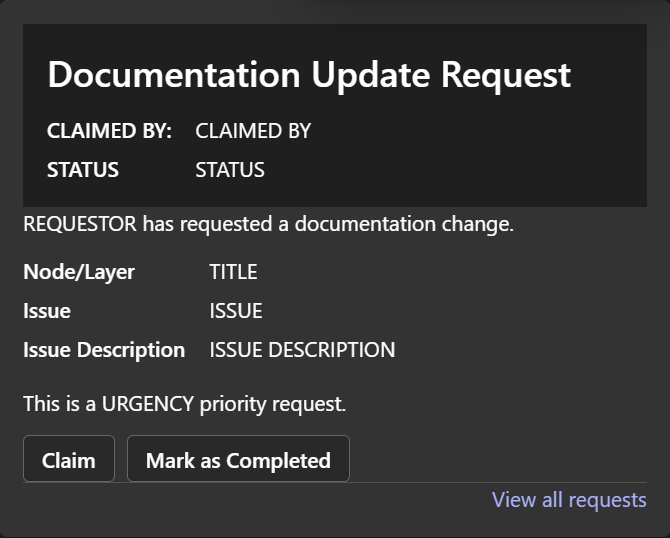
I'm trying to build the following adaptive card.
When a new item is created by a user, it will send a adaptive card to some users. These users can then claim it and mark it as complete by clicking a button. Ideally, these buttons would update the Sharepint list to say who is claiming them and change status to complete when the work is done.
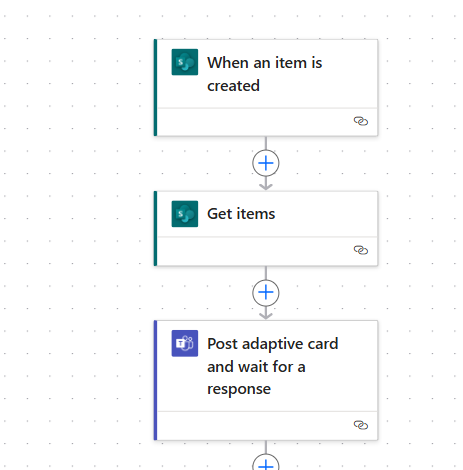
I have currently built my adaptive card but I can't figure out how to have the buttons to update the adaptive card/sharepoint. Any help is appreciated. I'm going to put my payload/current powerautomate flow below.
{
"$schema": "http://adaptivecards.io/schemas/adaptive-card.json",
"type": "AdaptiveCard",
"version": "1.0",
"body": [
{
"type": "ColumnSet",
"id": "1ede2aba-61b9-faa0-9895-9ed0c26b2e6f",
"columns": [
{
"type": "Column",
"id": "e5756242-0963-37a2-7cb4-4397886d60bb",
"padding": "None",
"width": "stretch",
"items": [
{
"type": "TextBlock",
"id": "44906797-222f-9fe2-0b7a-e3ee21c6e380",
"text": "Documentation Update Request",
"wrap": true,
"weight": "Bolder",
"size": "ExtraLarge",
"style": "heading",
"spacing": "Large"
},
{
"type": "FactSet",
"id": "d0e33865-1a9d-02d5-c5f8-81a75c58c77e",
"facts": [
{
"title": "CLAIMED BY:",
"value": "CLAIMED BY VALUE"
},
{
"title": "STATUS",
"value": "Incomplete"
}
]
}
],
"verticalContentAlignment": "Center"
}
],
"padding": {
"top": "Small",
"bottom": "Small",
"left": "Default",
"right": "Small"
},
"style": "emphasis"
},
{
"type": "Container",
"id": "fbcee869-2754-287d-bb37-145a4ccd750b",
"padding": "Default",
"spacing": "None",
"items": [
{
"type": "TextBlock",
"id": "f7abdf1a-3cce-2159-28ef-f2f362ec937e",
"text": " REQUESTOR NAME has requested a documentation change. ",
"wrap": true,
"size": "Medium"
},
{
"type": "FactSet",
"id": "99c2c00b-248b-7d27-c095-93bf13ea1690",
"facts": [
{
"title": "Node/Layer",
"value": "TITLE"
},
{
"title": "Issue",
"value": "ISSUE VALUE"
},
{
"title": "Issue Description",
"value": "ISSUE DESCRIPTION"
}
]
},
{
"type": "TextBlock",
"id": "9f8d895f-289f-41b7-567e-a7c5a0aca894",
"text": "This is a URGENCY VALUE priority request. ",
"wrap": true,
"spacing": "Medium"
},
{
"type": "ActionSet",
"id": "c8a5ba7e-7ec6-53ae-79da-0cfb952a527e",
"actions": [
{
"type": "Action.OpenUrl",
"id": "c57d5808-9634-f77e-6a28-508dbfff47b9",
"title": "Claim",
"url": "https://amdesigner.azurewebsites.net"
},
{
"type": "Action.OpenUrl",
"id": "01a5c057-b575-cff1-9297-392bf2671567",
"title": "Mark as Completed",
"url": "https://amdesigner.azurewebsites.net"
}
]
}
]
},
{
"type": "Container",
"id": "77102c5d-fde2-e573-4ea5-66022d646d64",
"padding": {
"top": "Small",
"bottom": "Small",
"left": "Small",
"right": "Default"
},
"spacing": "None",
"separator": true,
"items": [
{
"type": "TextBlock",
"id": "42654e7e-cece-b419-867a-3e3ef4076870",
"text": "[View all requests](WWW.LINK.COM)",
"wrap": true,
"color": "Accent",
"horizontalAlignment": "Right"
}
],
"horizontalAlignment": "Right"
}
],
"padding": "None"
}





