web
You’re offline. This is a read only version of the page.
close
Skip to main content

Announcements

News and Announcements icon
Community site session details

Community site session details

Session Id :
Power Platform Community / Forums / Power Automate / How to disable the "Ru...
Power Automate
Suggested Answer

How to disable the "Run flow" confirmation dialog when starting from Task Scheduler?

(0) ShareShare
ReportReport
Posted on by

Hi,

I am trying to fully automate my Power Automate Desktop (PAD) flow using Windows Task Scheduler.
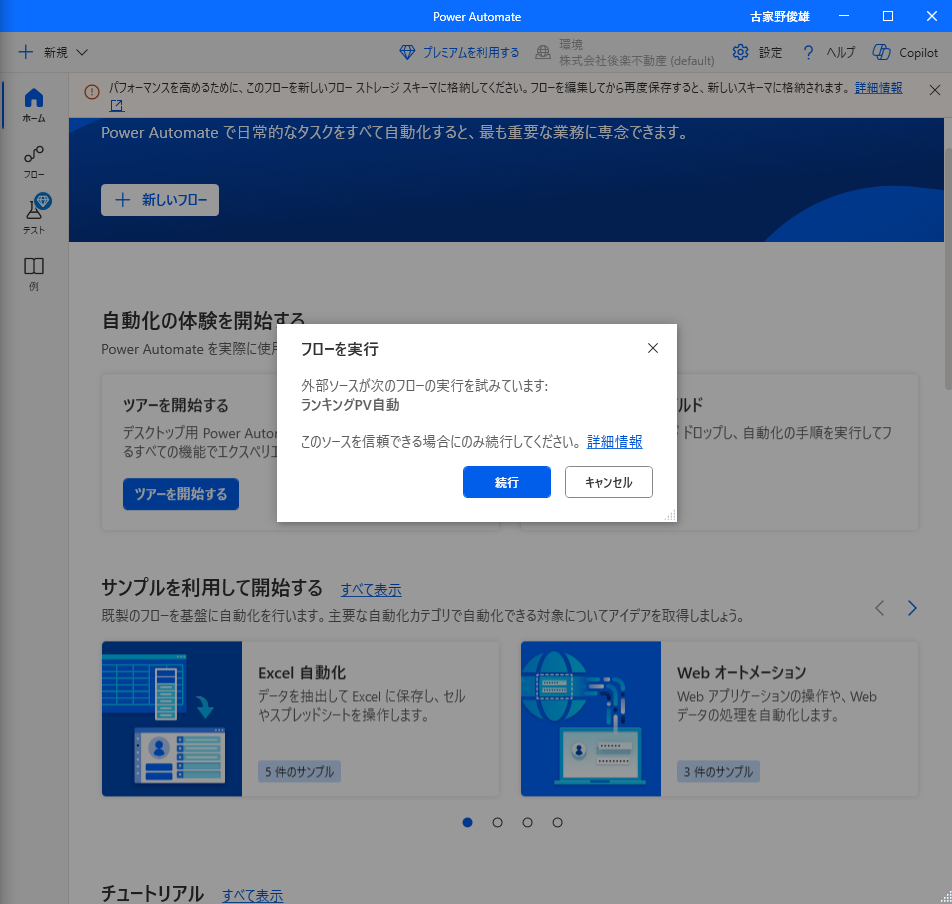
However, every time the task runs, the following confirmation dialog appears:
"Run flow: An external source is attempting to run the following flow..."

I have to manually click the "Run" (or "Continue") button, so it is not fully automated.

[What I want to achieve]
I want the flow to start automatically without any manual confirmation or clicks.

[What I have tried]

  • Running via URL: ms-powerautomate:/console/flow/run?workflowId=...

  • Checking PAD settings (but I couldn't find the "Display confirmation dialog" option).

How can I skip or disable this confirmation window? Any help would be appreciated.

Environment: Windows 11 / Power Automate Desktop (Free version)
I have the same question (0)
  • Suggested answer
    CU31080729-3 Profile Picture
    502 Moderator on at
    Hi,
     
    As of i know if you don,t have premium license of power automate , yow will not able to see option of "display conformation dialog when invoking flows externally" for disable this pop up when you run flow externally


    Thanks & Regards
    Chetan Ninghot
    Was this answer helpful?
    If yes, please mark it as the solution by selecting the checkbox in the discussion thread.
    Your feedback motivates me to keep contributing. Thank you!


  • Suggested answer
    CU07012140-0 Profile Picture
    14 on at
    Hi,
     
    This may be related to your license. What you’re trying to do is run the bot unattended, meaning without user supervision. Microsoft restricts this and requires a separate (more expensive) license for it: the Power Automate Process license (https://www.microsoft.com/en-us/power-platform/products/power-automate/pricing?msockid=2c3ee5dcbeed6f923910f30bbfbe6ece). With this license, you can use a cloud flow to start a desktop flow on a virtual machine.
     
    Good luck,
    Servan
  • CU20010034-0 Profile Picture
    on at
    I posted a workaround for this at reddit .. here is the link to it.
     
    Enjoy!

Under review

Thank you for your reply! To ensure a great experience for everyone, your content is awaiting approval by our Community Managers. Please check back later.

Helpful resources

Quick Links

Introducing the 2026 Season 1 community Super Users

Congratulations to our 2026 Super Users!

Kudos to our 2025 Community Spotlight Honorees

Congratulations to our 2025 community superstars!

Congratulations to the March Top 10 Community Leaders!

These are the community rock stars!

Leaderboard > Power Automate

#1
Haque Profile Picture

Haque 607

#2
Valantis Profile Picture

Valantis 456

#3
11manish Profile Picture

11manish 352

Last 30 days Overall leaderboard



