web
You’re offline. This is a read only version of the page.
close
Skip to main content

Announcements

News and Announcements icon
Community site session details

Community site session details

Session Id :
Power Platform Community / Forums / Power Automate / Help Needed: Error in ...
Power Automate
Unanswered

Help Needed: Error in Flow - Parsing JSON and Adding Rows to Dataverse Table

(0) ShareShare
ReportReport
Posted on by 47
Hi everyone,
I'm facing an issue with my flow where I need to parse JSON from an HTTP request and add rows to a Dataverse table.
When performing the steps needed (HTTP request, parse JSON with the sample schema of the API, 'add row to a dataverse table' ) I keep getting the error:
"The execution of template action 'Apply_to_each' failed: the result of the evaluation of 'foreach' expression '@body('Parse_JSON')?['person']' is of type 'Null'. The result must be a valid array."
Since there is an array in the HTTP response, I can't figure out what's going on. 
This process should be pretty straight forward. 
 
Any insights or solutions on how to resolve this would be greatly appreciated!
 
Thanks
Oren
2024-10-24 15_51_...

Your file is currently under scan for potential threats. Please wait while we review it for any viruses or malicious content.

Categories:
I have the same question (0)
  • Ellis Karim Profile Picture
    12,101 Super User 2026 Season 1 on at
    Your file upload seems to have blocked. Can you repost the screenshots of the flow and some sample data.
     
    Ellis
  • orengaliki Profile Picture
    47 on at
    Hi Ellis, 
    Thanks for your reply. 
    This is the latest fail: 
     
    This is the schema crated from the HTTP response/API Schema: 
     
    {
        "type": "object",
        "properties": {
            "studyPerson": {
                "type": "array",
                "items": {
                    "type": "object",
                    "properties": {
                        "personId": {
                            "type": "string"
                        },
                        "fax": {
                            "type": "string"
                        },
                        "objectType": {
                            "type": "string"
                        },
                        "name": {
                            "type": "string"
                        },
                        "prefix": {
                            "type": "string"
                        },
                        "firstName": {
                            "type": "string"
                        },
                        "middleName": {
                            "type": "string"
                        },
                        "lastName": {
                            "type": "string"
                        },
                        "suffix": {
                            "type": "string"
                        },
                        "mobilePhone": {
                            "type": "string"
                        },
                        "email": {
                            "type": "string"
                        },
                        "gcpCompliance": {
                            "type": "string"
                        },
                        "gcpComplianceComment": {
                            "type": "string"
                        },
                        "vaultUser": {
                            "type": "string"
                        },
                        "cdxId": {
                            "type": "string"
                        },
                        "externalId": {
                            "type": "string"
                        },
                        "irgId": {
                            "type": "string"
                        },
                        "samId": {
                            "type": "string"
                        },
                        "isid": {
                            "type": "string"
                        },
                        "mrlPersonId": {
                            "type": "string"
                        },
                        "contractorEmployee": {
                            "type": "string"
                        },
                        "state": {
                            "type": "string"
                        },
                        "oneTouchId": {
                            "type": "string"
                        },
                        "lifecycle": {
                            "type": "string"
                        },
                        "srcCreatedByDate": {
                            "type": "string"
                        },
                        "srcModifiedByDate": {
                            "type": "string"
                        },
                        "sourceSystem": {
                            "type": "string"
                        },
                        "createdBy": {
                            "type": "string"
                        },
                        "createdByDate": {
                            "type": "string"
                        },
                        "modifiedBy": {
                            "type": "string"
                        },
                        "modifiedByDate": {
                            "type": "string"
                        },
                        "deleteFlag": {
                            "type": "string"
                        }
                    }
                }
            }
        }
    }
    Hope this helps
  • Ellis Karim Profile Picture
    12,101 Super User 2026 Season 1 on at
    Looking at the schema, I think the expression you want to use in the Apply to Each loop is:
     body('HTTP')?['studyPerson']
    StudyPerson is an array, something like:
     
    {
        "studyPerson": [
            {
               {person1}
            },
            {
              {person2}
            },
      {
      ....
      } ] }
     
    Ellis
  • orengaliki Profile Picture
    47 on at
    Hi Ellis, 
    Still nothing. 
    Tried modifying the expression as suggested, and "cleaned" the response example from the API response to capture only the array, but it's still null. 
     
  • Ellis Karim Profile Picture
    12,101 Super User 2026 Season 1 on at
    Can you post the output of the HTTP action.
     
    I made up the following test data that I used for testing:
     
    {
        "statusCode": "OK",
        "headers": {
            "Content-Type": "application/json",
            "Date": "Wed, 01 Nov 2024 12:34:56 GMT"
        },
        "body": {
            "studyPerson": [
                {
                    "personId": "P12345",
                    "fax": "123-456-7890",
                    "objectType": "Researcher",
                    "name": "Dr. Jane Doe",
                    "prefix": "Dr.",
                    "firstName": "Jane",
                    "middleName": "M.",
                    "lastName": "Doe",
                    "suffix": "PhD",
                    "mobilePhone": "987-654-3210",
                    "email": "jane.doe@example.com",
                    "gcpCompliance": "Yes",
                    "gcpComplianceComment": "Completed training on 2023-09-15",
                    "vaultUser": "jdoe_vault",
                    "cdxId": "CDX123456",
                    "externalId": "EXT78910",
                    "irgId": "IRG54321",
                    "samId": "SAM99887",
                    "isid": "ISID001234",
                    "mrlPersonId": "MRL56789",
                    "contractorEmployee": "No",
                    "state": "Active",
                    "oneTouchId": "OT654321",
                    "lifecycle": "Onboarded",
                    "srcCreatedByDate": "2023-09-10T12:00:00Z",
                    "srcModifiedByDate": "2023-10-01T08:30:00Z",
                    "sourceSystem": "HRSystem",
                    "createdBy": "admin",
                    "createdByDate": "2023-09-10T12:00:00Z",
                    "modifiedBy": "jdoe_admin",
                    "modifiedByDate": "2023-10-01T08:30:00Z",
                    "deleteFlag": "No"
                }
            ]
        }
    }
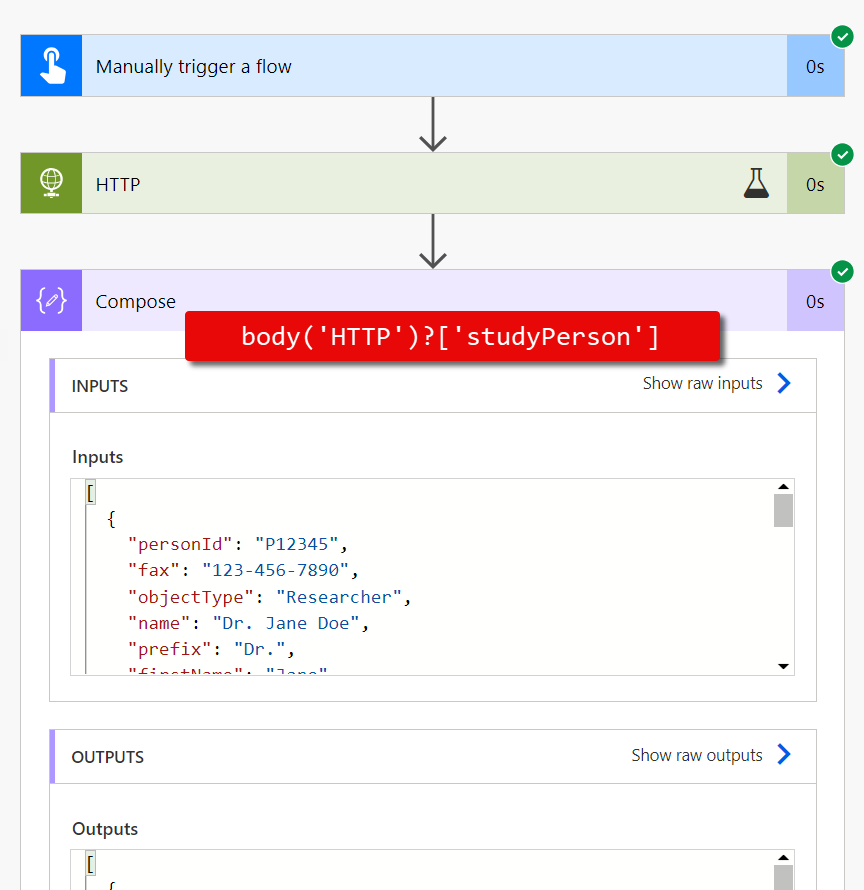


    Ellis

Under review

Thank you for your reply! To ensure a great experience for everyone, your content is awaiting approval by our Community Managers. Please check back later.

Helpful resources

Quick Links

Season of Sharing Community Challenge Launch!

Jump in, show your community spirit, and win prizes!

Kudos to our 2025 Community Spotlight Honorees

Expanding mentorship, skilling, and AI innovation

Congratulations to the April Top 10 Community Leaders!

These are the community rock stars!

Leaderboard > Power Automate

#1
Vish WR Profile Picture

Vish WR 450

#2
Haque Profile Picture

Haque 366

#3
Valantis Profile Picture

Valantis 349

Last 30 days Overall leaderboard



