web
You’re offline. This is a read only version of the page.
close
Skip to main content

Announcements

News and Announcements icon
Community site session details

Community site session details

Session Id :
Power Platform Community / Forums / Power Automate / Format Power Automate ...
Power Automate
Suggested Answer

Format Power Automate Flow

(0) ShareShare
ReportReport
Posted on by 7
Hi.
 
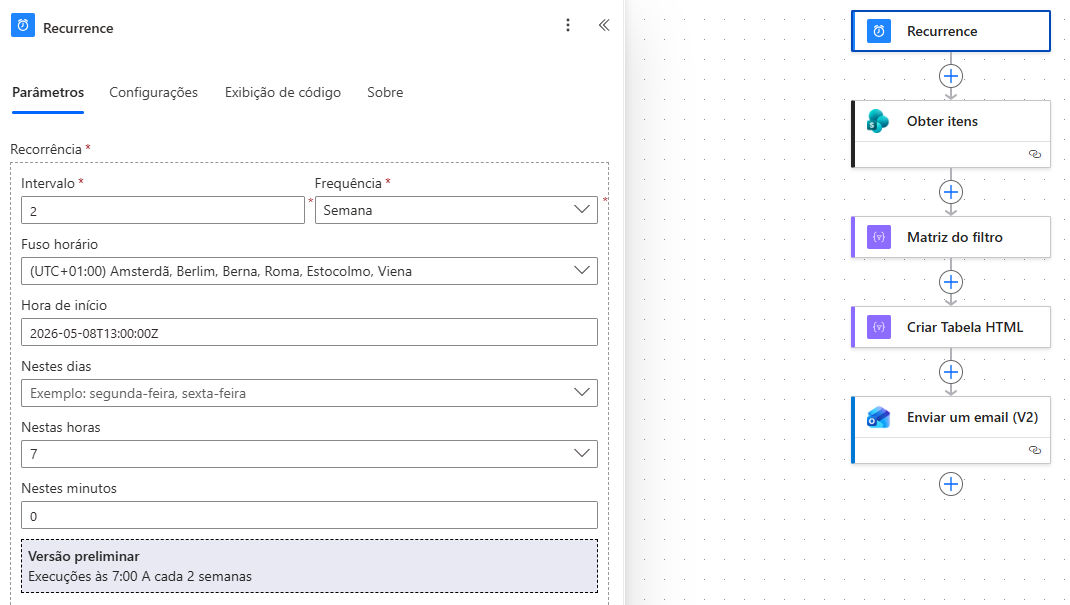
I have created a flow that sends an e-mail with a table extracted from a Shareoint List. The Sharepoint List shows equipment certificate expiration dates and the column "Remaining Days" shows how many days are left before expiring.
 
The flow takes only 4 columns from the List and filters the column `Remaining Days` to send by e-mail only the items with less than 180 days to expire.
 
The flow is working however the formatting is raw and not visually pleasant.
 
I would like to add the following:

- Add borders to the table
- Filter how the items are displayed in ascendent order (closer to expiration on top, more 'remaining days' at the bottom.
- Negative numbers (expired): remaining day in bold and red.
- Between 1 day to  90: remaining day in bold and orange.
- Between 91 days to 180: remaining day in bold and dark yellow.
 
Is it possible to include this features on the flow?
 
Thank you.


Categories:
I have the same question (0)
  • Suggested answer
    David_MA Profile Picture
    14,956 Super User 2026 Season 1 on at
    You can add CSS to the body of the e-mail to format the table. Use a Compose action to generate the e-mail using HTML and insert the CSS at the top. Here is some basic CSS for formatting the table:
     
    <style>
    Table {
      font-family: Arial, Helvetica, sans-serif;
      background-color: ; #EDF0F2;
      border-collapse: collapse;
      width: 100%;
      max-width: 820px;
    }
    Table td, Table th {
      border: 1px solid #ddd;
      padding: 3px 3px;
    }
    Table th {
      font-size: 15px;
      font-weight: bold;
      padding-top: 12px;
      padding-bottom: 12px;
      text-align: left;
      background-color: #0038A6;
      color: white;
    }
    </style>
     
    Then in the Outlook action, put the body into HTML code view and insert the output of the Compose action into the body. This is an important step, otherwise you will see the HTML code in the e-mail that gets sent as it will treat the code as text rather than HTML.
  • Suggested answer
    Power Platform Guy Profile Picture
    220 on at
     
    There is an excellent article about the HTML formatting in Power Automate from Matthew Devaney Foolproof Power Automate HTML Table Styling.
     
    You can use the below link to get the HTML design for the table layout - https://divtable.com/table-styler/
     
    ☑️Accept as Solution to help others 💙 A Like is appreciated ❓Tag @PowerPlatform Guy for any queries
  • David_MA Profile Picture
    14,956 Super User 2026 Season 1 on at
    The link @Power Platform Guy provided illustrates exactly what I outlined above. If you follow the steps here, and you are receiving the e-mails via Outlook, the tr:nth attribute for alternating row colors is not recognized by Outlook
     
    table tr:nth-child(even) {
    background: #D9E1F2; }
  • Daniela_Andrad Profile Picture
    7 on at
    Hi.
     
    I have tried the suggestions above and even before trying to add the Compose, Power Automate is automatically creating a "For each" when I create a table.

    That is causing some trouble and I cannot get the flow to work anymore, even without the visual formating.
     
    It gives me several errors when I save it, requesting me to add everything inside "For each", such as: Falha no salvamento do fluxo com o código 'InvalidTemplate' e a mensagem 'The template validation failed: 'The inputs of template action 'Enviar_um_email_(V2)' at line '1' and column '2303' is invalid. Action 'For_each' must be a parent 'foreach' scope of action 'Enviar_um_email_(V2)' to be referenced by 'repeatItems' or 'items' functions.'.'.
     
    Do you have any suggestions for fixing these errors with "For each"?
     
    Same thing happens when I use the "Select" option to create the HTML table.
     
    After that I can try the Compose and CCS again.
     
    Thank you.


  • dsfsdf Profile Picture
    Microsoft Employee on at
    This looks to be a cache issue can you verify in the appsettings.json if that is the case? 

Under review

Thank you for your reply! To ensure a great experience for everyone, your content is awaiting approval by our Community Managers. Please check back later.

Helpful resources

Quick Links

Season of Sharing Community Challenge Launch!

Jump in, show your community spirit, and win prizes!

Kudos to our 2025 Community Spotlight Honorees

Expanding mentorship, skilling, and AI innovation

Congratulations to the May Top 10 Community Leaders!

These are the community rock stars!

Leaderboard > Power Automate

#1
Valantis Profile Picture

Valantis 377

#2
11manish Profile Picture

11manish 279

#3
David_MA Profile Picture

David_MA 234 Super User 2026 Season 1

Last 30 days Overall leaderboard
