web
You’re offline. This is a read only version of the page.
close
Skip to main content

Announcements

News and Announcements icon
Community site session details

Community site session details

Session Id :
Power Platform Community / Forums / Power Automate / Title: Power BI Export...
Power Automate
Suggested Answer

Title: Power BI Export to PDF not applying filters (Power Automate)

(0) ShareShare
ReportReport
Posted on by


Question:

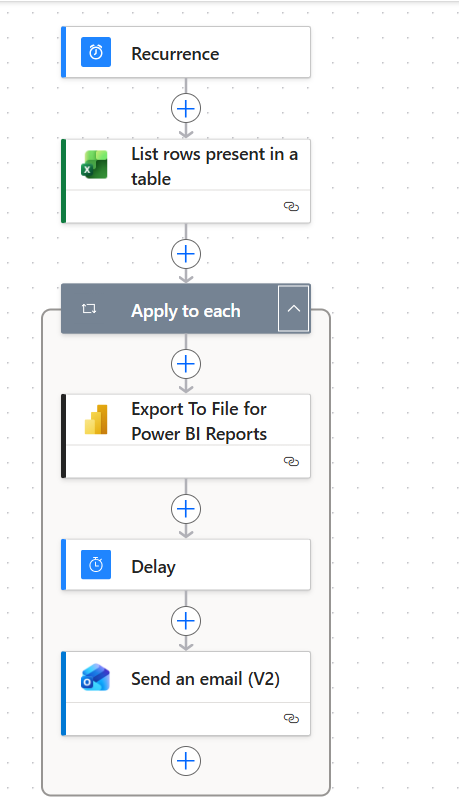
I’m using Power Automate to export a Power BI report to PDF per user (PPU workaround for dynamic subscriptions).

Flow:

Recurrence → Excel (dept_show, email) → Apply to each → Export to File → Delay → Send email


Issue:

PDF is generated and emailed, but filters are ignored — always returns full report.


Tried:

  • Dynamic filter

  • Physical column instead of calculated

  • Hardcoded filter

Example:

[
  {
    "table": "dim Dept",
    "column": "department",
    "operator": "In",
    "values": ["10120"]
  }
]

Result:

Export works, but no filtering applied at all


Question:

Is this a limitation of the Export API (especially for measure-driven reports), or am I missing something?


Thanks!

Categories:
I have the same question (0)
  • Suggested answer
    Vish WR Profile Picture
    2,292 on at
    Most likely causes:
    • Table/column name mismatch (must match model exactly, including spaces/case)
    • ❌ Using measure-driven visuals (filters only work reliably on columns)
    • Report/visual filters or bookmarks overriding your filter

    Your JSON format is correct, but if the column isn’t directly used or mismatched, the filter gets ignored and exports full report.


    Check the model for names 


  • lbendlin Profile Picture
    8,696 Super User 2026 Season 1 on at
    Your table name is incorrect.  Special characters in names of table or column need to be escaped.
     

Under review

Thank you for your reply! To ensure a great experience for everyone, your content is awaiting approval by our Community Managers. Please check back later.

Helpful resources

Quick Links

Introducing the 2026 Season 1 community Super Users

Congratulations to our 2026 Super Users!

Kudos to our 2025 Community Spotlight Honorees

Congratulations to our 2025 community superstars!

Congratulations to the March Top 10 Community Leaders!

These are the community rock stars!

Leaderboard > Power Automate

#1
Vish WR Profile Picture

Vish WR 881

#2
Valantis Profile Picture

Valantis 823

#3
Haque Profile Picture

Haque 485

Last 30 days Overall leaderboard
