web
You’re offline. This is a read only version of the page.
close
Skip to main content

Announcements

News and Announcements icon
Community site session details

Community site session details

Session Id :
Power Platform Community / Forums / Power Automate / Business Central Order...
Power Automate
Unanswered

Business Central Order Fields

(0) ShareShare
ReportReport
Posted on by 20
I am trying to create a flow that will see the balance, credit limit, and order from the customer and order number respectively. And I want to automatically process the order and release it if there is enough money in the customer's account after requesting approval. I have the skeleton of the flow I believe but my JSON is not that great and Chat GPT isn't helpful enough to solve this. Attached are images of my flow and some of the fields I have attempted already. But I see there are issues with it since the output on these fields I try to pull are usually 0. I will also paste my JSON below since it will be easier than taking extra screenshots.
 
TotalOutstandingOrders: 
add(
    float(coalesce(body('Customer')?['outstandingInvoicesLcy'], 0)),
    float(coalesce(body('Customer')?['outstandingOrdersLcy'], 0))
)
 
balanceLcy:
float(coalesce(body('Customer')?['balanceLcy'], 0))
 
balancedue:
float(coalesce(body('CustFinDetails')?['overdueAmount'], 0))
 
creditlimit:
float(coalesce(body('Customer')?['creditLimitLcy'], 0))
 
Condition:
1)
greater(coalesce(outputs('balanceLcy'), 0), coalesce(outputs('creditlimit'), 0)) ..... is equal to true
2)
greater(coalesce(outputs('balancedue'), 0), 0) ..... is equal to true
3)
if(
    greater(
        coalesce(outputs('creditlimit'), 0),
        add(
            coalesce(outputs('TotalOutstandingOrders'), 0),
            add(
                coalesce(outputs('balanceLcy'), 0),
                coalesce(body('GetRecord')?['orderAmount'], 0)
            )
        )
    ),
    true,
    false
)   ..... is equal to true
 
 
Condition 1:
greaterOrEquals(
    coalesce(outputs('balanceLcy'), 0),
    coalesce(body('OrderId')?['orderAmount'], 0)
)


I appreciate all feedback on this!!
part 2.PNG
part 1.PNG
Categories:
I have the same question (0)
  • eliotcole Profile Picture
    4,390 Moderator on at
     
    I believe that your problem is potentially two-fold.

    1 - That coalesce() Function May Be Hurting Things

    that all your requested values are wrapped in a coalesce() function along with the value of zero.
     
    What this will do is effectively:
    IF THIS_FIELD is not present
    THEN return 0
     
    A coalesce() function returns the first non-null value from your comma separated list of values inside the brackets.
     
    So, for the 'balanceLcy' action, if it cannot find a key/value pair from 'body('Customer')?['balanceLcy']' then the value that the coalesce() will spit out is 0.
     
    If you removed the coalesce() wrappers, it may fail, but you will perhaps learn more from this than you would by getting the flow made for you! ;-)
     
    As this will point you down the road of getting the right data, or ... if there is nothing there at all ... then

    2 -  You Might Not Be Selecting The Correct Body() Outputs

    It is also entirely possible that you may not be selecting the correct outputs from the calls like the 'body('Customer')?['balanceLcy']' mentioned previously.
     
    From a previous run, look at the outputs from the given option and just make sure that the 'Customer' action has a 'balanceLcy' key/value pairing at the root of the JSON tree.
     
    If it is further down, you may need to just pick that out a bit.
     
    If you need help with that, just post an obfuscated (replace sensitive information with nonsense) set of data that was spat out by a previous run and we might be able to guide you to it. I only state this because the outputs of the Actions that you are relying upon are largely dynamic, as listed, here:
     
    Equally, you could ask the team that helped setup your BC system to set you up your own personal outputs for this as it's a highly customisable system.
  • DB-30121647-0 Profile Picture
    20 on at
    I have started without the Coalesce in the code and it still wasn't able to fix the flow. I added them in hopes it would fix the issue but it seemed like it didn't make a difference. The images attached are the tables I am pointing towards. Unsure if those are the correct place but they seemed to be correct from what I saw from my tests so far. 
  • eliotcole Profile Picture
    4,390 Moderator on at
    Could you possibly please show the outputs of your Customer action?
    If you need to, just obfuscate anything sensitive with false data.
     
    I did mentioned this previously ... as it's needed to ably work with the data that comes ... but I did also mention that many of the Business Central endpoints only have a small set of default fields, and even less required.
     
    So it's good to at least have an idea of what is coming back *sometimes* ...
     
    But ... again ... like I mentioned previously ... with Business Central ... your best bet is to have the company BC developers create custom endpoints that can reliably provide you with the information that you need ... and that will allow you to properly work out a schema for what key/values will be present when calling that endpoint. :-)
  • DB-30121647-0 Profile Picture
    20 on at
    The data is all from a test environment that doesnt have any actual data(all test data). I do notice the credit limit is showing 0 in the customer output despite having data in BC. attached is a pic of the customer in bc as we;;.
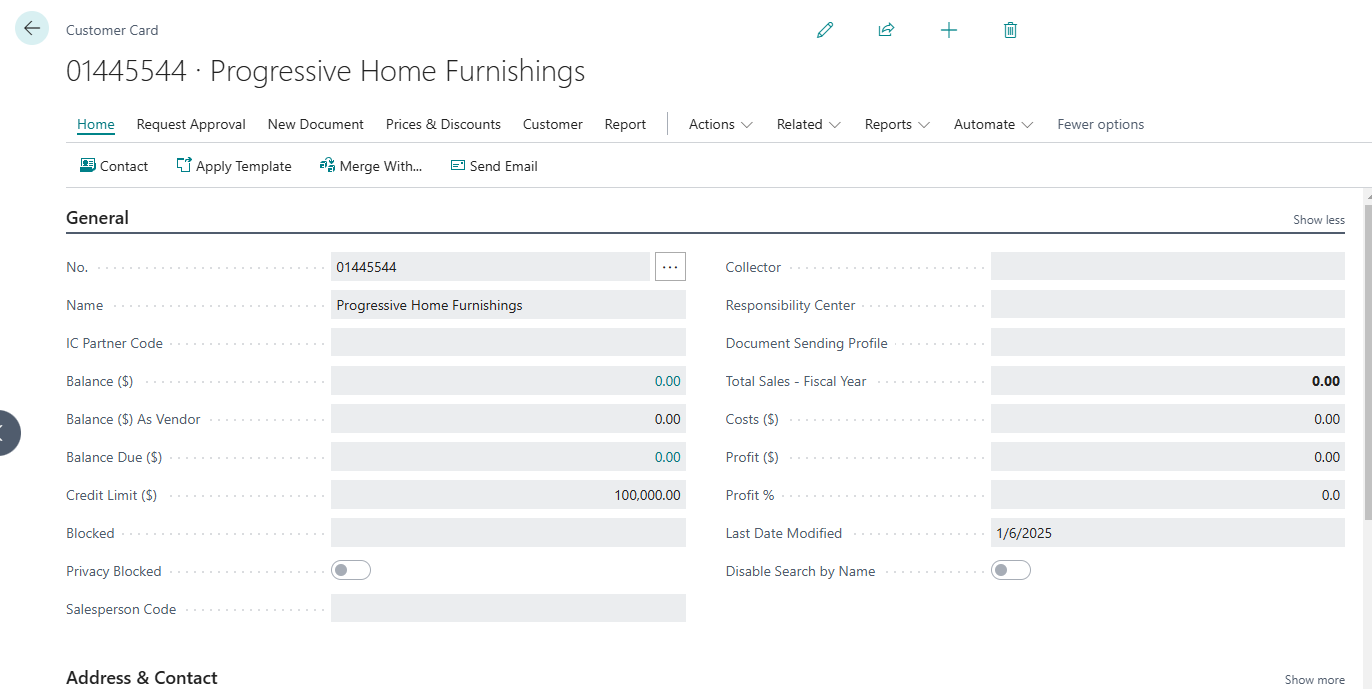
    The output for the Customer action is the following :
    {
    "@odata.context": "https://dynamicssmbsaas-eus.azconn-eus-002.p.azurewebsites.net/v3/$metadata#bcenvironments('PRODUCTION')/companies(8ba9c30f-e66e-ef11-a671-000d3a117760)/datasets('workflowEndpoints')/tables('workflowCustomers')/items/$entity",
    "@odata.etag": "W/\"JzE5OzMyMTI0NjUxMDM1MjkxNDQ2OTQxOzAwOyc=\"",
    "ItemInternalId": "99513bdc-a46f-ef11-a671-0022482690c5",
    "id": "blank",
    "number": "01121212",
    "name": "Spotsmeyer's Furnishings",
    "searchName": "",
    "name2": "",
    "address": "612 South Sunset Drive",
    "address2": "",
    "city": "Miami",
    "contact": "",
    "phoneNumber": "",
    "telexNumber": "",
    "documentSendingProfile": "",
    "ourAccountNumber": "",
    "territoryCode": "",
    "globalDimension1Code": "",
    "globalDimension2Code": "",
    "chainName": "",
    "budgetedAmount": 0,
    "creditLimitLcy": 0,
    "customerPostingGroup": "DOMESTIC",
    "currencyCode": "",
    "customerPriceGroup": "",
    "languageCode": "",
    "statisticsGroup": 0,
    "paymentTermsCode": "1M(8D)",
    "finChargeTermsCode": "",
    "salespersonCode": "",
    "shipmentMethodCode": "",
    "shippingAgentCode": "",
    "placeOfExport": "",
    "invoiceDiscCode": "01121212",
    "customerDiscGroup": "",
    "countryRegionCode": "US",
    "collectionMethod": "",
    "amount": 0,
    "comment": false,
    "blocked": " ",
    "invoiceCopies": 0,
    "lastStatementNumber": 0,
    "printStatements": true,
    "billToCustomerNumber": "",
    "priority": 0,
    "paymentMethodCode": "BANK",
    "lastModifiedDateTime": "2024-09-10T18:46:40.54Z",
    "lastDateModified": "2024-09-10",
    "dateFilter": "",
    "globalDimension1Filter": "",
    "globalDimension2Filter": "",
    "balance": 0,
    "balanceLcy": 0,
    "netChange": 0,
    "netChangeLcy": 0,
    "salesLcy": 0,
    "profitLcy": 0,
    "invDiscountsLcy": 0,
    "pmtDiscountsLcy": 0,
    "balanceDue": 0,
    "balanceDueLcy": 0,
    "payments": 0,
    "invoiceAmounts": 0,
    "crMemoAmounts": 0,
    "financeChargeMemoAmounts": 0,
    "paymentsLcy": 0,
    "invAmountsLcy": 0,
    "crMemoAmountsLcy": 0,
    "finChargeMemoAmountsLcy": 0,
    "outstandingOrders": 0,
    "shippedNotInvoiced": 0,
    "applicationMethod": "Manual",
    "pricesIncludingVat": false,
    "locationCode": "",
    "faxNumber": "",
    "telexAnswerBack": "",
    "vatRegistrationNumber": "",
    "combineShipments": false,
    "genBusPostingGroup": "DOMESTIC",
    "gln": "",
    "postCode": "37125",
    "county": "FL",
    "debitAmount": 0,
    "creditAmount": 0,
    "debitAmountLcy": 0,
    "creditAmountLcy": 0,
    "eMail": "",
    "homePage": "",
    "reminderTermsCode": "",
    "reminderAmounts": 0,
    "reminderAmountsLcy": 0,
    "numberSeries": "",
    "taxAreaCode": "",
    "taxLiable": true,
    "vatBusPostingGroup": "",
    "currencyFilter": "",
    "outstandingOrdersLcy": 0,
    "shippedNotInvoicedLcy": 0,
    "reserve": "Optional",
    "blockPaymentTolerance": false,
    "pmtDiscToleranceLcy": 0,
    "pmtToleranceLcy": 0,
    "icPartnerCode": "",
    "refunds": 0,
    "refundsLcy": 0,
    "otherAmounts": 0,
    "otherAmountsLcy": 0,
    "prepaymentPercent": 0,
    "outstandingInvoicesLcy": 0,
    "outstandingInvoices": 0,
    "billToNumberOfArchivedDoc": 0,
    "sellToNumberOfArchivedDoc": 0,
    "partnerType": " ",
    "preferredBankAccountCode": "",
    "cashFlowPaymentTermsCode": "",
    "primaryContactNumber": "",
    "contactType": "Company",
    "responsibilityCenter": "",
    "shippingAdvice": "Partial",
    "shippingTime": "",
    "shippingAgentServiceCode": "",
    "serviceZoneCode": "",
    "contractGainLossAmount": 0,
    "shipToFilter": "",
    "outstandingServOrdersLcy": 0,
    "servShippedNotInvoicedLcy": 0,
    "outstandingServInvoicesLcy": 0,
    "allowLineDisc": true,
    "numberOfQuotes": 0,
    "numberOfBlanketOrders": 0,
    "numberOfOrders": 0,
    "numberOfInvoices": 0,
    "numberOfReturnOrders": 0,
    "numberOfCreditMemos": 0,
    "numberOfPstdShipments": 0,
    "numberOfPstdInvoices": 0,
    "numberOfPstdReturnReceipts": 0,
    "numberOfPstdCreditMemos": 0,
    "numberOfShipToAddresses": 0,
    "billToNumberOfQuotes": 0,
    "billToNumberOfBlanketOrders": 0,
    "billToNumberOfOrders": 0,
    "billToNumberOfInvoices": 0,
    "billToNumberOfReturnOrders": 0,
    "billToNumberOfCreditMemos": 0,
    "billToNumberOfPstdShipments": 0,
    "billToNumberOfPstdInvoices": 0,
    "billToNumberOfPstdReturnR": 0,
    "billToNumberOfPstdCrMemos": 0,
    "baseCalendarCode": "",
    "copySellToAddrToQteFrom": "Company",
    "validateEuVatRegNumber": false,
    "currencyId": "00000000-0000-0000-0000-000000000000",
    "paymentTermsId": "fabe1646-e66e-ef11-a671-000d3a117760",
    "shipmentMethodId": "00000000-0000-0000-0000-000000000000",
    "paymentMethodId": "933a0f4c-e66e-ef11-a671-000d3a117760",
    "taxAreaId": "00000000-0000-0000-0000-000000000000",
    "contactId": "00000000-0000-0000-0000-000000000000"
    }

Under review

Thank you for your reply! To ensure a great experience for everyone, your content is awaiting approval by our Community Managers. Please check back later.

Helpful resources

Quick Links

Season of Sharing Community Challenge Launch!

Jump in, show your community spirit, and win prizes!

Kudos to our 2025 Community Spotlight Honorees

Expanding mentorship, skilling, and AI innovation

Congratulations to the May Top 10 Community Leaders!

These are the community rock stars!

Leaderboard > Power Automate

#1
Valantis Profile Picture

Valantis 391

#2
11manish Profile Picture

11manish 276

#3
David_MA Profile Picture

David_MA 256 Super User 2026 Season 1

Last 30 days Overall leaderboard
