So I get a monthly .xlsm attachment emailed to me every month that has about 8k rows. I then manually copy + paste these rows into a masterfile (that has over 70k rows). I've created two flows to automate this process:
Flow 1: When a new email arrives -> create a file (this then creates the monthly file in a sharepoint folder)
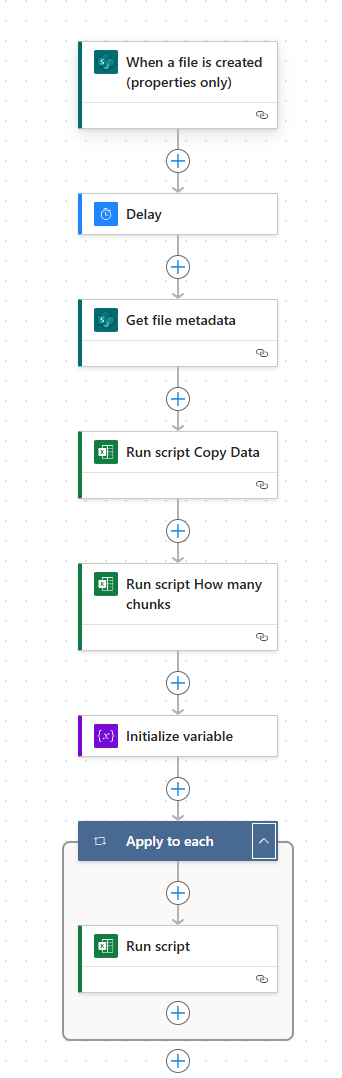
Flow 2 (see pic below): When a file is created in sharepoint (file properties only) -> get file metadata (/identifier in the File parameter) -> run script 'Get data' (this grabs the data from monthly file and creates a json array, see pic below for more. Uses "@outputs('Get_file_metadata')?['body/Id']") -> run script 'how many chunks' (uses body/result from previous script, file parameter doesn't matter here, put any file) -> initialize variable called NumberofChunks (integer value, based on the body/result of 'how many chunks' script -> apply to each (range(1, add(variables('NumberofChunks'), 1))-> run script 'Paste Data'
script for grabbing/getting the data:
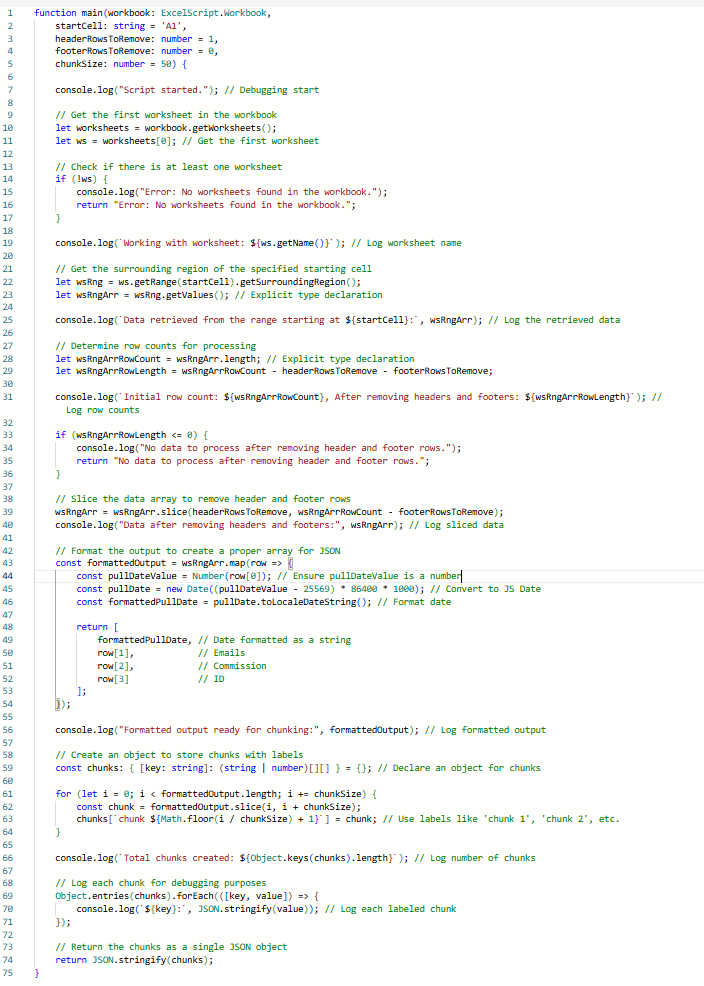
This results in array that looks like this in the body/result section:
"{\"chunk 1\":[[\"1/5/2025\",\"example1@email.com\",\"\",\"123456\"],[\"1/18/2025\",\"example1@email.com\",\"\",\"123456\"],....\"chunk 161\":[[\"1/18/2025\",\"example1@email.com\",\"\",\"123456\"]]}"
The next script 'how many chunks' look like this:
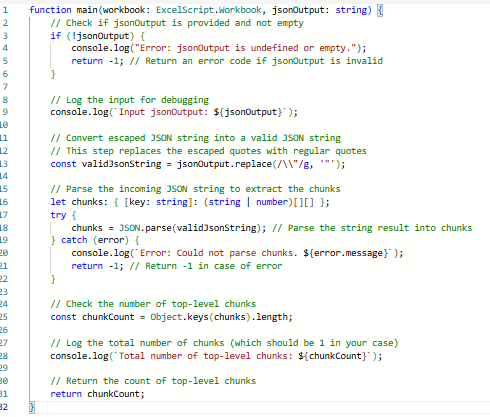
With the jsonOutput's input being body/result of the first script. This results in an integer for the body/result.
Next script is the 'paste data' script:
This pastes the script one at a time
THE PROBLEM:
While the above flows work fine when copy/pasting data into a smaller file (about 10k rows or so), the second flow fails at the very last step when trying to paste into a large file, like my masterfile that is about 70k rows. I get a '400' error with a message that says 'we were unable to run the script'. Ik that is not true as the flow works just fine on smaller files. It even worked on a file that had about 60k rows in it (albeit it took two hours to paste). I need help with the last step failing, how do I fix it?
Note, if this flow is failing due to power automate size limits or something I can't control, then please help point me in another direction using power bi, macros, or something else that can help automate this copy/paste process.


