Yes, SharePoint Alerts are being retired, but you can replace them with a Power Automate reminder flow. Yes, this is fully doable and you don’t need a template.
How to Build the Flow
Trigger:
Recurrence → run daily.
Create One Array Variable
Add a Initialize variable action:
Name: ReminderArray
Type: Array
Value (paste this):
[
"@{formatDateTime(addDays(utcNow(),1),'yyyy-MM-dd')}",
"@{formatDateTime(addDays(utcNow(),7),'yyyy-MM-dd')}",
"@{formatDateTime(addDays(utcNow(),30),'yyyy-MM-dd')}",
"@{formatDateTime(addDays(utcNow(),60),'yyyy-MM-dd')}",
"@{formatDateTime(addDays(utcNow(),90),'yyyy-MM-dd')}"
]
Get Items:
Add Get items (SharePoint) → point to your list.
In Get items → Filter Query, OData Filter Query (copy/paste):
ExpirationDate ge '@{formatDateTime(utcNow(),'yyyy-MM-dd')}'
Filter rows:
Filter array action, place right after Get items
Use an OData filter to find items approaching expiration.
@contains(variables('ReminderArray'), formatDateTime(item()?['ExpirationDate'], 'yyyy-MM-dd'))
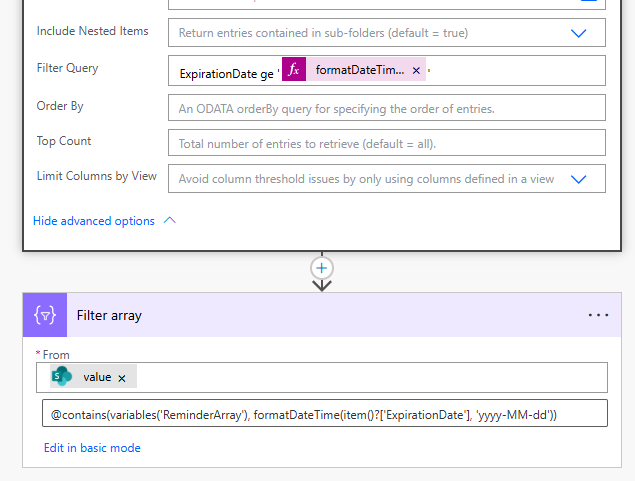
Power Automate pre-calculates dynamic dates:
Today + 1
Today + 7
Today + 30
Today + 60
Today + 90
These values exist in ReminderArray, not in SharePoint.
Filter Array checks:
“Is this ExpirationDate one of my reminder dates?”
SharePoint cannot perform this check.
So Power Automate must do it.
Apply to each → Send email notifications
Send email:
Add Send email (V2) with the item details + days left.
Make sure ExpirationDate is a real SharePoint Date column.
Convert dates with formatDateTime() if needed.
You can extend the list to any number of intervals.
This replicates classic SharePoint alerts, but far more reliably and customizable.
✅ If this answer helped resolve your issue, please mark it as Accepted so it can help others with the same problem.
👍 Feel free to Like the post if you found it useful.


