I’m new to Power Automate. I built a flow with Copilot that:
- Prompts for a SharePoint source folder
- Lets the user select specific files from that folder
- Prompts for a destination UNC path and copies files to that network share
The List folder action fails. I edited it to select the Site Address and the File Identifier (folder path) via the picker and after clicking the Save button getting an error.
Error (from Run history):
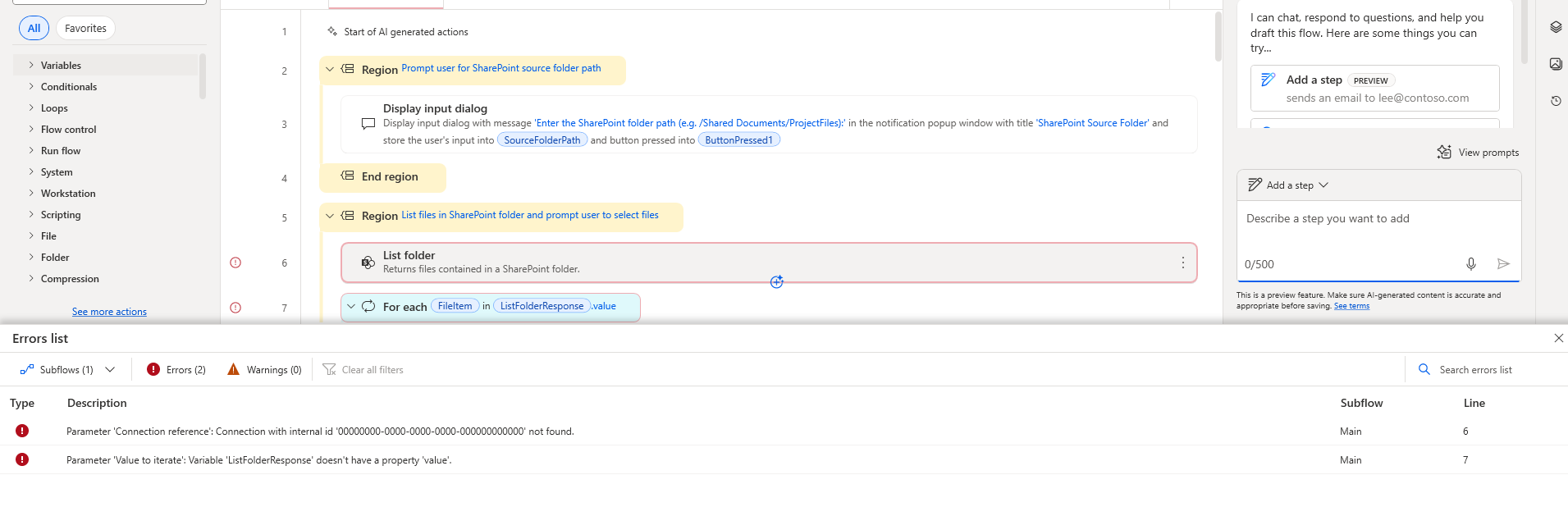
I confirmed the folder exists and I have access. What am I missing—should I use a folder path vs. file identifier, or is my library name wrong? Any known issues with “List folder” and library names like “Shared Documents”?
Error :
Message = Object reference not set to an instance of an object.
Error = System.NullReferenceException
Full text = System.NullReferenceException: Object reference not set to an instance of an object.
at Microsoft.Flow.RPA.Desktop.Designer.Application.Compilation.Commands.CompileCommandHandler.GetConnectorTiers(CompilerResult results)
at Microsoft.Flow.RPA.Desktop.Designer.Application.Compilation.Commands.CompileCommandHandler.Handle(CompileCommand request, CancellationToken cancellationToken)
at MediatR.Internal.RequestHandlerWrapperImpl`2.<>c__DisplayClass1_0.<Handle>g__Handler|0()
at MediatR.Pipeline.RequestPostProcessorBehavior`2.Handle(TRequest request, CancellationToken cancellationToken, RequestHandlerDelegate`1 next)
at MediatR.Pipeline.RequestPreProcessorBehavior`2.Handle(TRequest request, CancellationToken cancellationToken, RequestHandlerDelegate`1 next)
at Microsoft.Flow.RPA.Desktop.Designer.Application.DesignerProgram.EventHandlers.CompileOnProgramUpdatedEventHandler.CompileAsync()
at Microsoft.Flow.RPA.Desktop.Designer.Application.DesignerProgram.EventHandlers.CompileOnProgramUpdatedEventHandler.Handle(ProgramUpdatedEvent e)
at System.Threading.Tasks.Task.<>c.<ThrowAsync>b__128_0(Object state)
at System.Windows.Threading.ExceptionWrapper.InternalRealCall(Delegate callback, Object args, Int32 numArgs)
at System.Windows.Threading.ExceptionWrapper.TryCatchWhen(Object source, Delegate callback, Object args, Int32 numArgs, Delegate catchHandler)


