web
You’re offline. This is a read only version of the page.
close
Skip to main content

Announcements

News and Announcements icon
Community site session details

Community site session details

Session Id :
Power Platform Community / Forums / Power Automate / Microsoft Flow - Excel...
Power Automate
Unanswered

Microsoft Flow - Excel File Locked While Not Open

(0) ShareShare
ReportReport
Posted on by Microsoft Employee

Good morning,


I work for an institution of Higher Education, and my team and I have been attempting to transition several of our business processes that are used with our residential population to Microsoft Flow.


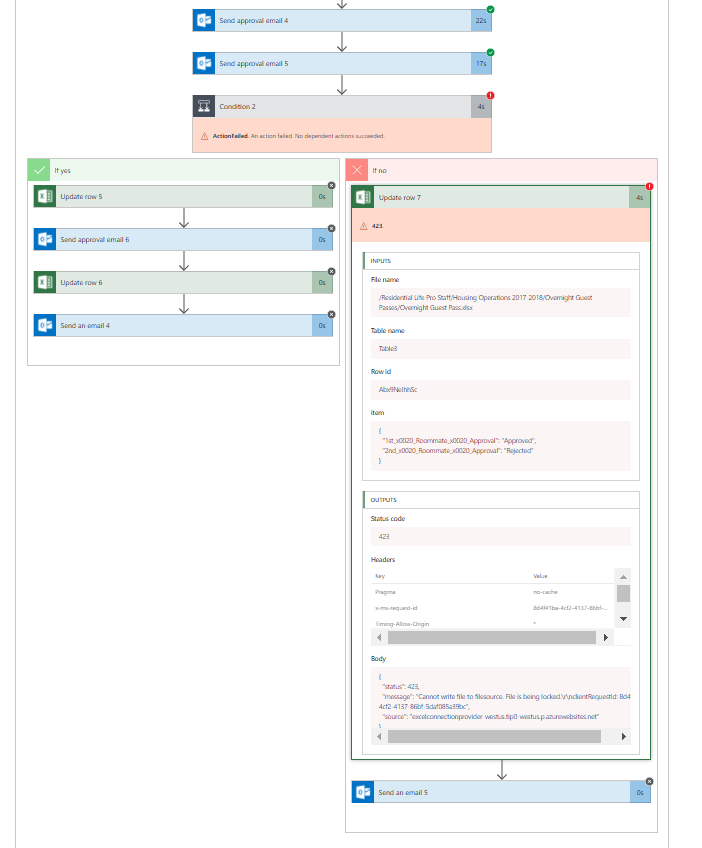
Recently, we've had some issues with one of our Flows that don't seem to stem from the logic. The Flow uses a series of approval emails to roommates and administrative staff, to approve overnight guests. However, when attempting to write new data or modify existing data on the excel spreadsheet that we would use to track requests, the Flow will sometimes fail due to the errow below. It seems to happen when multiple requests are submitted within a few minutes of each other, and/or approval emails are responded to promptly, which would result in the excel row being modified quite quickly, after its initial creation. I am aware that the error will often come up when a user has the spreadsheet open somewhere. That is not the case in this instance. We have no need to have the spreadsheet open, since Flow should be doing all of the editing. Anyways, here are screenshots of the overall flow, and the error. The exact text of the error is  ""status"423,
  "message""Cannot write file to filesource. File is being locked.\r\nclientRequestId: 8d4f41ba-4cf2-4137-86bf-5daf085a39bc",
  "source""excelconnectionprovider-westus.tip0-westus.p.azurewebsites.net"


Categories:
I have the same question (0)
  • v-xida-msft Profile Picture
    Microsoft Employee on at

    Hi @Anonymous,


    The error message told that you have no access to write file to filesource which is being locked. I think this issue is related to the multiple requests. 


    For example, your first flow run which is trigger by your first request is executing the "Update row" action and is not completed, your second request is submitted. When your second flow run is going to execute the "Update row" action and the "Update row" action of your first flow run is not completed, your second flow run would fail. The error message would show up as below:

    "status": 423,
    "message": "Cannot write file to filesource. File is being locked.\r\nclientRequestId: 8d4f41ba-4cf2-4137-86bf-5daf085a39bc",
    "source": "excelconnectionprovider-westus.tip0-westus.p.azurewebsites.net"
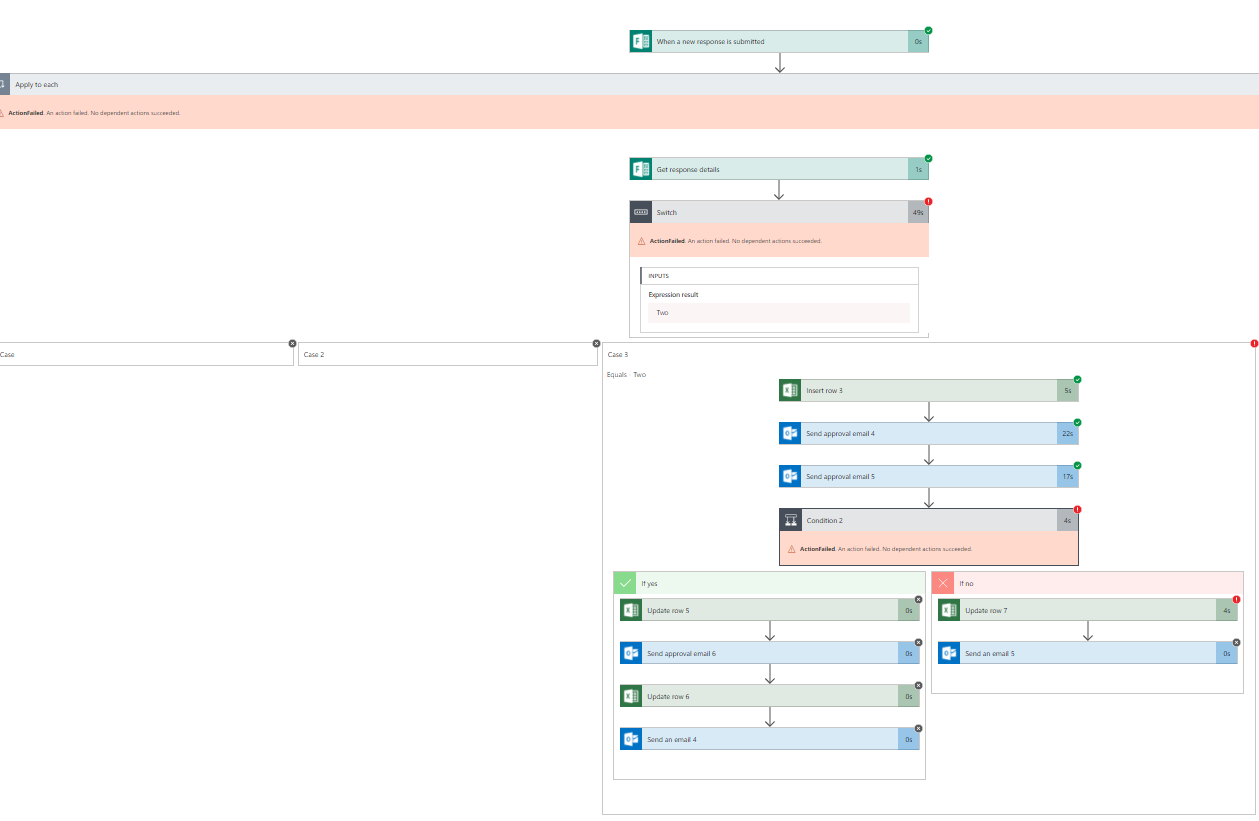
     

    You could consider take a try to add a "Delay" action before your "Update row 7" action within "If/no" branch of Condition 2, the flow's configuration as below:20.JPG

    Within "Delay" action, Unit field set to Minute, Count field set to a proper integer value. Please take a try with above workaround and check if the issue is solved.


    Best regards,

    Kris


  • Community Power Platform Member Profile Picture
    Microsoft Employee on at

    This seems to have worked, Kris. Thank you! 

  • Community Power Platform Member Profile Picture
    Microsoft Employee on at

    Hey, I'm having the same issue, and a 3 minute delay hasn't helped me. 

    My flow is:
    When a file is created (Sharepoint online library)

    Get Tables (excel online)

    list rows present in table (excel online)

    initialize a couple variables

    delay 3 minutes

    update document metadata

    Then I get the "file is locked" error. 

Under review

Thank you for your reply! To ensure a great experience for everyone, your content is awaiting approval by our Community Managers. Please check back later.

Helpful resources

Quick Links

Season of Sharing Community Challenge Launch!

Jump in, show your community spirit, and win prizes!

Kudos to our 2025 Community Spotlight Honorees

Expanding mentorship, skilling, and AI innovation

Congratulations to the May Top 10 Community Leaders!

These are the community rock stars!

Leaderboard > Power Automate

#1
Valantis Profile Picture

Valantis 389

#2
Vish WR Profile Picture

Vish WR 331

#3
David_MA Profile Picture

David_MA 298 Super User 2026 Season 1

Last 30 days Overall leaderboard