Is the data in a table in Excel? So like this:

If so then "List rows in a
table" -action should be able to retrieve the data. You just give it the correct table name. So like in my picture it would be "Table1".
If the data is not in a table then there lies the issue. Power Automates Excel actions are not able to read data in Excel if they are not in a table.
You could
Use "Create table" -action to create the table dynamically as long as you know where the data is in the Excel. So if you know its in A column you can use Table range A:A so that the whole A column will become a table. Or if you know it cant be more than 50 rows long then use Table range A1:A50. That would make the table creation quicker and more reliable than having it create a table from the whole A column.

It can take some time to create the table even if the action itself has finished so I recommend adding 1 minute of delay before using List rows.
Also downside to this method of creating table dynamically is that you will always lose the data from the first row since Create table will create a header column to be the first row.
 Recommended way:
Better way is to use Office script and creating a script that retrieves the data from the Excel worksheet.


The script:
function main(workbook: ExcelScript.Workbook) {
let sheet = workbook.getWorksheet("Sheet1");
let range = sheet.getUsedRange();
let values = range.getValues();
return values;
}
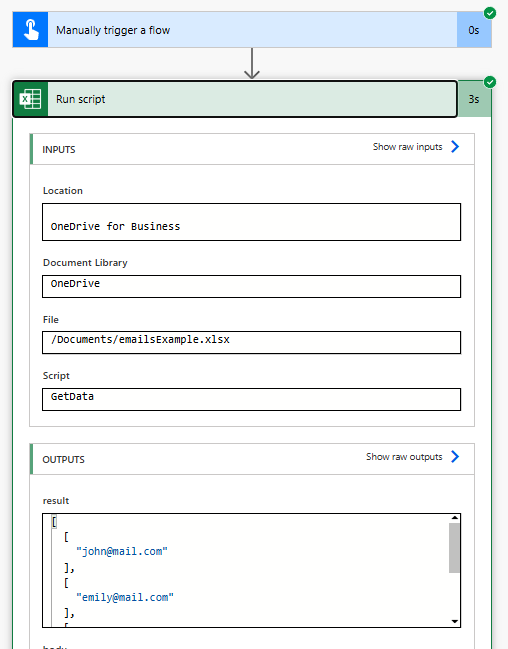
Then just use that in your flow.

result: