web
You’re offline. This is a read only version of the page.
close
Skip to main content

Announcements

News and Announcements icon
Community site session details

Community site session details

Session Id :
Power Automate
Answered

AI consistency

(0) ShareShare
ReportReport
Posted on by 2
hello
I am working on a flow that can iterate through files in my sharepoint (no more then 5 pages per file) and have an AI analyze the contents. The AI is given a list of criteria (about 45 different criteria), like "does this document involve this specific project" or "does this document involve this organization". It then fills out a JSON with either a 1 (true) or a 0 (false) if the files matches that criteria. it also asks the AI to provide reasoning and evidence to support its claim. the flow then Populates a spreadsheet and continues to the next file. 
I have completes the PowerAutoamte flow. It is able to open files, run a custom prompt, and then populate the spreadsheet with no problem. The issue is with the AI. I am getting the two following issues:
 
  1. The Ai is not consistent enough. Even when using premium GPT-5 reasoning, it still is not consistent when given a 1 or a 0 to each criteria. Each time I run the flow I will get different outputs. I have tried changing the wording of the prompt but nothing seems to change the consistency. Could there be too many criteria, and that is what is causing the confusion? Or could it be something else that I can do to help with the consistency?
  2. The second issue is that I occasionally get a Response Content Filtered Error. I believe this is because Microsoft's filters are blocking the output of the AI after is analyzed the document? It I not consistent with which documents will get flagged for their output, as sometimes the flow runs with no error, and sometimes one of the files randomly gets flagged. Any way around this?
Any help would be greatly appreciated. Thanks!
Categories:
I have the same question (0)
  • Verified answer
    chiaraalina Profile Picture
    2,348 Super User 2026 Season 1 on at
     
    Yes, could be that 45 criteria is too many for one prompt. Maybe breaking classification tasks into smaller batches reduces cognitive load and improves accuracy. LLMs have limited "working memory" during inference and evaluating 45 decisions + reasoning strains their ability to maintain consistency.
     
    Try chunking:

    First option to try:
    Pass 1: Run 10-15 high-priority criteria
    Pass 2: Run 10-15 organizational criteria
    Pass 3: Run remaining criteria

    Orchestrate this with Scope actions in Power Automate or use parallel branches if the criteria are independent.
     
    Second option you could try:
    Run the same prompt 3 times and take the majority vote for each criterion

    Use a Apply to each to invoke the AI action 3 times
    Parse the three JSON responses
    For each criterion, assign 1 if at least 2 out of 3 responses agree
     
    Third option to try:
    Instead of asking the AI to both analyze and score in one step:
    Pass 1: Extract relevant text snippets for each criterion
    Pass 2: Score each criterion based on the extracted text

    This separates retrieval from reasoning and could improving reliability
     
    Also please verify:
    Temperature is set to 0
    Content moderation level is set to low
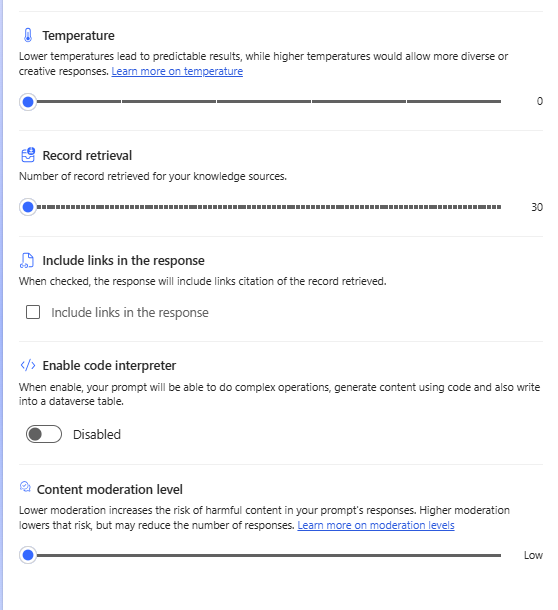
     
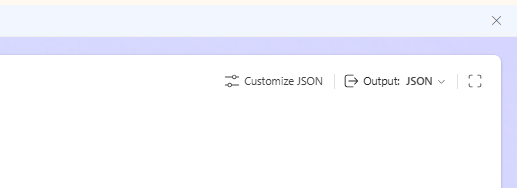
    And if you haven't already: Use JSON mode in your Prompt. Define a strict JSON schema by using the Customize JSON.
     
    Even with GPT-5 reasoning models, variability is inherent to LLM behavior. 
     
    Hope it helps!
  • Vish WR Profile Picture
    3,648 on at

    For consistency: set temperature to 0 and use a strict JSON schema — that fixes most of the drift. Splitting the work into chunks (10-15 criteria per pass) instead of all 45 at once also helps a lot.


    For the content filter error: lower the moderation level to Low in the prompt settings, and wrap the AI step in a Scope with a "has failed" branch so one flagged file doesn't kill the whole run

  • David_MA Profile Picture
    14,840 Super User 2026 Season 1 on at
    Since you did not include the actual instructions being used in the AI Builder prompt, there is one key factor that cannot be evaluated, which is how your instructions have been written. As with any set of instructions, the criteria need to be clearly defined and should not be:
    • too broad
    • overlapping or conflicting
    • subjective
    • missing definitions
    • based on implied knowledge
    • asking for interpretation instead of direct detection
     
    For example, you mentioned this as one of the criteria: “does this document involve this specific project.” I assume the actual prompt is something more like: “does this document involve Project X42?”
     
    If that is the case, have you defined how the AI should determine whether a document involves Project X42? For instance, instead of only naming the project, you could provide context such as:
     
    “Project X42 is a next-generation soccer performance system developed in Norway and led by Erling Haaland. It uses wearable sensors in jerseys and the player's shoes to track player speed, stamina, shot power, and positioning during matches and training.”
     
    Without that kind of definition, the AI has to interpret what qualifies as “involvement,” which can lead to inconsistent results. 

    By defining what Project X42 is instead of just naming it, you remove ambiguity and give the AI something concrete to match against. That reduces interpretation and helps the model make more consistent decisions. It will not fully eliminate variation (especially with 45 criteria), but unclear or undefined criteria will almost always increase inconsistency regardless of how the flow is structured.
     

Under review

Thank you for your reply! To ensure a great experience for everyone, your content is awaiting approval by our Community Managers. Please check back later.

Helpful resources

Quick Links

Season of Sharing Community Challenge Launch!

Jump in, show your community spirit, and win prizes!

Kudos to our 2025 Community Spotlight Honorees

Expanding mentorship, skilling, and AI innovation

Congratulations to the May Top 10 Community Leaders!

These are the community rock stars!

Leaderboard > Power Automate

#1
Valantis Profile Picture

Valantis 462

#2
Vish WR Profile Picture

Vish WR 256

#3
David_MA Profile Picture

David_MA 242 Super User 2026 Season 1

Last 30 days Overall leaderboard



