web
You’re offline. This is a read only version of the page.
close
Skip to main content

Notifications

Announcements

Community site session details

Community site session details

Session Id :
Power Platform Community / Forums / Power Automate / Easy Indexing Does not...
Power Automate
Unanswered

Easy Indexing Does not Work

(0) ShareShare
ReportReport
Posted on by 2
Hello,
 
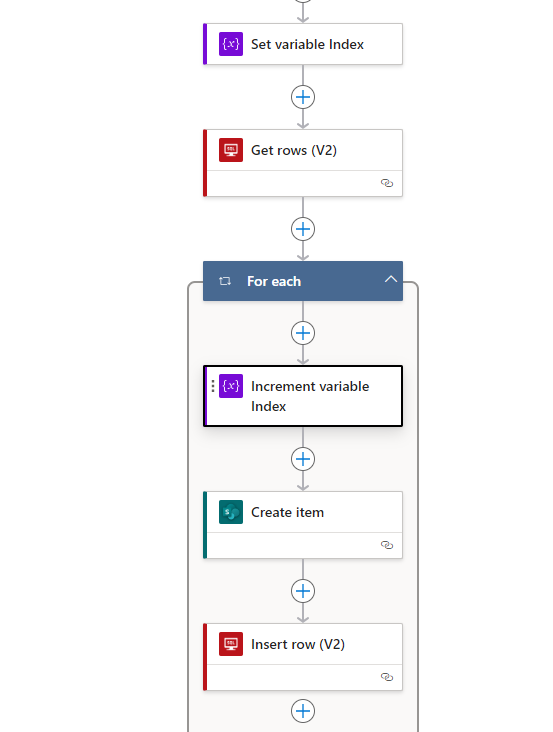
Power AUtomate drives me crazy. I have a logic app.
 
I get rows from SQL and get the maximum Index_ID from there This works.
 
Then the loop starts and first step is to increment the Index by one. This is totally randomn. so when the Index is 19130 it wont be 19131 , will be 19141 for example. Some numbers are also double. So at the first round and at the 15 round of the loop it will be 19141. 
 
At the next step it should save the index variable in the sharepoint list. This also doesnt work. Sometimes it saves the right value of the variable but every second time it saves 19140 instead of 19141 or some other randomn number. It s really weird. 

I have no idea how all this can happen. I appreciate any help.
 
Greetings
 
Yannick


Categories:
I have the same question (0)
  • Srini007 Profile Picture
    3,327 Super User 2025 Season 2 on at
    Hi,
     
    It would be helpful if you could elaborate on the expressions used for each action. Just seeing the action labels makes it difficult to provide meaningful suggestions.
     
    If I have answered your question, please mark it as the Answered. If you like my response, please give it a Like.
    Regards,
    Srini
  • YR-23100830-0 Profile Picture
    2 on at
    Hello,
     
    Get Rows (v2) Order BY Faktura_ID. Rest is empty. Its connexted to a SQL Table.
     
    For each: 
     
     
    Increment variable Index Value: 1
     
    Sharepoint Create Item: 


    Any other questions?
  • Srini007 Profile Picture
    3,327 Super User 2025 Season 2 on at
    Hi,
     
    Can you check the output of the Get Rows which you are passing to Apply To Each action into a Compose action and see that output, As you have the actions in the Apply to Each action, you need to place CurrentItem instead of directly passing from the above actions
     
    Maybe this might help you
     
    If I have answered your question, please mark it as the Answered. If you like my response, please give it a Like.
    Regards,
    Srini

Under review

Thank you for your reply! To ensure a great experience for everyone, your content is awaiting approval by our Community Managers. Please check back later.

Helpful resources

Quick Links

Forum hierarchy changes are complete!

In our never-ending quest to improve we are simplifying the forum hierarchy…

Ajay Kumar Gannamaneni – Community Spotlight

We are honored to recognize Ajay Kumar Gannamaneni as our Community Spotlight for December…

Leaderboard > Power Automate

#1
Michael E. Gernaey Profile Picture

Michael E. Gernaey 525 Super User 2025 Season 2

#2
Tomac Profile Picture

Tomac 324 Moderator

#3
abm abm Profile Picture

abm abm 232 Most Valuable Professional

Last 30 days Overall leaderboard



