web
You’re offline. This is a read only version of the page.
close
Skip to main content

Announcements

News and Announcements icon
Community site session details

Community site session details

Session Id :
Power Platform Community / Forums / Power Automate / Update an adaptive car...
Power Automate
Suggested Answer

Update an adaptive card in a chat or channel does not update

(1) ShareShare
ReportReport
Posted on by 5
Hello everyone, I would like to ask the experts a question.

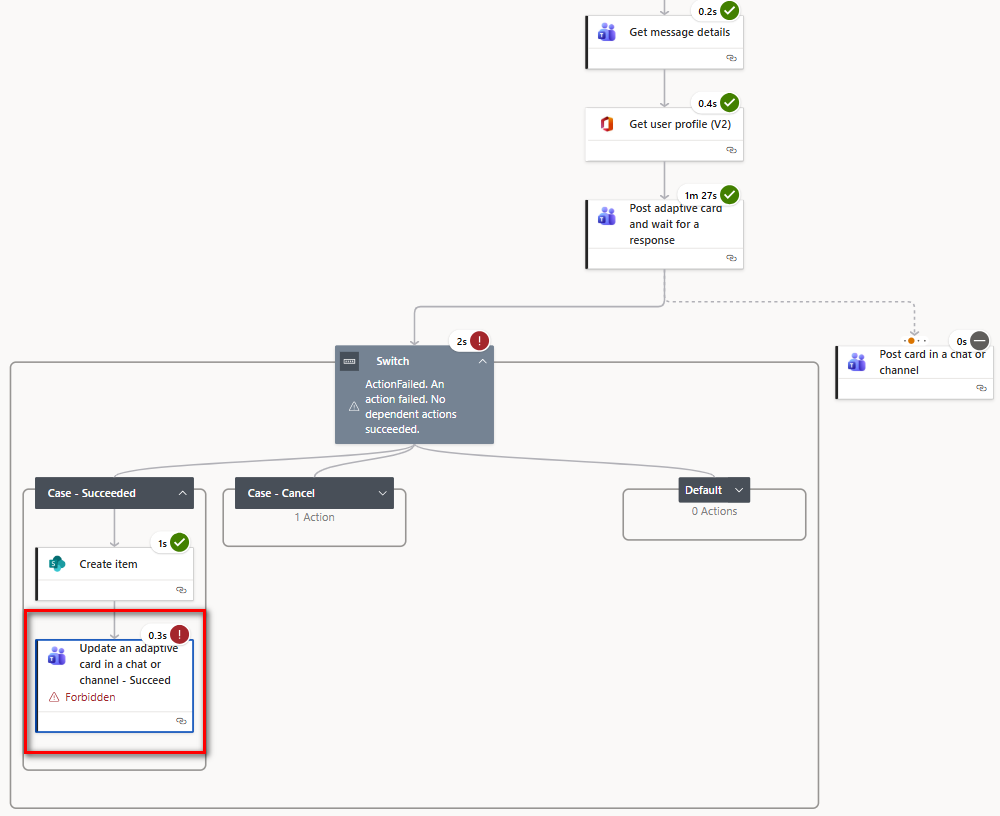
I built a flow to update some data in SharePoint. I am facing an issue in the last step, “Update an adaptive card in a chat or channel.”

When I run the task myself, the flow runs successfully without errors and the adaptative card sent in the step "Post adaptative card and wait for a response" is updated correctly.

However, when another person runs the same flow, an error occurs in the last step, “Update an adaptive card in a chat or channel,” and the adaptative card sent in the step "Post adaptative card and wait for a response" is not updated.

Could this error be related to some access policy or permission setting? How can I work around this issue? Would I need to use some kind of service account?


Thanks!

I have the same question (0)
  • CU11031726-0 Profile Picture
    5 on at
    Hello, guys!
     
    Could this error be related to some access policy or permission setting? How can I work around this issue? Would I need to use some kind of service account?
     
    Thanks
  • Suggested answer
    Assisted by AI
    Elliot M. Profile Picture
    19 on at
    Hello,
    This seems to be a connection identity issue, and your instinct about a service account is correct.

    What's happening:

    The "Post adaptive card" and "Update an adaptive card" actions use the Teams connector connection, which runs in the context of whoever owns that connection. When you (the flow creator) run the flow, your Teams connection posts the card as you, and can update it because you're the message author. When another user triggers the flow, one of two things happens:

    1. If the flow uses
    your connection (default for automated/scheduled flows): the card is posted as you, but the update may fail if the other user's context interferes with the message ownership chain.
    2. If the flow uses the
    triggering user's connection (common with instant/manual flows): the card was originally posted by your connection during setup/testing, and now the other user's connection can't update a card it didn't post — Teams enforces that only the message author can update their own messages.

    The fix — use a dedicated service account:

    1. Create a service account (e.g., automations@yourorg.com) with a Teams license.
    2. Open the flow → go to the Teams connector connections.
    3. Replace your personal connection with the service account connection for both the "Post" and "Update" actions.
    4. Under flow properties →
    Run only users, share the flow and set the Teams connection to "Use this connection" (the service account), not "Provided by run-only user."

    This ensures all cards are posted and updated by the same identity regardless of who triggers the flow.


    Alternative if you can't use a service account: Instead of "Update an adaptive card," post a new card as a reply to the original. This avoids the message ownership constraint entirely, though it creates a new message instead of updating in place.

Under review

Thank you for your reply! To ensure a great experience for everyone, your content is awaiting approval by our Community Managers. Please check back later.

Helpful resources

Quick Links

Season of Sharing Community Challenge Launch!

Jump in, show your community spirit, and win prizes!

Kudos to our 2025 Community Spotlight Honorees

Expanding mentorship, skilling, and AI innovation

Congratulations to the May Top 10 Community Leaders!

These are the community rock stars!

Leaderboard > Power Automate

#1
Valantis Profile Picture

Valantis 377

#2
11manish Profile Picture

11manish 279

#3
David_MA Profile Picture

David_MA 234 Super User 2026 Season 1

Last 30 days Overall leaderboard
