You’re right that Power Automate Desktop does not support an in‑place rollback once updated. When rollback is mentioned in this context, it’s meant purely as a validation step, not a supported production action. For example, confirming behavior on a separate test VM or machine that hasn’t yet been updated. The goal is only to confirm whether this is a runtime regression in the latest PAD version, which helps Microsoft engineering investigate.
Since this issue started immediately after the upgrade and now reproduces across multiple machines, the next recommended step is to open a Microsoft support ticket.
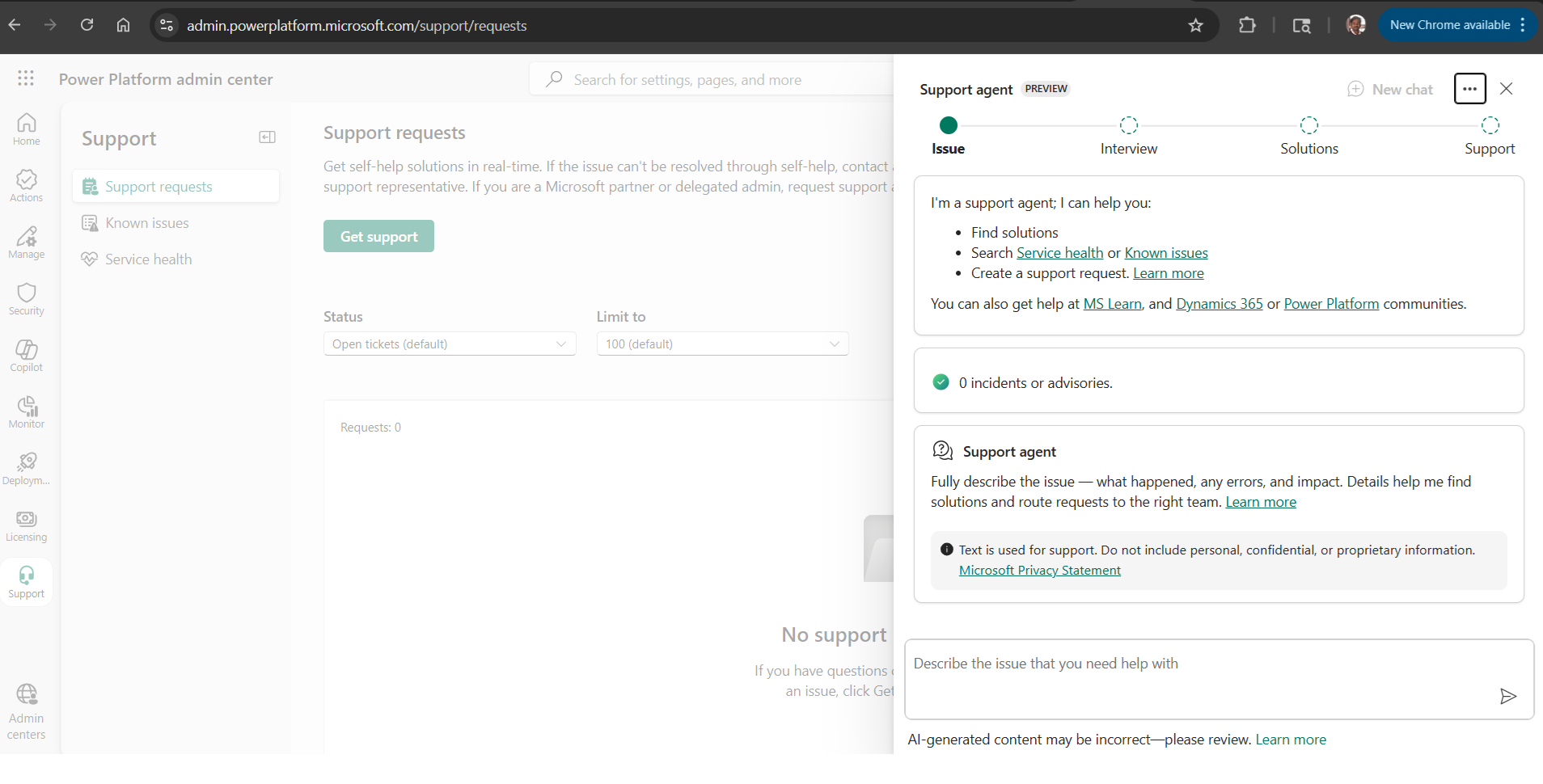
You can do this from the Power Platform Admin Center:
This is the correct Power Platform Admin Center support experience for raising a Power Automate / PAD support ticket.
This allows Microsoft to review backend telemetry and agent diagnostics that aren’t visible from the community side.
At this point, investigation on the Microsoft side is required.
Exact steps to create a Microsoft support ticket (based on the screenshot attached)
Follow these steps exactly from where you are now:
Step 1: Start the request
Click the Get support button (left side, green button)
This opens the Support agent (Preview) flow you already see on the right.
Step 2: Describe the issue (IMPORTANT)
In the text box that says “Describe the issue that you need help with”, paste a clear summary, for example:
Power Automate Desktop unattended flows are intermittently failing with error code ExecutionStatusNotTerminal.
The issue started immediately after upgrading PAD to version 2.67.143.26090 and reproduces across multiple machines and machine groups.
Flows run for several minutes but return no action logs. Machine replacement did not resolve the issue.
Then click the Send / arrow button.
Step 3: Interview phase
The Support agent will:
Ask clarifying questions (product, scope, impact)
Propose self‑help or known issues
If a suggested solution does not apply, explicitly choose “This did not solve my issue”.
This is important, it unlocks escalation.
Step 4: Move to “Support” (human escalation)
Once self‑help is exhausted, the flow will present an option similar to:
Contact Microsoft Support
Create a support request
Select that option.
You’ll then be asked to:
Choose Product: Power Automate / Power Automate Desktop
Choose the Environment
Set Severity
Provide contact details
Step 5: Submit
After submission:
A support request / case number is generated
The ticket appears in the Support requests list (left panel)
Microsoft support may follow up asking for:
Correlation IDs
Machine runtime logs
Confirmation of version and timeline


