web
You’re offline. This is a read only version of the page.
close
Skip to main content

Announcements

News and Announcements icon
Community site session details

Community site session details

Session Id :
Power Platform Community / Forums / Power Automate / Issue with SharePoint ...
Power Automate
Suggested Answer

Issue with SharePoint "Get File Content using Path"

(1) ShareShare
ReportReport
Posted on by 4
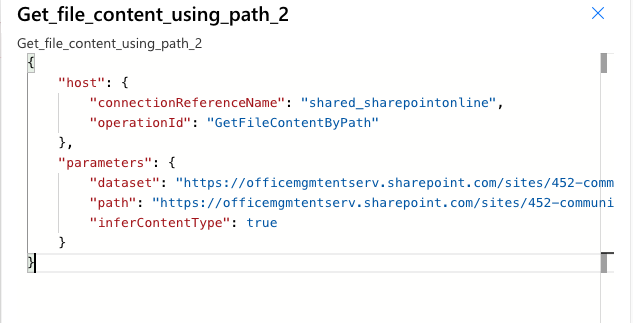
I'm having trouble with some 'File Not Found' errors when trying to use the SharePoint 'Get File Using Path' connector. Looking through the raw outputs of my flow show it is passing along a usable file path because I can just copy the output and put it into my browser and it works.
 
Entire flow triggers on a Group Form submission, has a switch, creates a task and uploads the form's attachments to the created task. Where I'm getting the error is in the attached image


The Compose is just json(the attachment dynamic variable) to fetch multiple uploads into an array. The apply to each looks at the compose output. The 'get file content using path' variable is set to 'item()?['link'] to fetch the given Link of the current item in the apply to each loop.
 
This works on a different flow I have created so I can't seem to figure out what the issue is here. Any help is appreciated, thank you.
 
 
Edit for additional info:
 
Looking at the failed run, I can look at the parameters that the 'get file using path' is receiving. Copying that link into my browser shows it goes to the correct file in SharePoint, so I know it isn't an issue with the apply to all loop.
Categories:
I have the same question (0)
  • David_MA Profile Picture
    14,956 Super User 2026 Season 1 on at
    There seems to be an issue with the scanning function of attachments in posts. Please edit your post and paste the images directly into the post instead of attaching them.
  • CR-15011548-0 Profile Picture
    4 on at
    Thanks David, I updated accordingly
  • Suggested answer
    Ellis Karim Profile Picture
    12,163 Super User 2026 Season 1 on at
     
    You may need to use an "unencoded URL" in the Get file content using path action. For an explanation and examples about this, please see: How to Get SharePoint File Content in Power Automate: File Paths vs URLs | Troubleshooting – Ellis Karim's Blog
     
     
    Ellis Karim
    Ellis Karim
    elliskarim.com  |  LinkedIn  |  Bluesky
    If this solved your issue, please mark it as ✅ Accepted Answer. If it helped, feel free to give it a 🩷 Like!


Under review

Thank you for your reply! To ensure a great experience for everyone, your content is awaiting approval by our Community Managers. Please check back later.

Helpful resources

Quick Links

Season of Sharing Community Challenge Launch!

Jump in, show your community spirit, and win prizes!

Kudos to our 2025 Community Spotlight Honorees

Expanding mentorship, skilling, and AI innovation

Congratulations to the May Top 10 Community Leaders!

These are the community rock stars!

Leaderboard > Power Automate

#1
Valantis Profile Picture

Valantis 377

#2
11manish Profile Picture

11manish 279

#3
David_MA Profile Picture

David_MA 234 Super User 2026 Season 1

Last 30 days Overall leaderboard
