

web
You’re offline. This is a read only version of the page.
close
Skip to main content

Announcements

News and Announcements icon
Community site session details

Community site session details

Session Id :
Power Platform Community / Forums / Power Automate / Send one email to mult...
Power Automate
Answered

Send one email to multiple people

(0) ShareShare
ReportReport
Posted on by
Hi all,
 
I am using SharePoint lists, where a single button triggers a manual flow based on data entered in a 'status' column. For example, if the status is "Send email to Chair", it is programmed to retrieve the email from the relevant Chair ('person or group') column and send it to them. 
 
However, if multiple people are listed in a person or group column, the email is sent to them individually. Instead of sending 3 separate emails, I'd like to send one email with all of them cc'd or to all of them in general (I'm not fussy!). 
 
Because this is a single button that runs multiple flows based on a list item's state, I'm finding that traditional workarounds don't work. 
 
This is the beginning of the flow, which goes into a switch. 
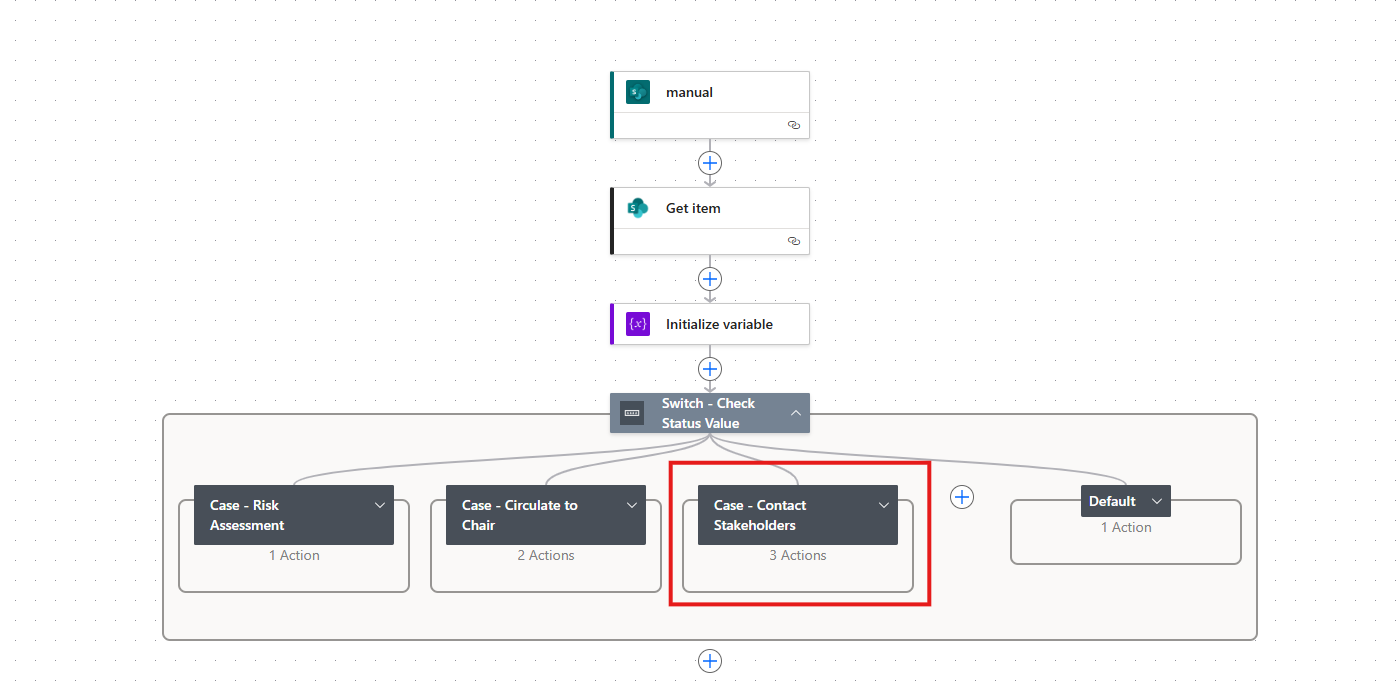
 
This is the red outlined one I'm having issues with: 
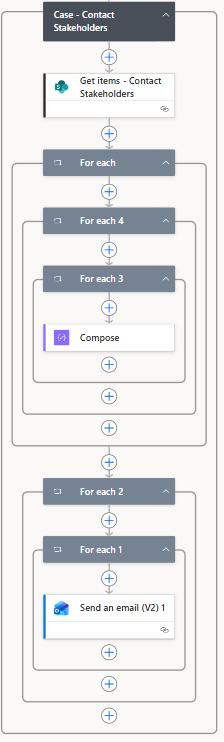
 
PowerAutomate has put them into multiple 'for each' columns; this is not a user choice- just an FYI! If someone can help me get this flow to send one email to multiple people, I would be forever grateful. 
Categories:
I have the same question (0)
  • Verified answer
    David_MA Profile Picture
    14,956 Super User 2026 Season 1 on at
    Do this:
    1. Create an array variable and set the default value to []
    2. Add an apply to each action to your flow with and set it to use the people field (the one without anything after it it such as people name, people email, etc., just people)
    3. In the apply to each, add an Append to an array variable action and append the array with the email value of the people field.
    4. Then in your e-mail action, use the join() expression to join the emails from the variable with a semicolon

Under review

Thank you for your reply! To ensure a great experience for everyone, your content is awaiting approval by our Community Managers. Please check back later.

Helpful resources

Quick Links

Season of Sharing Community Challenge Launch!

Jump in, show your community spirit, and win prizes!

Kudos to our 2025 Community Spotlight Honorees

Expanding mentorship, skilling, and AI innovation

Congratulations to the May Top 10 Community Leaders!

These are the community rock stars!

Leaderboard > Power Automate

#1
Valantis Profile Picture

Valantis 377

#2
11manish Profile Picture

11manish 279

#3
David_MA Profile Picture

David_MA 234 Super User 2026 Season 1

Last 30 days Overall leaderboard



