web
You’re offline. This is a read only version of the page.
close
Skip to main content

Announcements

News and Announcements icon
Community site session details

Community site session details

Session Id :
Power Platform Community / Forums / Power Automate / How do I fix the DateT...
Power Automate
Answered

How do I fix the DateTime string in my flow?

(1) ShareShare
ReportReport
Posted on by 76

Hello,


I've been trying all the troubleshooting suggested here on the Microsoft community to fix my problem but nothing is working. If anyone could take a look at what I've done and figure out what's wrong I'd be really grateful.


Every time I run my flow I receive this message:

The error indicates that the flow failed because the date string being used in the filter query is not recognized as a valid DateTime. This issue is likely caused by the format of the date being passed in the filter query, which may not match the expected format for SharePoint. To resolve this, have you considered ensuring that the date string is formatted correctly before using it in the filter query?


This is the variable:

dateDifference(convertFromUtc('2018-01-01T08:00:00.0000000Z', 'AUS Eastern Standard Time'), addDays(convertFromUtc('2018-01-01T08:00:00.0000000Z', 'AUS Eastern Standard Time'), 7))


This is the Get Items action that is failing:
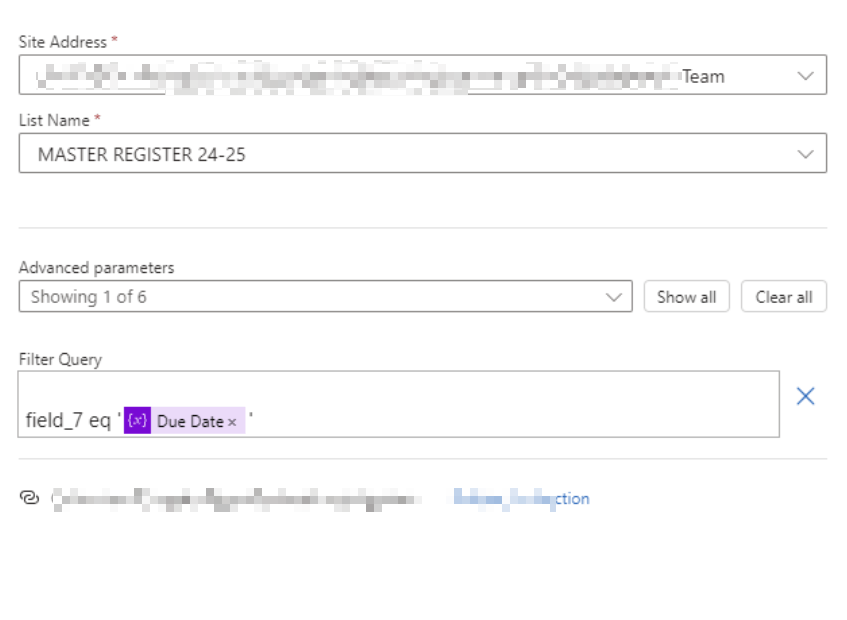
Image


And this is the column "field_7" that it is trying to read for "eq":
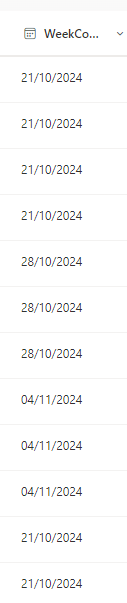
Image


Thank you

Categories:
I have the same question (0)
  • CFernandes Profile Picture
    8,504 Most Valuable Professional on at
    Hey Mate,
     
    Format the date string to ISO 8601 before using it in the filter query.
     
    Try the following, Add a Compose and use the Formula
    'formatDateTime(yourDate, 'yyyy-MM-ddTHH:mm:ssZ')
     
    Then past the output of the Compose to Filter.
     
     field_7 eq '<Compose>'
  • Suggested answer
    CU15102032-0 Profile Picture
    10 on at
    It seems like you're using Due Date in a variable. Check is that variable a string?
  • LB-20090315-0 Profile Picture
    76 on at
    Hello, thank you for the suggestions.
     
    The Due Date variable is a string. 
     
    I attempted to add a compose but it would not accept formatDateTime(yourDate, 'yyyy-MM-ddTHH:mm:ssZ') as a valid formula. I assume I'm supposed to change yourDate but I don't know what to change it to.
     
    Kind Regards,
    Lauren
  • CFernandes Profile Picture
    8,504 Most Valuable Professional on at
    Hey Mate,
     
    You need to replace yourDate with 'Due Date'
     
    If this reply has answered your question or solved your issue, please mark this question as answered. Answered questions helps users in the future who may have the same issue or question quickly find a resolution via search. If you liked my response, please consider giving it a thumbs up. THANKS!
     
    P.S. take a look at my blog here and like & subscribe to my YouTube Channel thanks.

     
  • David_MA Profile Picture
    14,864 Super User 2026 Season 1 on at
    The expression you are using is going to return a string representing days,hours:minutes:seconds (in your example, 7.00:00:00). You are trying to use a query filter where one date equals another date. Since your expression returns a string and not a date, this is the cause of your error. Since I don't know what you are trying to do, I cannot help you fix it, only give you the reason it does not work.
     
    To use equals in a query filter, the two sides of the filter must use the same data type (number to number, date to date, string to string, etc.). And when filtering on dates, both dates must be formatted using the ISO 8601 date format (yyyy-MM-dd). If the screen shot of field7 is from a SharePoint list, that will be stored in SharePoint in that format even though it displays in the list differently.
  • Verified answer
    LB-20090315-0 Profile Picture
    76 on at
    Hi,
     
    It's always the simplest thing. Turns out I was using the wrong function. I've changed it to the correct one now and it's working fine. Thank you all so much for your help!

Under review

Thank you for your reply! To ensure a great experience for everyone, your content is awaiting approval by our Community Managers. Please check back later.

Helpful resources

Quick Links

Season of Sharing Community Challenge Launch!

Jump in, show your community spirit, and win prizes!

Kudos to our 2025 Community Spotlight Honorees

Expanding mentorship, skilling, and AI innovation

Congratulations to the May Top 10 Community Leaders!

These are the community rock stars!

Leaderboard > Power Automate

#1
Valantis Profile Picture

Valantis 463

#1
Valantis Profile Picture

Valantis 463

#3
11manish Profile Picture

11manish 264

Last 30 days Overall leaderboard



