Hello all!
I'm trying to utilize MS Bookings but also power automate to make a cleaner more unique email template but also trying to build an ICS file to attach as well. Listed below is my flow, i "thought" i was creating the ICS file correctly but when i test with my email, the attachment doesn't open and another odd thing is its taking a couple minutes for the file to show in the proper location i have stored. I'll take all the help you can offer, thanks all!
When appointment is created > pulls from my bookings page
Delay > because it takes about 5 seconds for the calendar appointment to be built and upload to the calendar
Compose > CustomerQuestionAnswers from bookings to gather all questions from the bookings site
Initialize variable > pulls from start and end time of appointment and URL as well
Create a file > saves to my documents but like i said for some reason when i run this flow it doesn't show up for legit minutes later and the file name doesn't end up being invitiation.ics for some reason
Get file content is pulling from the ID on the step above/prior
Within the advance parameters in send an email i attached the ID of the file and the file contents.
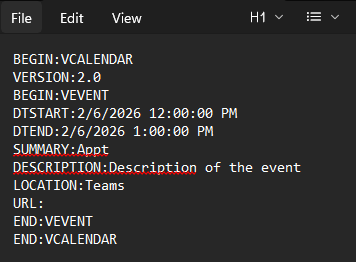
attached is a copy of what is being sent, and for some reason the attachment is not being named invitation.ics which i thought i had covered up above
But when i try to open it with notepad it comes out with all the info that i entered
and about 5 minutes later the actual file is uploaded to the location with the proper name. When i try to open it, it doesn't work.

but same issue, if i load it as a txt file it shows the same info as above