web
You’re offline. This is a read only version of the page.
close
Skip to main content

Announcements

News and Announcements icon
Community site session details

Community site session details

Session Id :
Power Platform Community / Forums / Power Apps / Adding a Combobox in P...
Power Apps
Answered

Adding a Combobox in Powerapps with data from Intune/Entra ID

(3) ShareShare
ReportReport
Posted on by 11
Hello,
 
i am building an app in which visitors register themselves when they have an appointment at our office.
 
I created a sharepointlist with contactpersons (internal) and added a combobox in the app in which visitors have to search for the right contactperson with whom they have the appointment with.

Is it possible to get data from Intune or Entra ID, lead/sync or copy the data into the sharepointlist Contactpersons and connect this data to the combobox Contactperson in the Power App?
 
 
Example sharepointlist with columns


Example Power App:
 
 
Can anybody help me solving this problem?

It is not done when stasrting the app, that somebody has to login as an administrator to get the app and all connections started. 

Hopefully somebody can help me.
 
With regards,
Diana Nijssen
Categories:
I have the same question (0)
  • WarrenBelz Profile Picture
    155,838 Most Valuable Professional on at
    I have a blog on displaying users from Entra itself, or from members of a Group in a Combo Box. Is this what you are referring to ?
     
    Simple examples of the Items of a Combo Box - all users
    Office365Users.SearchUserV2(
       {
          searchTerm: Self.SearchText,
          isSearchTermRequired: false,
          accountEnabled: true,
          top: 999
       }
    ).value
    Members of a Group (using your Group Id)
    Office365Groups.ListGroupMembers(
        "YourGroupIDHere",
        {top: 999}
    ).value
    
    You will see more of the required settings in the blog.
     
    Please Does this answer your question if my post helped you solve your issue. This will help others find it more readily. It also closes the item. If the content was useful in other ways, please consider answering Yes to Was this reply helpful? or give it a Like
    Visit my blog
    Practical Power Apps    LinkedIn  
  • Suggested answer
    11manish Profile Picture
    3,333 on at
    Yes, you can use Entra ID as your data source. The best approach is to connect your ComboBox directly to the Office 365 Users connector, or optionally sync filtered users into SharePoint using Power Automate if you need more control.
     
    try below approach:
    Use the Office 365 Users connector in Microsoft Power Apps to pull users directly from Microsoft Entra ID.
    ComboBox configuration
    Items
    • Office365Users.SearchUser({searchTerm: ComboBox1.SearchText})
    DisplayFields
    • ["DisplayName","Mail"]
    SearchFields
    • ["DisplayName","Mail"]
    one another option :
     
    If you need control, then:
    Use Microsoft Power Automate to sync:
    Entra ID users → SharePoint ContactPersons list
     
    Reference :
     
  • Vish WR Profile Picture
    3,748 on at
     
     
    Office365Users.SearchUser({searchTerm: ComboBox1.SearchText})
    DisplayFields
    • ["DisplayName","Mail"]
    SearchFields
    • ["DisplayName","Mail"]
  • Suggested answer
    Valantis Profile Picture
    6,735 on at
     
    Two things to address here.
    For getting Entra ID users into the combobox, you actually don't need to sync to SharePoint at all. Power Apps has a built-in Office 365 Users connector that queries
     
    Entra ID directly. Set the combobox Items property to:
    Office365Users.SearchUser({searchTerm: Contactpersoon.SearchText})
    And set DisplayFields to ["DisplayName"] and SearchFields to ["DisplayName"]. This searches your entire Entra ID user directory in real time as the visitor types. No maintenance needed, always up to date.

    If you want to keep your SharePoint list approach (for example to only show specific internal contacts and not all users), you can populate it with a scheduled Power Automate flow: trigger on a schedule, use the Office 365 Users connector to get your users (you can filter by group or department), then create or update items in the SharePoint list. Run it nightly and the list stays current.

    For the admin login issue, this is a connection sharing problem. When you share the app with users, you also need to share the connections. Go to make.powerapps.com, find your app, click the three dots and select Share. At the bottom you will see the connections the app uses. Make sure you share those connections with your users as well, or set them to be used with each user's own credentials. That way nobody needs to log in as admin to activate the connections.


    Best regards,

    Valantis


    ✅ If this helped solve your issue, please Accept as Solution so others can find it quickly.

    ❤️ If it didn’t fully solve it but was still useful, please click “Yes” on “Was this reply helpful?” or leave a Like :).

    🏷️ For follow-ups  @Valantis.

    📝 https://valantisond365.com/

    💼 LinkedIn

    ▶️ YouTube

  • Valantis Profile Picture
    6,735 on at

    Hi @Dorak10052,

    Just wanted to check in and see if everything is working now. If you still need any help, feel free to let me know.

    Also, if the issue is resolved, it would be great if you could mark the answer as solved so others with the same question can find it easily.


    Thanks and have a great day!

     
  • Suggested answer
    Dorak10052 Profile Picture
    11 on at
     
    Unfortunatelly i doesn't work.

    I still get an error on the saving button. It doesn't save anything to my sharepoint llist with the name Bezoekers registratie.


    And i think that my fields in Contactpersoon lijst, are the same:


    OnSelect Commando for Opslaan -button:
    // Validatie - Check of alle velden zijn ingevuld
    If(
        IsBlank(txtInput_Naam.Text) ||
        IsBlank(txtInput_Email.Text) ||
        IsBlank(txtInput_Telefoon.Text) ||
        IsBlank(dtpDatum.SelectedDate) ||
        IsBlank(ddContactpersoon.Selected.Title),
       
        Notify("⚠️ Vul alle verplichte velden in", NotificationType.Error),
             
        // Als alles OK is, opslaan in SharePoint
        Patch(
            'Bezoekers lijst',
            Defaults('Bezoekers lijst'),
            {
                Naam: txtInput_Naam.Text,
                Datum: dtpDatum.SelectedDate,
                Naam: txtInput_Naam.Text,
                Email: txtInput_Email.Text,  // ← Pas aan naar exacte kolomnaam
                Telefoonnummer: txtInput_Telefoon.Text,
                Contactpersoon: {
                 '@odata.type': "#Microsoft.Azure.Connectors.SharePoint.SPListExpandedReference",
                   Id: ddContactpersoon.Selected.ID,
                   Value: ddContactpersoon.Selected.Title
                },
                Status: "Aangemeld",
     
            }
        );
       
        Notify("✅ Bezoeker succesvol opgeslagen!", NotificationType.Success);
       
        Reset(txtInput_Naam);
        Reset(txtInput_Email);
        Reset(txtInput_Telefoon);
        Reset(dtpDatum);
        Reset(ddContactpersoon);
       
        Navigate(Startscherm, ScreenTransition.Fade)
    );


    My Power app:
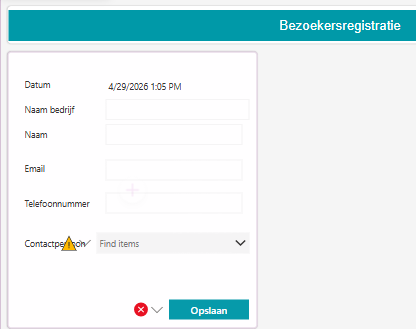
     
    Maybe it is something simple, but i don't see it at this point. Maybe you can see in an eyeblink what i do wrong.

    Thank you in advance.

    With regards,
    Diana
  • Suggested answer
    Valantis Profile Picture
    6,735 on at
     
    I can see one issue straight away in the Patch formula: Naam is listed twice. Power Apps will throw an error on duplicate keys in a record.
    Remove the second Naam line, so it becomes:
    Patch(
        'Bezoekers lijst',
        Defaults('Bezoekers lijst'),
        {
            Naam: txtInput_Naam.Text,
            Datum: dtpDatum.SelectedDate,
            Email: txtInput_Email.Text,
            Telefoonnummer: txtInput_Telefoon.Text,
            Contactpersoon: {
                '@odata.type': "#Microsoft.Azure.Connectors.SharePoint.SPListExpandedReference",
                Id: ddContactpersoon.Selected.ID,
                Value: ddContactpersoon.Selected.Title
            },
            Status: "Aangemeld"
        }
    );
    Also, what is the exact error you see when clicking Opslaan? If there is a red banner or a formula error indicator, sharing that would help narrow it down faster.


    Best regards,

    Valantis


    ✅ If this helped solve your issue, please Accept as Solution so others can find it quickly.

    ❤️ If it didn’t fully solve it but was still useful, please click “Yes” on “Was this reply helpful?” or leave a Like :).

    🏷️ For follow-ups  @Valantis.

    📝 https://valantisond365.com/

    💼 LinkedIn

    ▶️ YouTube

  • WarrenBelz Profile Picture
    155,838 Most Valuable Professional on at
    Firstly @Valantis is on the right track with the duplication of the Naam field in the Patch.
     
    What is a bit confusing is that your initial post subject referred to Adding a Combobox in Powerapps with data from Intune/Entra ID and my initial response assumed you were dealing with a Person field. There is another potential issue here assuming now that ContactPerson is a Lookup field. If so, then you need to refer to the other list being looked up as below, using the field name (assume Title) and the list name being looked up.
     
    You do not need the odata reference any more and also had an extra comma at the end of the Status line in the Patch.
     
    If(
       IsBlank(txtInput_Naam.Text) ||
       IsBlank(txtInput_Email.Text) ||
       IsBlank(txtInput_Telefoon.Text) ||
       IsBlank(dtpDatum.SelectedDate) ||
       IsBlank(ddContactpersoon.Selected.Title),
       Notify(
          "⚠️ Vul alle verplichte velden in", 
          NotificationType.Error
       ),
       Patch(
          'Bezoekers lijst',
          Defaults('Bezoekers lijst'),
          {
             Naam: txtInput_Naam.Text,
             Datum: dtpDatum.SelectedDate,
             Email: txtInput_Email.Text,
             Telefoonnummer: txtInput_Telefoon.Text,
             Contactpersoon:
             {   
                Value: ddContactpersoon.Selected.Title,
                Id:
                LookUp(
                   YourOtherList,
                   Title = ddContactpersoon.Selected.Title
                ).ID			   
             },
             Status: "Aangemeld"
          }
       );
       Notify(
          "✅ Bezoeker succesvol opgeslagen!", 
          NotificationType.Success
       );
       UpdateContext({varReset: true});
       UpdateContext({varReset: false});
       Navigate(
          Startscherm, 
          ScreenTransition.Fade
       )
    );
    I have added another suggestion on resetting the controls - if you set the Reset property of txtInput_Naam, txtInput_Email, txtInput_Telefoon, dtpDatum and ddContactpersoon to varReset (or whatever you want to call the Variable), you can toggle the variable to reset them all as above.
     
    Please Does this answer your question if my post helped you solve your issue. This will help others find it more readily. It also closes the item. If the content was useful in other ways, please consider answering Yes to Was this reply helpful? or give it a Like
    Visit my blog
    Practical Power Apps    LinkedIn  


Under review

Thank you for your reply! To ensure a great experience for everyone, your content is awaiting approval by our Community Managers. Please check back later.

Helpful resources

Quick Links

Season of Sharing Community Challenge Launch!

Jump in, show your community spirit, and win prizes!

Kudos to our 2025 Community Spotlight Honorees

Expanding mentorship, skilling, and AI innovation

Congratulations to the May Top 10 Community Leaders!

These are the community rock stars!

Leaderboard > Power Apps

#1
Valantis Profile Picture

Valantis 424

#2
WarrenBelz Profile Picture

WarrenBelz 355 Most Valuable Professional

#3
11manish Profile Picture

11manish 290

Last 30 days Overall leaderboard
