Hi, we created a Model-Driven App that connects to Dataverse tables. We are also managing our users using the Power Platform Admin Center. We created a Custom role for example "App - Business Users".
When we shared the App to 3 Users with the custom role they've received an error.
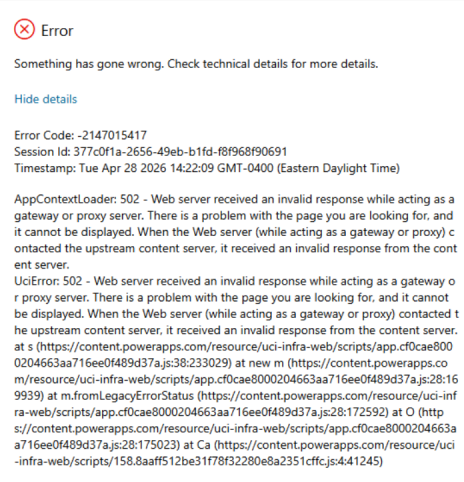
I switched their roles to System Customizer and asked them to access the App then it worked. I asked CoPilot about this and mentioned "custom security role was missing required read permissions on certain Dataverse system tables". It also mentioned one-time initialization ("bootstrap") including Loading app metadata, Creating per-user app settings, UCI, and Caching the user's effective permissions. The custom role was incomplete that's why the initialization failed and returned the 502 / AppContextLoader error.
Assigning the Users to System Customizer bypasses all those missing permissions but we don't want to assign the Users in the System Customizer in a long run. I've asked CoPilot which roles I need to modify to make this work and mentioned these
- Model-Driven App (appmodule) → Read = Organization
- App Action → Read = Organization
- Security Role → Read = Organization
- User → Read = Organization
- Business Unit → Read = Organization
- Model-Driven App User Setting (appusersetting) → Read = Organization
I did the work and changed their roles back from System Customer to App - Business Users then asked the Users again to login and it worked. After couple of hours 2 out of 3 of Users received this error again but only 1 has able to logged in the App and mentioned it prompted a Microsoft Sign In then it worked. A day passed then all of them cannot access now the app, so I switched them back all to System Customer role. I've attached the screenshots of the access I've changed in the Admin Center for the Custom role App - Business Users.
CoPilot mentioned that another option is use Incognito to open the App and forced Sign the User but that option is disabled in our Organization. Another is Revoke the Sessions but we don't have that kind of access. Lastly is the Password Reset for each of users that forces the User to login again and forces token invalidation but I don't want to go to this route yet unless I'm really sure this is the fix.
Next step we did is we moved the Solution with the App to another environment with correct Custom role and shared the App again to our users and still received the same issue.
Are there any missing settings I'm missing other than what CoPilot suggested?





