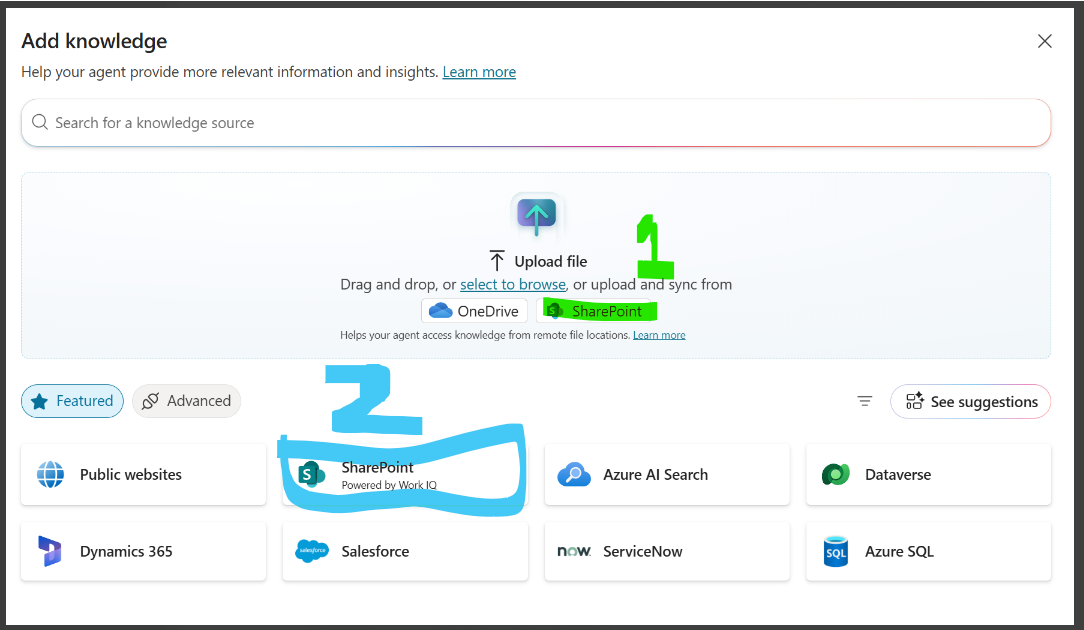
Issue Summary:
In Copilot Studio, while adding SharePoint (Dataverse-backed) as a knowledge source, the system shows a generic “Error” message at the time of adding the file. No detailed error message is surfaced in the UI.
At the same time, SharePoint (Powered by Work IQ) option is working as expected for the same SharePoint site/files.
Observed Behavior:
Error appears immediately after selecting a SharePoint file and clicking Add
UI only shows “Error”, no error code or additional details
Issue is reproducible
Expected Behavior:
SharePoint (Dataverse) knowledge source should either:
Successfully ingest the file, or
Provide a meaningful error message indicating permission, configuration, or indexing issue
Impact:
Customer is unable to use Dataverse-backed SharePoint knowledge source
Limits usage of structured / Dataverse-indexed knowledge for Copilot Studio agent
Troubleshooting Performed (Already Validated)
Multiple Validation Attempts
Same SharePoint file was tested twice
Behavior was consistent on both attempts
No relevant error details or additional insights were returned in either attempt
Comparison with Alternate SharePoint Path
SharePoint (Powered by Work IQ) works fine with the same content
Confirms:
SharePoint access is valid
File is readable
Issue is specific to Dataverse-backed ingestion path
File-Level Checks
File is accessible
File selection completes successfully
Error occurs only at Add / Sync stage
Agent-Level Validation
Tested within the same and new agent
No agent configuration changes impact the behavior
1st one is not working
2nd one is working