




 Share
Share Report
Hi,
Setup
I have 3 sharepoint lists I am loading into an app to create a dynamic questionnaire style response gathering app. The end goal is to feed this back into a sharepoint list to be used in further analysis elsewhere.
My 3 lists and their columns are:
Question Set (Question ID, Question Text, Question Type (dropdown, yes/no, multi, free text), Starting Question?)
Question Answers (Question ID, Answer ID, Answer (text)
Question Branching (Question ID, Answer ID, NextQuestion ID, End of Questions (yes/no)
Question Set (Question ID, Question Text, Question Type (dropdown, yes/no, multi, free text), Starting Question?)
Question Answers (Question ID, Answer ID, Answer (text)
Question Branching (Question ID, Answer ID, NextQuestion ID, End of Questions (yes/no)
The idea behind this setup was to allow me to build dropdown/label combinations, or combo box, label combinations, to display the each question one-by-one. Every time the user selected an answer they would click the next button and the correct next question would show up based on the branching.
My app is currently setup like this:
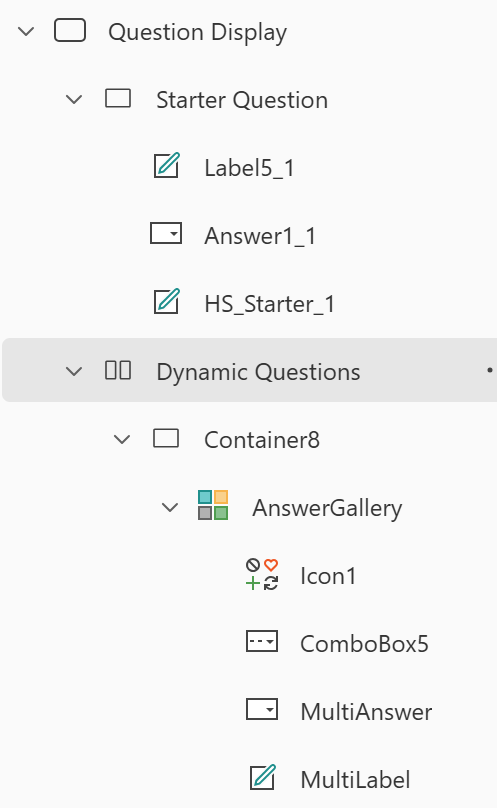
The Starter question is hardcoded, this is by design and i would like to keep it that way.
Then the Answer Gallery has the label, single or combo dropdown (this is displayed depending on the Question type being either Multi or NOT multi and is working fine).
Then the Answer Gallery has the label, single or combo dropdown (this is displayed depending on the Question type being either Multi or NOT multi and is working fine).
Once "Yes" is selected in the Starter Question, the first dynamic question is displayed through branching. The next question in dynamic is multi select, once the user chooses as many options as required and clicks Icon1 (next arrow) the gallery displays all of the next branching questions stacked vertically - this is exactly how i want it to work.
The Issue
The Issue
Once the user chooses selections in those multiple boxes, the next arrow shows up for all of them (i understand why, as the gallery repeats the layout inside it over and over again). The problem is once a user clicks next arrow on any of those boxes the next branching question shows up whilst the earlier questions from the combobox are also displayed.
What i am trying to get to is Static Question -> Dynamic question (multi is first, just the way the questions fall) -> multiple label/dropdown show up based on selections -> All selections submitted -> Single dropdown and label are displayed.
It is important to note although this is "branching", after responses are received for a multi dropdown, the next question - regardless of the answer - is the same for all of them. I also want this to be as dynamic as possible as there are a lot of instances of multi dropdown in my data that i want to handle this way.
What i am trying to get to is Static Question -> Dynamic question (multi is first, just the way the questions fall) -> multiple label/dropdown show up based on selections -> All selections submitted -> Single dropdown and label are displayed.
It is important to note although this is "branching", after responses are received for a multi dropdown, the next question - regardless of the answer - is the same for all of them. I also want this to be as dynamic as possible as there are a lot of instances of multi dropdown in my data that i want to handle this way.
The Code
I have tried so many variations of this setup to get this to work, even with help from co-pilot and other AI tools and it just doesn't fit. This includes not doing it in galleries, doing single select separate and galleries for multi select only controlled by visible code. I've also looked at making it almost fully manual but it would take so long and we have a lot more questions to add.
Here is my current setup.
Static Question
Dropdown
Items: Filter(
OnChange:
Dropdown
Items: Filter(
'Question Answers Test', 'Question ID' = 1
)
Clear(colResponses);
Clear(colQuestionFlow);
Clear(colNextQuestions);
Set(varComplete, false);
Collect(
colResponses,
{
QuestionID: 1,
QuestionText: LookUp(
'Question Set Test',
'Question ID' = 1
).QuestionText,
AnswerID: Answer1_1.Selected.AnswerID,
AnswerText: Answer1_1.Selected.Answer
}
);
ClearCollect(
colNextQuestions,
Filter(
'Question Branching',
'Question ID' = 1 &&
AnswerID = Answer1_1.Selected.AnswerID
)
);
ForAll(
Filter(colNextQuestions, 'End of Questions' <> true),
Collect(
colQuestionFlow,
LookUp(
'Question Set Test',
'Question ID' = NextQuestionID
)
)
);
Reset(AnswerGallery)
Label
text: Topic = "Health" && 'Starting Question' = true, 'Question Text')
text: Topic = "Health" && 'Starting Question' = true, 'Question Text')
AnswerGallery
Items:
Items:
colQuestionFlow
Gallery label text :
ThisItem.QuestionText
Gallery Single select dropdown
Items:
Filter('Question Answers Test', 'Question ID' = ThisItem.'Question ID')
Collect(
colResponses,
{
QuestionID: ThisItem.QuestionID,
QuestionText: ThisItem.QuestionText,
AnswerID: MultiAnswer.Selected.AnswerID,
AnswerText: MultiAnswer.Selected.Answer
}
)
Gallery combo box
Items:
Onchange:
next button on select:
Items:
Filter(
'Question Answers Test',
'Question ID' = ThisItem.'Question ID'
)
Collect(
colResponses,
{
QuestionID: ThisItem.QuestionID,
QuestionText: ThisItem.QuestionText,
AnswerID: ComboBox5.Selected.AnswerID,
AnswerText: ComboBox5.Selected.Answer
}
);
next button on select:
RemoveIf(
colResponses,
QuestionID = ThisItem.'Question ID'
);
If(
ThisItem.QuestionType.Value <> "Multi",
Collect(
colResponses,
{
QuestionID: ThisItem.'Question ID',
QuestionText: ThisItem.QuestionText,
AnswerID: MultiAnswer.Selected.AnswerID,
AnswerText: MultiAnswer.Selected.Answer
}
)
);
If(
ThisItem.QuestionType.Value = "Multi",
ForAll(
ComboBox5.SelectedItems,
Collect(
colResponses,
{
QuestionID: ThisItem.'Question ID',
QuestionText: ThisItem.QuestionText,
AnswerID: AnswerID,
AnswerText: Answer
}
)
)
);
ClearCollect(
colNextQuestions,
Filter(
'Question Branching',
'Question ID' = ThisItem.'Question ID' &&
AnswerID in
Filter(
colResponses,
QuestionID = ThisItem.'Question ID'
).AnswerID
)
)
;
// Remove current question
RemoveIf(
colQuestionFlow,
'Question ID' = ThisItem.'Question ID'
);
// Add next questions
ForAll(
Filter(colNextQuestions, 'End of Questions' <> true),
Collect(
colQuestionFlow,
LookUp(
'Question Set Test',
'Question ID' = NextQuestionID
)
)
);
I am hoping i've missed something obvious but i essentially have tunnel vision having looked at this for days now, i've started again more times than i can count but the multi-dropdown issues just keep getting in the way.
My next steps for this are to re-work the collection so I can have 1 row per entry for the entire question set, i have done something similar before so I'm happy with that once i can work this issue out.
Thank you.
Categories:
I have the same question (0)
 All responses (
 Answers (
 2,318
2,318









