web
You’re offline. This is a read only version of the page.
close
Skip to main content

Notifications

Announcements

Community site session details

Community site session details

Session Id :
Power Platform Community / Forums / Power Automate / How to Add Images to S...
Power Automate
Suggested Answer

How to Add Images to Sections of an Html to PDF Conversion

(0) ShareShare
ReportReport
Posted on by 5,325 Super User 2025 Season 2

I am trying to build a flow that - through html and conversion to PDF, saves that
files to a SharePoint library and emails said file to a dynamic list of stakeholders.

As represented below, I've got most of that working. What I can't figure out is how
to get the related images (from a SharePoint library) to the appropriate section of
the document.

There are six sections - Administrative, Maintenance, etc. The user can upload no
more than three files for each section; or none at all.

 The SPList_1 and SPLibrary_1 have these same columns -
Location
Report Section
Week Ending
 
The images should appear (or not) at the bottom of each section based on Location,
Week Ending and Report Section.


This is the piece of the flow where I thought I was grabbing those library documents
(image files). However, no images appear in PDF, only the text.

Categories:
I have the same question (0)
  • Suggested answer
    Nived_Nambiar Profile Picture
    18,129 Super User 2025 Season 2 on at
    Hi,
     
    Try to follow the below approach to add the images 
     
    I assume you need the final file in sharepoint.
     
    see below
     
    1. Use get file content to get image file content
     
    2. I have used a compose action to write a sample html along with embedding images 
    Expression used: 
    base64(outputs('Get_file_content')?['body'])
     
    3. Use create file under onedrive actions to create html file
     
     
    4. Use convert file to convert the file to pdf format
     
    5. use create file to create the new pdf file in sharepoint 


    Thanks & Regards,
    Nived N

    Stay connected:
    LinkedIn | YouTube | Blogs

    Was this answer helpful?
    If yes, please mark it as the solution by selecting the checkbox in the discussion thread.
    Your feedback motivates me to keep contributing. Thank you!

  • Phineas Profile Picture
    5,325 Super User 2025 Season 2 on at
    My reading of your recommended corrective action leads me to believe it will create and convert a document.

    How does that help me incorporate the images I need into the document created by my flow?
  • Nived_Nambiar Profile Picture
    18,129 Super User 2025 Season 2 on at
    Hi,
     
    Just to get things clear- want to confirm whether you are panning your flow to be executed in this way 
     
    1. Flow creates a html document and embed images in it.
    2. Flow converts to pdf file
    3. It emails to required persons.
     
    Am i correct in understanding your process ?
     

    Thanks & Regards,
    Nived N

    Stay connected:
    LinkedIn | YouTube | Blogs

    Was this answer helpful?
    If yes, please mark it as the solution by selecting the checkbox in the discussion thread.
    Your feedback motivates me to keep contributing. Thank you!

  • Phineas Profile Picture
    5,325 Super User 2025 Season 2 on at
    To be clear, it is not my flow, which is why I am having such issues with it.

    I was asked to try to get it working with a Power App, after the builder was
    no longer available. 

    I've got most of it working, but can't figure out why I can't get images to show
    in the PDF.
     
    1. Flow creates a html document and embed images in it.
        Correct. The desired outcome is to retrieve data and images from
        a SharePoint list and SharePoint library, build an html header and
        body, convert both into a single PDF file.

     
    2. Flow converts to pdf file
        Yes
     
    3. It emails to required persons.
       Yes
     
    This is the PDF file (as opened in my email).

    There are six sections - Administrative, Maintenance, Financial, etc. Each section may have multiple issues, or no issues. Each section may have up to three images, or no images.

    I can't figure out how to get the images to show in the PDF file.


    This is the section of the flow that is supposed to bring in the images.
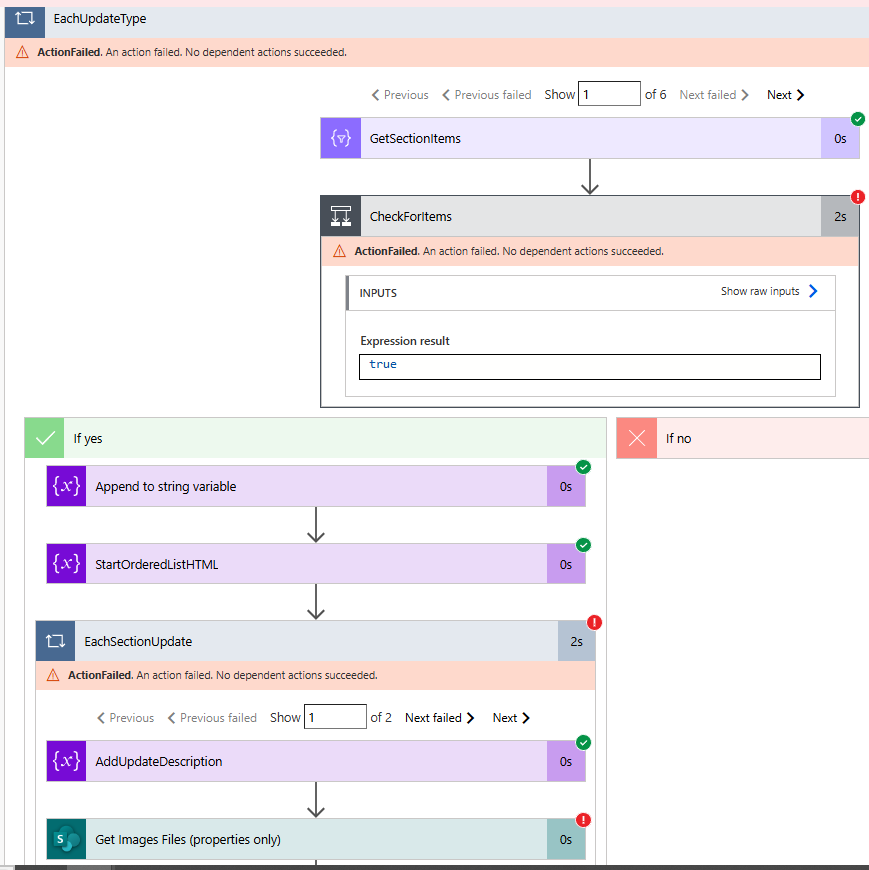

    The error is -
    If this error was temporary, you can try resubmitting the run and the issue may have been resolved.
  • Nived_Nambiar Profile Picture
    18,129 Super User 2025 Season 2 on at
    Hi
     
    I see the error is occuring at get file properties action - seems like issue with filter query - could you share the filter query used in that ?
     

    Thanks & Regards,
    Nived N

    Stay connected:
    LinkedIn | YouTube | Blogs

    Was this answer helpful?
    If yes, please mark it as the solution by selecting the checkbox in the discussion thread.
    Your feedback motivates me to keep contributing. Thank you!

  • Phineas Profile Picture
    5,325 Super User 2025 Season 2 on at
    I managed to clear the error.

    The output (with test data) now looks like this following.
    The next step is to get the images to show as I've written
    on the documents.


    Flow has a header section - 


    And a body section -

    dataUri(outputs('Get_attachment_content')?['body'])
  • Phineas Profile Picture
    5,325 Super User 2025 Season 2 on at
    UPDATE -

    I've gotten the flow to give me the following.

    As previously stated, there are six sections that may or may not have content
    and images.

    My latest edit no gets me an image (because it is hardcoded).

    How do I make this dynamic? Each section can have up to three images.

    And how do I make sure the image shows ONLY in its specific section?


    The back end of the flow where the images are added. My most recent edits are the
    Get file content 2, with the hardcoded image (this needs to be dynamic based on 
    Section), and the Compose 2, with the dataUri formula. Adding these and tweaking
    the rest FINALLY brought in an image.

    How do I refine to get all images dynamically and in the right place in the document?


Under review

Thank you for your reply! To ensure a great experience for everyone, your content is awaiting approval by our Community Managers. Please check back later.

Helpful resources

Quick Links

Forum hierarchy changes are complete!

In our never-ending quest to improve we are simplifying the forum hierarchy…

Ajay Kumar Gannamaneni – Community Spotlight

We are honored to recognize Ajay Kumar Gannamaneni as our Community Spotlight for December…

Leaderboard > Power Automate

#1
Michael E. Gernaey Profile Picture

Michael E. Gernaey 519 Super User 2025 Season 2

#2
Tomac Profile Picture

Tomac 296 Moderator

#3
abm abm Profile Picture

abm abm 232 Most Valuable Professional

Last 30 days Overall leaderboard



