web
You’re offline. This is a read only version of the page.
close
Skip to main content

Announcements

News and Announcements icon
Community site session details

Community site session details

Session Id :
Power Platform Community / Forums / Copilot Studio / Copilot Studio Session...
Copilot Studio
Answered

Copilot Studio Session Context Not Available in Omnichannel Workstream Routing

(1) ShareShare
ReportReport
Posted on by 79

Hello,

We are experiencing an issue with Microsoft Copilot Studio integration with Dynamics 365 Omnichannel for Customer Service while transferring conversations to a live agent.

Environment Details:

- Platform: Microsoft Copilot Studio + Dynamics 365 Omnichannel for Customer Service

- Environment Type: Trial

- Channel: Chat

- Routing mechanism: Workstreams with Work Classification Rules

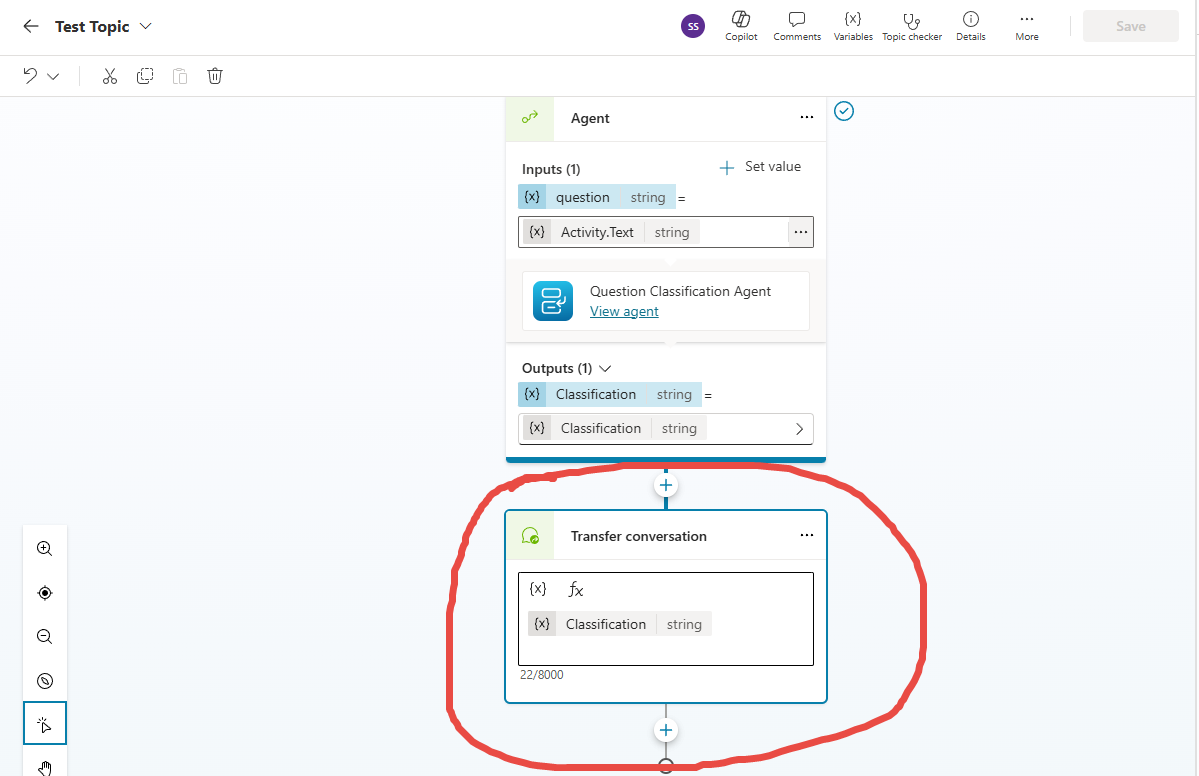
- Transfer method: “Transfer conversation” node in Copilot Studio


Issue Description:

We are invoking an Agent in Copilot Studio that returns a string response (used as intent/classification). 

This response is stored using the “Set a variable value” action (session-scoped variable) and then passed through the “Transfer conversation” node with context enabled.


However, when the conversation is transferred to a live agent:

- The session context variable is not available in the Workstream Work Classification Rules.

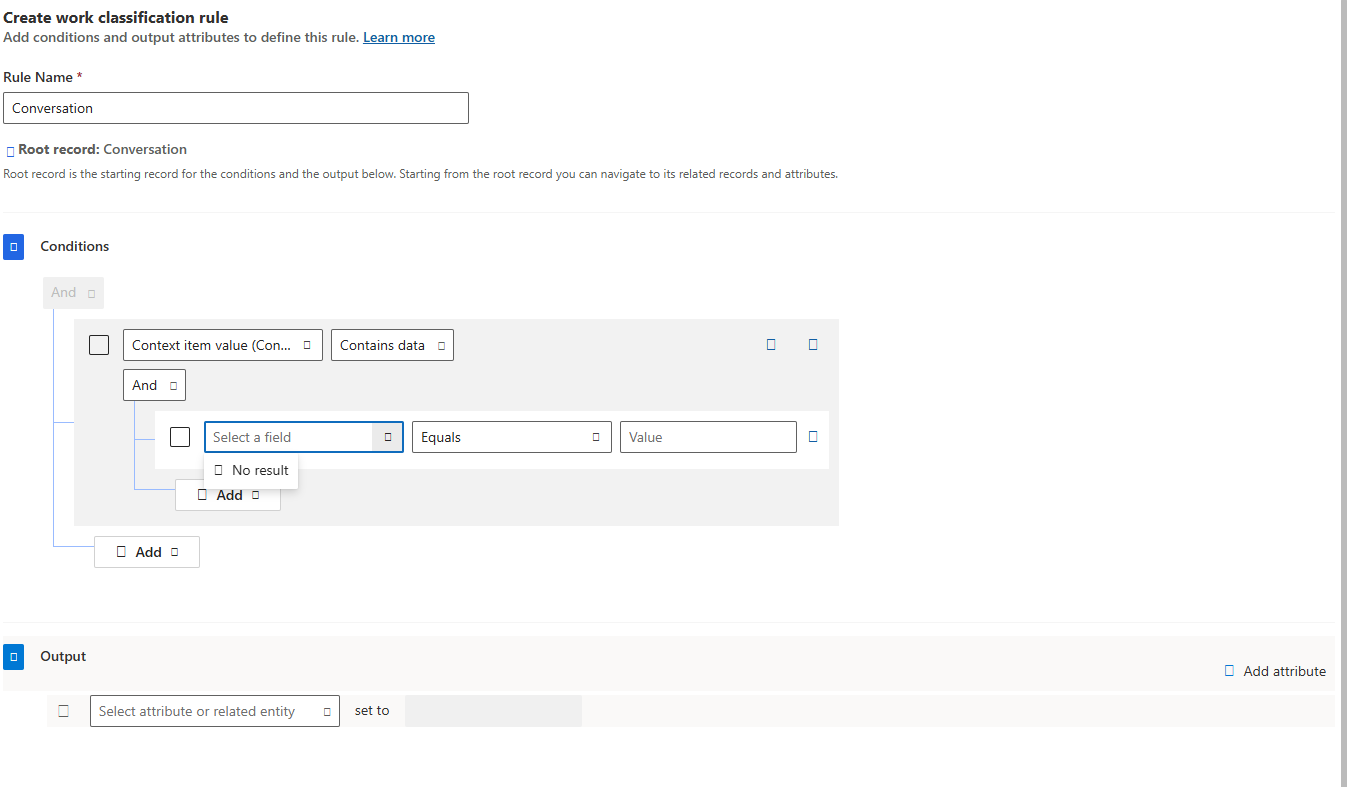
- In the Work Classification Rules, under Root record = Conversation, we are using “Context item value (Conversation)” to evaluate session context.

- The routing rules are unable to detect or match the expected context value, and therefore classification and routing do not occur.


Expected Behavior:

The session context set in Copilot Studio should be available in Omnichannel Work Classification Rules via “Context item value (Conversation)” after the Transfer Conversation action, allowing routing based on the Copilot response.


Actual Behavior:

No session context value is detected in Work Classification Rules after the conversation is transferred to a live agent.


Troubleshooting Already Performed:

- Confirmed agent output is populated in Copilot Studio

- Confirmed “Set a variable value” is executed prior to Transfer Conversation

- Enabled context passing during transfer

- Used “Context item value (Conversation)” in Work Classification Rules

- Verified logic using simple string comparisons

- Issue reproduces consistently


Additional Notes:

We would like confirmation on:

1. Whether this is a known limitation or issue in Trial environments

2. Whether session context is fully supported for routing in Work Classification Rules during Copilot-to-Agent transfer

3. Any additional configuration required for Copilot Studio + Omnichannel integration


We have attached screenshots of the Copilot flow and Workstream configuration for reference.


Thank you for your support.
Categories:
I have the same question (0)
  • Suggested answer
    Robu1 Profile Picture
    1,646 Super User 2026 Season 1 on at
    Hi    ,
     
    Thank you for choosing Microsoft Community.
     
    If you want Omnichannel to route based on something Copilot figured out, you must:

    Push that value into Dataverse → then let Work Classification Rules read it.

    Once you do that, routing works exactly as expected. 

    In addition, its not a Trial limitation- it’s a platform‑wide limitation.

    session context is not automatically supported for routing. Copilot variables are not visible to Omnichannel.

    finally, extra configuration is needed to write the value into Dataverse via Power Automate before transfer.

    I hope this helps resolve the issue! If you need more specific guidance, feel free to ask.
     
    🏷️ Please tag me @Robu1 if you still have any queries related to the solution or issue persists.
     
     
    ✅ Please click Accept as solution if my post helped you solve your issue and help others who will face the similar issue in future. ❤️ Please consider giving it a Like, If the approach was useful in other ways.
     
    Happy to help
    Robu 1👩‍💻
     
  • Verified answer
    Sayali Profile Picture
    Microsoft Employee on at
    Hello   ,
    In Copilot Studio integrated with Dynamics 365 Omnichannel, setting a session‑scoped variable in a topic and passing it through the Transfer conversation node does not make that value available to Omnichannel Work Classification Rules for routing. Although the Copilot agent correctly returns an intent or classification string and stores it in session memory prior to transfer, this session context remains within the Copilot runtime and is not automatically promoted to Dataverse conversation context items (msdyn_ocliveworkitemcontextitem) that Omnichannel’s routing engine evaluates. As a result, when Workstream rules attempt to use Context item value (Conversation) to match routing logic, the value appears null and classification fails. This is not a limitation of trial environments but a current platform behavior: Copilot session variables are not directly accessible to Omnichannel routing unless explicitly persisted. The recommended production approach is to invoke a Power Automate flow before transferring the conversation and create a corresponding Dataverse conversation context item using the Copilot output (for example, intent = BillingIssue). Once this value is stored at the Live Work Item level, Omnichannel Work Classification Rules can successfully detect it and route the conversation based on Copilot‑derived classification.
    Reference Document:
    1. Hand off to a live agent - Microsoft Copilot Studio | Microsoft Learn
    2. Context item value (msdyn_ocliveworkitemcontextitem) table/entity reference (Microsoft Dynamics 365) | Microsoft Learn
    3. Configure context variables for agents | Microsoft Learn

    -----------------------------------------------------------------------------------------------------------------------------------
    Your feedback is important to us. Please rate us:

    🤩 Excellent 🙂 Good 😐 Average 🙁 Needs Improvement 😠 Poor

Under review

Thank you for your reply! To ensure a great experience for everyone, your content is awaiting approval by our Community Managers. Please check back later.

Helpful resources

Quick Links

Introducing the 2026 Season 1 community Super Users

Congratulations to our 2026 Super Users!

Kudos to our 2025 Community Spotlight Honorees

Congratulations to our 2025 community superstars!

Congratulations to the March Top 10 Community Leaders!

These are the community rock stars!

Leaderboard > Copilot Studio

#1
Valantis Profile Picture

Valantis 618

#2
Haque Profile Picture

Haque 147

#3
Vish WR Profile Picture

Vish WR 140

Last 30 days Overall leaderboard