web
You’re offline. This is a read only version of the page.
close
Skip to main content

Announcements

News and Announcements icon
Community site session details

Community site session details

Session Id :
Power Platform Community / Forums / Power Automate / Inconsistent Behavior ...
Power Automate
Suggested Answer

Inconsistent Behavior with SharePoint Date Filter in Power Automate

(0) ShareShare
ReportReport
Posted on by 16

I've encountered several instances where my Get Items filter query fails to retrieve data from a SharePoint list when applying a date range condition. However, when I remove the date value from the SharePoint list item and re-enter it, the flow runs successfully and extracts the data as expected.

I’d appreciate any insights into the root cause of this issue and suggestions for a reliable workaround.

Categories:
I have the same question (0)
  • Ellis Karim Profile Picture
    12,101 Super User 2026 Season 1 on at
     
    We need more details to help you! Please share a screenshot of your flow, showing the configured actions. If there’s an error, tell us which action failed and include the error message. Be careful not to include any sensitive or personal information. This will help us understand the issue and provide a solution faster. Thank you!
     
    Please could you also share the query filter.


    Ellis Karim
    Ellis Karim
    elliskarim.com  |  LinkedIn  |  Bluesky
    If this solved your issue, please mark it as ✅ Accepted Answer. If it helped, feel free to give it a 🩷 Like!


  • nazmisyaz1 Profile Picture
    16 on at
    Hi @Ellis Karim,

    1) Initially, I extract below Sharepoint List based on its EstInvoiceDate using Get Items action.


    The filter query I used are EstInvoiceDate eq '08/01/2024' and EstInvoiceDate eq '2024-08-01'.
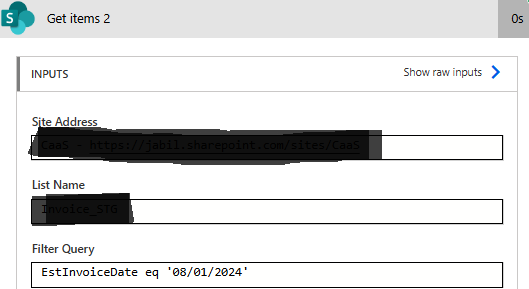
    Both filter query returns blank: {"body":{"value":[]}}
     
     
    2) Next thing I do, is removed the date and manually update it.
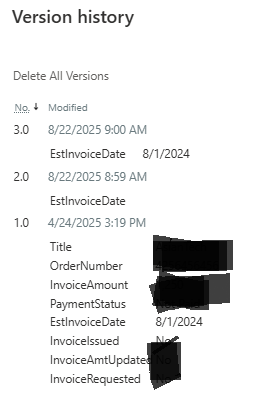
    I used same action and the same filter query to extract the Sharepoint list.
    And finally it returns the expected result I want.
    {"body":{"value":[{"@odata.etag":"\"xx\"","ItemInternalId":"xx","ID":302,"Title":"xxxxxxx","OrderNumber":"xxxxxxxxx","InvoiceAmount":xxxxxx,"EstInvoiceDate":"2024-08-03","InvoiceRequested":xxxxxx,"InvoiceIssued":xxxxx,"PaymentStatus":"xxxxxxxx","InvoiceAmtUpdated":xxxxx,"Modified":"2025-08-22T01:00:02Z"

    FYI, this run is being done on 8/22/2025
    3) I hope you can advise me why is this happening.

    Thank you

     
  • Ellis Karim Profile Picture
    12,101 Super User 2026 Season 1 on at
    I don't see why the query is not working with the current list data.
     
    I recommend always using ISO 8601 format dates in your OData filter queries. This is the format SharePoint uses to store dates and it's the correct and most reliable way to handle dates in your flows. It will also avoid the regional ambiguity of dates: 08/01/2024 could mean 8 Jan 2024 in the UK (I'm based in the UK), but 1 Aug 2024 in the US.
     
    Note that when you VIEW dates in SharePoint, they are displayed according to your site’s Regional settings even though they are stored as ISO 8601 format
     
    In our case, the date format for the query will be YYYY-MM-DD. (As you can see this in the runtime outputs).  
     
    Things to try
     
    • If you create a new flow with a Get items and the same queries, does the flow also behave the same way and not return any results? (i.e. is it only this problematic flow that is experiencing the issue?)
       
    • You could delete the Get items action in your main flow and re-add it. Be careful with doing this as it may impact the parts of your flow. You can make a backup copy using the Save As option first.


    My test
     
    I used a Test List and created a date column (with no time) called EstInvoiceDate.


    Here is my test data:


    Here is my query EstInvoiceDate eq '2024-08-01'


    I got back the following, which I expected:
      "body": {
        "value": [
          {
            "@odata.etag": "\"4\"",
            "ItemInternalId": "4",
            "ID": 4,
            "Title": "Invoice D",
            "EstInvoiceDate": "2024-08-01",
            "Modified": "2025-08-22T07:25:30Z",
            "Created": "2025-08-13T07:45:32Z",


    Ellis Karim
    Ellis Karim
    elliskarim.com  |  LinkedIn  |  Bluesky
    If this solved your issue, please mark it as ✅ Accepted Answer. If it helped, feel free to give it a 🩷 Like!
  • nazmisyaz1 Profile Picture
    16 on at
    Hi @Ellis Karim,

    I have tried one of your recommendations:
    Thing-to-try #1: 
    The new flow also behave the same way and did not return the any list.
    Thus I don't see the needs to test Thing-to-try #2 as I have tested a newly created Get Items action and produce same outputs.

    FYI, I already used the ISO 8601 format dates in my OData filter queries (as mentioned earlier).
    I also understand that the filter query I used should have working normally as tested.

    However, the question of why the list only extracted after I delete and re-entered the date value still remain unanswered.

    Thank you.
  • Ellis Karim Profile Picture
    12,101 Super User 2026 Season 1 on at
    I have not been able to reproduce the problem.
     
    Can you please try the following:
     
    (1) Please confirm that the EstInvoiceDate column is a Date Only type:
     
     
    (2) Can you run the following test query using a date range, for example:
     
    EstInvoiceDate ge '2024-08-03' and EstInvoiceDate lt '2024-08-04'
     
    Screenshot showing a highlighted date '03/08/2024' from a list of dates in a web interface. The date is magnified with a green callout box for emphasis. Image prepared by Ellis Karim for elliskarim.com.
     
    This query should return item ID 1 in the example above, for date 2024-08-03
     
    Please also check that no advanced parameters are set:

    Power Automate 'Get items' action configuration screen. The site address is set to 'Demo Site', the list name is 'Test List', and a filter query is entered: EstInvoiceDate ge '2024-08-03' and EstInvoiceDate lt '2024-08-04'. The advanced parameters section shows options such as Order By, Top Count, Limit Columns by View, Limit Entries to Folder, and Include Nested Items. Screenshot prepared by Ellis Karim for elliskarim.com.
     
    Please share screenshots of the data in the test Sharepoint list, the filter query and the runtime outputs.
     
    Ellis Karim
    Ellis Karim
    elliskarim.com  |  LinkedIn  |  Bluesky
    If this solved your issue, please mark it as ✅ Accepted Answer. If it helped, feel free to give it a 🩷 Like!
     
  • Suggested answer
    Tomac Profile Picture
    4,138 Moderator on at
     
    Sometimes SharePoint needs a little help with date fields. Try adding the datetime datatype identifier in your query in the future:
    EstInvoiceDate eq datetime'2024-08-01'
    or
    EstInvoiceDate eq datetime'Dynamic_Content_Inside_The_Single_Quotes'
    if you're generating your date dynamically.
     
     
    As Ellis said, always use 'yyyy-MM-dd' format for the date when running queries in SharePoint as it stores dates internally using this method. You can convert dynamic dates to this format with the formatdatetime() function:
     
    FormatDateTime(utcNow(),'yyyy-MM-dd')
     
  • nazmisyaz1 Profile Picture
    16 on at
    Hi @Tomac,

    I've tried to add datetime datatype identifier in my query,
    EstInvoiceDate eq datetime'2025-02-05T10:38:44Z'

    But resulting in blank.
    {"body":{"value":[]}}


    Hi @Ellis Karim,

    (1) It is confirmed that the EstInvoiceDate column is a Date Only type:

     
    (2) I've try to run the following test query using a date range below to extract below list
    List To Extract:

    i) Date Range: EstInvoiceDate ge '2025-02-05' and EstInvoiceDate le '2025-02-05'
    Resulting in blank
    {"body":{"value":[]}}
     
    i) Date Range: EstInvoiceDate ge '2025-02-05' and EstInvoiceDate lt '2025-02-06'
    Resulting in successful extraction
    {"body":{"value":[{"@odata.etag":"\"21\"","ItemInternalId":"277","ID":277
     
    May I know why is this happening like this?


  • Ellis Karim Profile Picture
    12,101 Super User 2026 Season 1 on at
     
    I suspect that your source data for EstInvoiceDate likely contains date and time (e.g. 2025-08-26T10:28:00), but I can't be sure. 
     
    • Is EstInvoiceDate dates entered by the user in SharePoint?
    • Or is there a flow that updates EstInvoiceDate using data from another source?
    • Can you post any sample date for EstInvoiceDate before it is entered into SharePoint?
     
    In your filter query, for now,  you will need to specify a range between two dates.
    A date like 2025-08-26, is interpreted as 2025-08-26T00:00 (yyyy-MM-ddTHH:mm:ss).
     
     
    EstInvoiceDate is "greater or equal" to 2025-08-26T00:00:00
    and  
    EstInvoiceDate is "less than" 2025-08-27T00:00:00


    Ellis Karim
    Ellis Karim
    elliskarim.com  |  LinkedIn  |  Bluesky
    If this solved your issue, please mark it as ✅ Accepted Answer. If it helped, feel free to give it a 🩷 Like!
  • Ellis Karim Profile Picture
    12,101 Super User 2026 Season 1 on at
    Hi @Tomac.
     
    Thanks for sharing. I hadn't used the literal datetime in a Get Items action before.
     
     
    Ellis Karim
    Ellis Karim
    elliskarim.com  |  LinkedIn  |  Bluesky
    If this solved your issue, please mark it as ✅ Accepted Answer. If it helped, feel free to give it a 🩷 Like!
  • Tomac Profile Picture
    4,138 Moderator on at
     
    The filter EstInvoiceDate eq datetime'2025-02-05T10:38:44Z' will fail because you're comparing a date only field to a full date and time. Your source data is 2025-2-05 without a timestamp, so comparing with the Equals operator to something with a timestamp will always return no results.
     
    It looks like you're trying to find a range, so try this filter to get datetime values within the single day:
    EstInvoiceDate ge datetime'2025-02-05' and EstInvoiceDate le datetime'2025-02-05T23:59:59'
     
    This closely mirrors an issue last week that was resolved by adding the datetime data type modifier to the filter query.

Under review

Thank you for your reply! To ensure a great experience for everyone, your content is awaiting approval by our Community Managers. Please check back later.

Helpful resources

Quick Links

Season of Sharing Community Challenge Launch!

Jump in, show your community spirit, and win prizes!

Kudos to our 2025 Community Spotlight Honorees

Expanding mentorship, skilling, and AI innovation

Congratulations to the April Top 10 Community Leaders!

These are the community rock stars!

Leaderboard > Power Automate

#1
Vish WR Profile Picture

Vish WR 386

#2
Valantis Profile Picture

Valantis 342

#3
Haque Profile Picture

Haque 336

Last 30 days Overall leaderboard



