web
You’re offline. This is a read only version of the page.
close
Skip to main content

Announcements

News and Announcements icon
Community site session details

Community site session details

Session Id :
Power Platform Community / Forums / Power Automate / Error Action Condition...
Power Automate
Answered

Error Action Condition_2 Failed

(2) ShareShare
ReportReport
Posted on by 16
I've had this flow, and it was working without issue for months, now all the sudden it is getting an error. I've posted the flow and error information below. I know it's a little weird that I have the condition in there twice to determine if the attachment is an image, but it didn't work when I left it with just the 1 condition. I am super new to PowerAutomate, so please provide answers as if I know nothing. Any idea what is causing the error and how to fix it? The purpose of the flow is to take emails received in a Shared Mailbox, if the email has non image attachments it will upload the document to a SharePoint library and then edit some of the file properties. The flow now works up to the point that it saves the document to SharePoint, but it is no longer editing the file properties.
 
The error message is: 
Error
Action 'Condition_2' failed
 
Flow: 
 
Error:
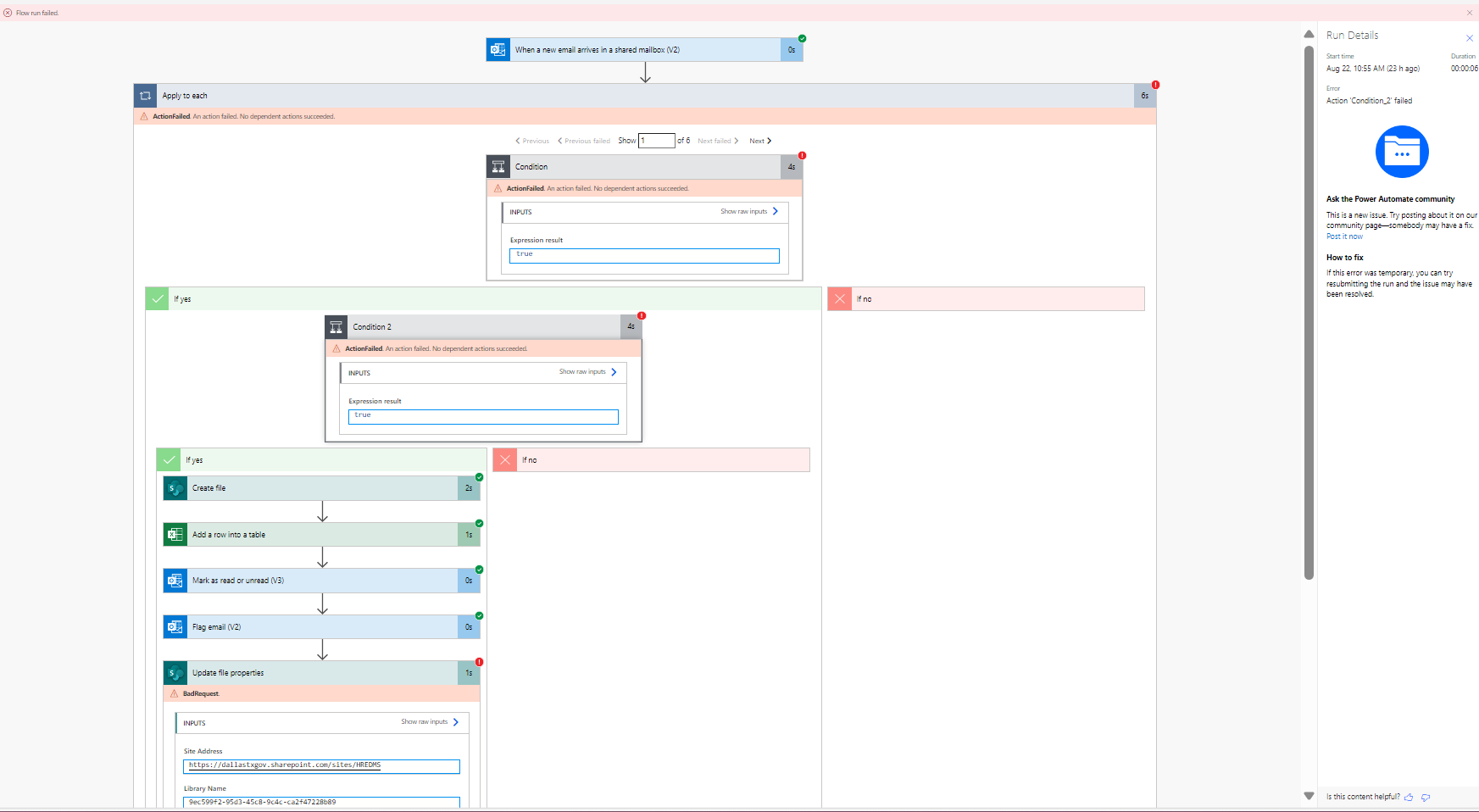


The inputs for the first red exclamation point:
 
Inputs for the 2nd red exclamation point:
 
Inputs for the 3rd red exclamation point:
 
2nd Red Excl.jpg
1st Red Excl.jpg
3rd Red Excl.jpg
Categories:
I have the same question (0)
  • Verified answer
    trice602 Profile Picture
    16,316 Super User 2026 Season 1 on at
    Hi,
     
    What I typically do here is have one condition that has three rows
     
    OR (type)
     
    if the attachment name ends with .jpg 
    if the attachment name ends with .png
    if the attachment name ends with .gif


    So in this example if I only wanted to save the images, this is going to help you filter images better and is more efficient.  Give it a try and let me know ~ always glad to help!  Tom
     
    ------------------------------------------------


    If this was helpful, please like and/or mark as a verified answer to help others find this too!


    Always glad to help! 💯💯💯💯💯

    Tom 

    Follow me on LinkedIn - Thomas Rice, PMP | LinkedIn


  • JK-23081501-0 Profile Picture
    16 on at
    Thank you, Tom! This worked perfectly! I modified it just a bit, but here is my end product. Couldn't have figured this out without you.
     

Under review

Thank you for your reply! To ensure a great experience for everyone, your content is awaiting approval by our Community Managers. Please check back later.

Helpful resources

Quick Links

Season of Sharing Community Challenge Winners!

Congratulations to our community stars!

Kudos to our 2025 Community Spotlight Honorees

Expanding mentorship, skilling, and AI innovation

Congratulations to the June Top 10 Community Leaders!

These are the community rock stars!

Leaderboard > Power Automate

#1
David_MA Profile Picture

David_MA 238 Super User 2026 Season 1

#2
11manish Profile Picture

11manish 225

#3
Haque Profile Picture

Haque 181

Last 30 days Overall leaderboard
