web
You’re offline. This is a read only version of the page.
close
Skip to main content

Announcements

News and Announcements icon
Community site session details

Community site session details

Session Id :
Power Platform Community / Forums / Power Apps / Label x property wrong...
Power Apps
Suggested Answer

Label x property wrong, label not showing up in right place in Gallery: Gantt Chart

(1) ShareShare
ReportReport
Posted on by 224 Season of Giving Solutions 2025
 
I got the original from C# Corner but I modified it.  This is what I'm working with and the bar is not starting where it should nor does the width have the correct value.
 
Label Name: Bar
X = Value((StartDays_1.Text) * 'Gantt Tasks_2'.Width/365       The starting date is not correct on the gantt chart.
Width =   (Value(EndDays_1.Text) - Value(StartDays_1.Text)) * 'Gantt Tasks_2'.Width / 365    This calculates correctly.

                Tasks is the Gallery Name

                StartDays_1 is a Text Input field
                Default = DateDiff(Date(2026,1,1), DateValue(Text(StartDate_1.Text, "[$-en-US]mm/dd/yyyy")))    This calculates correctly.

                EndDays_1 is a Text Input field
                Default = DateDiff(Date(2026,1,1), DateValue(EndDate_1.Text))+1      This calculates correctly.

                StartDate_1 is a Text Input field
                Default = ThisItem.StartDate
                Column name is StartDate
                EndDate_1 is a Text Input field
                Default = ThisItem.EndDate  
                Column name is EndDate
 
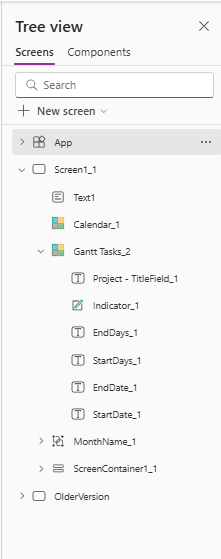
Here is my Tree View 


Categories:
I have the same question (0)
  • Suggested answer
    11manish Profile Picture
    3,333 on at
    The issue with your X position is caused by using the gallery width incorrectly and relying on TextInput values inside the gallery, which are not reliable for layout calculations.
     
    You should replace 'Gantt Tasks_2'.Width with Parent.Width and ideally calculate directly from ThisItem.StartDate using DateDiff.
     
    This ensures correct positioning and avoids rendering inconsistencies.
  • S S Profile Picture
    224 Season of Giving Solutions 2025 on at
    I will try that now.  Thank you!
  • S S Profile Picture
    224 Season of Giving Solutions 2025 on at
    Almost there.  I must have missed something.  
    Label Width= (Value(EndDays_1.Text) - Value(StartDays_1.Text)) * Parent.Width / 365
    StartDays_1 default =DateDiff(Date(2026,1,1), ThisItem.StartDate)
    EndDays_1 default = DateDiff(Date(2026,1,1), ThisItem.EndDate)
     
    The full bar is not showing for the whole time period and I can't get it to match the month. 108 px
  • Suggested answer
    Valantis Profile Picture
    6,735 on at
    Hi @S S,
     
    The bar positions don't match the month headers because the bars and the month header gallery are using different width references. Parent.Width in the Gantt Tasks gallery item is not the same as the total width of the MonthName_1 gallery header.
    Fix: make both use the same reference. Replace Parent.Width in your X and Width formulas with the total width of your month header gallery:
    X = DateDiff(Date(2026,1,1), ThisItem.StartDate) * MonthName_1.Width / 365
    Width = DateDiff(ThisItem.StartDate, ThisItem.EndDate) * MonthName_1.Width / 365
    This locks the bar scale to exactly the same pixel-per-day ratio as the month headers so they align correctly.
    Also drop the Text Input middlemen completely as mentioned earlier and reference ThisItem.StartDate and ThisItem.EndDate directly. The Text Input default values recalculate inconsistently inside galleries and are almost certainly contributing to the mismatch you're seeing.


    Best regards,

    Valantis


    ✅ If this helped solve your issue, please Accept as Solution so others can find it quickly.

    ❤️ If it didn’t fully solve it but was still useful, please click “Yes” on “Was this reply helpful?” or leave a Like :).

    🏷️ For follow-ups  @Valantis.

    📝 https://valantisond365.com/

    💼 LinkedIn

    ▶️ YouTube

  • S S Profile Picture
    224 Season of Giving Solutions 2025 on at
    Valantis,
    Thank you.  I will try the fix.
     
    Regards,
    Sharon
  • Valantis Profile Picture
    6,735 on at
    @S S np, let me know how it goes. 
  • S S Profile Picture
    224 Season of Giving Solutions 2025 on at
    I get an error message when I use  X = DateDiff(Date(2026,1,1), ThisItem.StartDate) * MonthName_1.Width / 365
     
    It doesn't like ThisItem.StartDate in DateDiff
  • Suggested answer
    Valantis Profile Picture
    6,735 on at
    Hi @S S,
     
    DateDiff is rejecting ThisItem.StartDate because the column is coming through as text rather than a date value. Wrap it in DateValue to convert it first:

    X = DateDiff(Date(2026,1,1), DateValue(Text(ThisItem.StartDate, "[$-en-US]mm/dd/yyyy"))) * MonthName_1.Width / 365
    Width = DateDiff(DateValue(Text(ThisItem.StartDate, "[$-en-US]mm/dd/yyyy")), DateValue(Text(ThisItem.EndDate, "[$-en-US]mm/dd/yyyy"))) * MonthName_1.Width / 365
    If your data source is Dataverse or SharePoint with a proper Date column (not text), you can also try just:
    X = DateDiff(Date(2026,1,1), ThisItem.StartDate, TimeUnit.Days) * MonthName_1.Width / 365

    Adding TimeUnit.Days explicitly sometimes resolves the type mismatch. Try that first as it's cleaner.


    Best regards,

    Valantis


    ✅ If this helped solve your issue, please Accept as Solution so others can find it quickly.

    ❤️ If it didn’t fully solve it but was still useful, please click “Yes” on “Was this reply helpful?” or leave a Like :).

    🏷️ For follow-ups  @Valantis.

    📝 https://valantisond365.com/

    💼 LinkedIn

    ▶️ YouTube

  • S S Profile Picture
    224 Season of Giving Solutions 2025 on at
    Hello, I'm still getting an error
     This is for the bar
     
    This is MonthName_2


Under review

Thank you for your reply! To ensure a great experience for everyone, your content is awaiting approval by our Community Managers. Please check back later.

Helpful resources

Quick Links

Season of Sharing Community Challenge Launch!

Jump in, show your community spirit, and win prizes!

Kudos to our 2025 Community Spotlight Honorees

Expanding mentorship, skilling, and AI innovation

Congratulations to the May Top 10 Community Leaders!

These are the community rock stars!

Leaderboard > Power Apps

#1
Valantis Profile Picture

Valantis 424

#2
WarrenBelz Profile Picture

WarrenBelz 355 Most Valuable Professional

#3
11manish Profile Picture

11manish 290

Last 30 days Overall leaderboard
