web
You’re offline. This is a read only version of the page.
close
Skip to main content

Announcements

News and Announcements icon
Community site session details

Community site session details

Session Id :
Power Platform Community / Forums / Power Automate / Flow Condition Functio...
Power Automate
Unanswered

Flow Condition Function "equal to" fails to compare text

(0) ShareShare
ReportReport
Posted on by Microsoft Employee

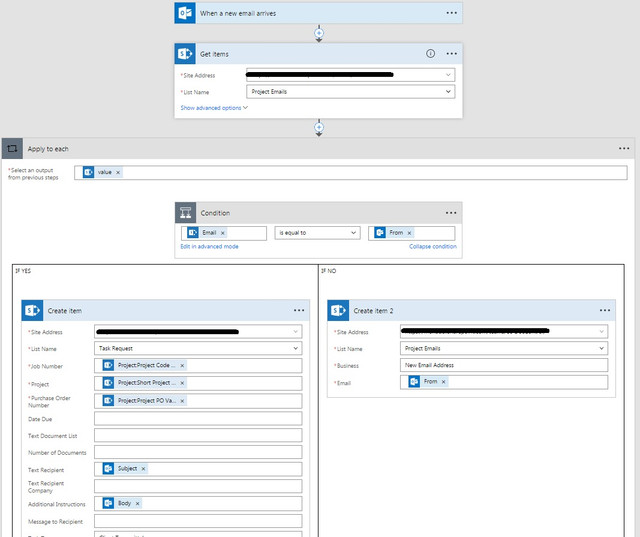
See the attached Flow:


Essentially - I wish to:

  1. Recieve an email
  2. Look up the address in a SharePoint list
  3. If I have the email address in my Email list - save the message to another list
  4. If I don't have the email address, add it to the Email List.

So in the test, by rights, the second time I process this, it should work.


For some reason, the email address in the SharePoint List always fails the comparison with the email address in the From field.


The SharePoint list Field with the email is formatted as a single line of text.
 

FlowFed
fb photo upload


The conditions seem pretty simple but I can not get it to work.


Can someone help me understand the right way to do this?

Categories:
I have the same question (0)
  • v-yamao-msft Profile Picture
    Microsoft Employee on at

    Hi drclowes,


    Can the flow run succeed? What’ the run status?


    According to your description, I create two lists with an Email column, and the Email column is configured as a Single line of text.


    I create a flow the similar with yours. It seems that when the flow runs, the email address will be created several times in both the two lists.


    I am still working on this flow.


    Best regards,
    Mabel Mao

  • Community Power Platform Member Profile Picture
    Microsoft Employee on at

    Hi Mabel,


    The flow succeeds, but every time, the condition reverts to the "false" leg. (and creates another list item with an email address)


    I think there is some thing to do with the way the condition evaluates the data in the email "from" field.


    I have made another example where I write the "from" email address in to a temp field. Then get that field back from sharepoint with another step and compare against my email list. This works and the comparison correcty identifies my record, but I'm stuck and have to recieve every message, rather than block every message that does not match an email on my list.

  • Community Power Platform Member Profile Picture
    Microsoft Employee on at

    Hi Mabel,


    Did you have any success?

  • TravisB Profile Picture
    Microsoft Employee on at

    Hi @Anonymous,


    You can check what happened on any runs you are confused about to see exactly why the comparison failed.


    If from your flow list, you click into the relevant flow, this will take you to the flow details page.


    On the flow details page you can open the flow run history and look at individual runs. When looking at an individual run, you can inspect the outputs of triggers and actions to see where the mismatch is happening.


    If you find a run where it isn't really clear why the two aren't matching up, please update so we can dig more into it!


    Hope this helps!


    Best,

    Travis

Under review

Thank you for your reply! To ensure a great experience for everyone, your content is awaiting approval by our Community Managers. Please check back later.

Helpful resources

Quick Links

Season of Sharing Community Challenge Winners!

Congratulations to our community stars!

Kudos to our 2025 Community Spotlight Honorees

Expanding mentorship, skilling, and AI innovation

Congratulations to the June Top 10 Community Leaders!

These are the community rock stars!

Leaderboard > Power Automate

#1
11manish Profile Picture

11manish 223

#2
David_MA Profile Picture

David_MA 210 Super User 2026 Season 1

#3
Haque Profile Picture

Haque 175

Last 30 days Overall leaderboard
