web
You’re offline. This is a read only version of the page.
close
Skip to main content

Announcements

News and Announcements icon
Community site session details

Community site session details

Session Id :
Power Platform Community / Forums / Power Apps / Some users unable to v...
Power Apps
Unanswered

Some users unable to view details on a shopping cart screen during checkout

(2) ShareShare
ReportReport
Posted on by 6
Hello,

We use a third-party designed inventory ordering system that allows users to search for stocked items that can be selected and added to their shopping cart.  When they are ready to place their orders, they click on a shopping cart icon, which opens a shopping cart screen.  Here, the user can view the contents of their order and click a "Place Order" button. Subsequently, an "Order Placed" screen then appears.  The issue is that some users have items in their carts but when they go to check out, the shopping cart screen is blank for them.  

In looking through the design of the shopping cart screen, I do not see anything that performs any type of filtering for the signed-on user.  New users are granted access to the system via an AD group that provides contribute rights.  Once they are provided the AD group access, we share the application with the user via Power Apps' "Manage Access" feature, providing them User rights, not as Co-owner.  (Although for users experiencing this issue have been provided the co-owner right but was unsuccessful.)  I have also had users clear their browser cache of all options for timeframe at all times, but no difference; the issue remains.  I've also had my IT group that provides the AD access to verify the users having the issue match to those who are not having issues but no difference. Net result is this an issue with the app and/or something external to the program? 

Thanks in advance for your time and interest in this matter. 
Categories:
I have the same question (0)
  • Ram Prakash Duraisamy Profile Picture
    5,877 Super User 2026 Season 1 on at
    Hi,

    Can you please provide us some clarity for the same by providing some screenshots etc? It will be helpful to help you the same.
     
    Please mark as answer if my suggestion helps.
    Subscribe here for More Useful videos : https://www.youtube.com/@rampprakash3991
  • timl Profile Picture
    37,214 Super User 2026 Season 1 on at
     
    I would guess that placing an item in the shopping cart adds the item to a collection.
     
    Those items might be lost when navigating to the checkout screen. 
     
    If you could provide the formulas used for the "Place Order" button and "Order Placed" gallery/screen, we can probably help you further.
     
    You could also try using Monitor to debug your app.


  • sumit_artesian Profile Picture
    261 on at
     
    I am just assuming here, but could it be possible that the users facing this issue do not have access to the data source?
     
    Like for instance, if your app is using SharePoint as the data source (or Dataverse, it doesn't really matter), could it be possible that the users facing this issue have not been added to that specific SharePoint site (or do not have a valid role with read permission on that Dataverse table)?
     
    That could be one of the reasons why some can see the items while some can't.
     
    Either way, could you please share the code on your "Place Order" button and the items property of your gallery in your Cart Screen? That would help us debug this more precisely.
     

    Please  Does this answer your question if my post helped you solve your issue. This will help others find it more readily. It also closes the item.
    If the content was useful in other ways, please consider answering Yes to Was this reply helpful? or give it a Like! 🩷
  • JL-07051453-0 Profile Picture
    6 on at
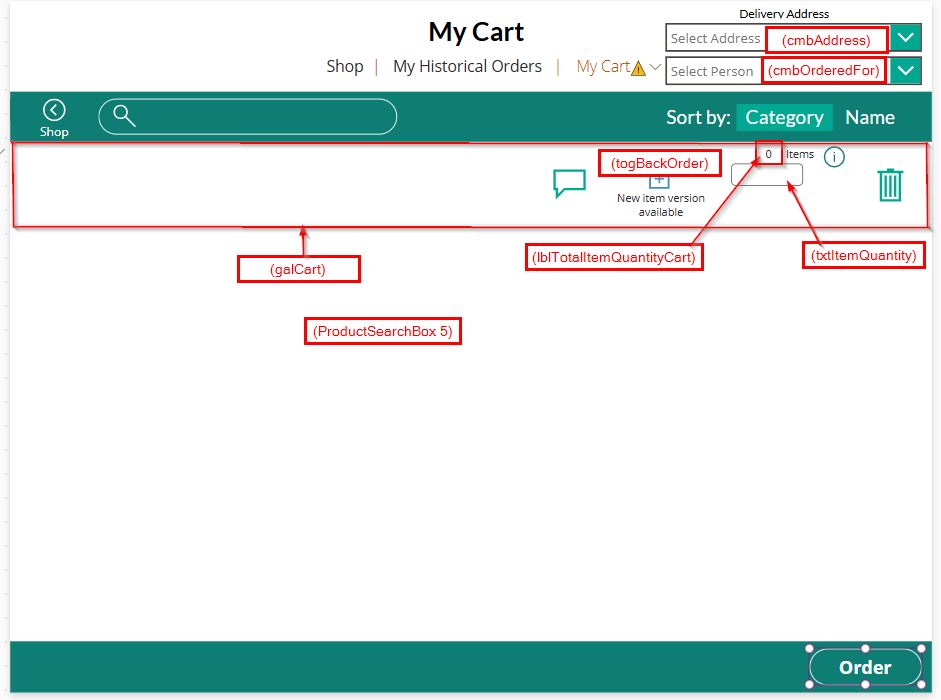
    Hello All - Thank you for responding. In addition to including a design view of the screen in question, additional comments are provided to help provide better clarity.  

    Q.  Could it be possible that the users facing this issue do not have access to the data source?
    A. The data source is a SharePoint site containing several lists used in the application; Dataverse is not used.  I have confirmed the users in question do indeed have the necessary access and rights to the site and lists in question.  For background, there are four lists used in the application:
    • Stocked Items: is the master list of all items available for selection
    • Cart: a list that temporarily contains the items the user select from the Stocked Items list and added to their shopping cart.  Once they place the order, the items then append into the Orders list; subsequently the items are then deleted from the Cart (all seamless to the user).
    • Orders: Contains the contents of the user’s Cart.  An order number is generated and status set to indicate it is in progress.  Pertinent details from the order then appended into the following Transactions list:
    • Transactions: This list contains information from that order and is used in another Power App that permits our warehouse personnel to view it in their system and subsequently take actions, which include processing the item and quantities from our warehouse of stocked items. 
    For those users who cannot view the contents of their shopping cart, they should be able to view the Cart list.  (At the SharePoint list, I can see the Cart list is populated but not presenting on their screens.)  And even though they clicked the “Place Order” button, the items themselves do not append to the Orders list for these users, either.

    As requested, the following codes are provided:

    Order Button (Action: OnSelect):

    If(
        IsEmpty(cmbAddress.SelectedItems) || IsBlank(cmbAddress.SelectedItems),
        Notify(
            "Please select Delivery Address and Person",
            NotificationType.Information
        ),
        UpdateContext(
            {
                varOrderID: GUID(),
                varIsCC: true in CartCol[@IsPoD],
                varIsWH: false in CartCol[@IsPoD]
            }
        );
        Patch(
            Orders,
            Defaults(Orders),
            {
                Title: varOrderID,
                Delivery_x0020_Address: First(cmbAddress.SelectedItems).Result,
                Ordered_x0020_For: First(cmbOrderedFor.SelectedItems).Contact_x0020_Person,
                Status: {Value: "New"},
                IsCC: varIsCC,
                IsWH: varIsWH
            }
        );
        ForAll(
            galCart.AllItems As Order,
            If(
                Order.RezervedQuantity <> Value(Order.txtItemQuantity.Text) && !Order.IsPoD && !Order.togBackOrder.Value && (Order.AvailableQTY - Value(Order.lblTotalItemQuantityCart.Text) >= 0),
                Patch(
                    'Stocked Items',
                    LookUp(
                        'Stocked Items',
                        Title = Order.Title && Status.Value = "Active"
                    ),
                    {Available_x0020_Quantity: Order.AvailableQTY - Value(Order.lblTotalItemQuantityCart.Text)}
                ),
                Order.RezervedQuantity <> Value(Order.txtItemQuantity.Text) && !Order.IsPoD && !Order.togBackOrder.Value && (Order.AvailableQTY - Value(Order.lblTotalItemQuantityCart.Text) < 0),
                Patch(
                    'Stocked Items',
                    LookUp(
                        'Stocked Items',
                        Title = Order.Title && Status.Value = "Active"
                    ),
                    {Available_x0020_Quantity: 0}
                )
            );
            If(
                Order.togBackOrder.Value && Order.AvailableQTY > 0,
                Patch(
                    Transactions,
                    Defaults(Transactions),
                    {
                        Title: GUID(),
                        Item_x0020_ID: Order.Title,
                        Order_x0020_ID: varOrderID,
                        Transaction_x0020_Quantity: Order.AvailableQTY / Order.PerUnit,
                        Transaction_x0020_Group: {Value: "Order"},
                        Item_x0020_Quantity: Order.AvailableQTY,
                        IsPoD: Order.IsPoD,
                        Status: {Value: "In Progress"},
                        Comment: Order.Comment,
                        Ordered_x0020_By: {
                            '@odata.type': "#Microsoft.Azure.Connectors.SharePoint.SPListExpandedUser",
                            Claims: "i:0#.f|membership|" & varUser.Email,
                            Department: "",
                            DisplayName: varUser.FullName,
                            Email: varUser.Email,
                            JobTitle: "",
                            Picture: ""
                        }
                    }
                );
                Patch(
                    Transactions,
                    Defaults(Transactions),
                    {
                        Title: GUID(),
                        Item_x0020_ID: Order.Title,
                        Order_x0020_ID: varOrderID,
                        Transaction_x0020_Group: {Value: "Order"},
                        Transaction_x0020_Quantity: (Value(Order.lblTotalItemQuantityCart.Text) - Order.AvailableQTY) / Order.PerUnit,
                        Item_x0020_Quantity: Value(Order.lblTotalItemQuantityCart.Text) - Order.AvailableQTY,
                        IsPoD: Order.IsPoD,
                        Status: {Value: "Back Order"},
                        Comment: Order.Comment,
                        Ordered_x0020_By: {
                            '@odata.type': "#Microsoft.Azure.Connectors.SharePoint.SPListExpandedUser",
                            Claims: "i:0#.f|membership|" & varUser.Email,
                            Department: "",
                            DisplayName: varUser.FullName,
                            Email: varUser.Email,
                            JobTitle: "",
                            Picture: ""
                        }
                    }
                );
                Patch(
                    'Stocked Items',
                    LookUp(
                        'Stocked Items',
                        Title = Order.Title && Status.Value = "Active"
                    ),
                    {Available_x0020_Quantity: 0}
                ),
                Order.togBackOrder.Value && Order.AvailableQTY = 0,
                Patch(
                    Transactions,
                    Defaults(Transactions),
                    {
                        Title: GUID(),
                        Item_x0020_ID: Order.Title,
                        Order_x0020_ID: varOrderID,
                        Transaction_x0020_Group: {Value: "Order"},
                        Transaction_x0020_Quantity: Value(Order.lblTotalItemQuantityCart.Text) / LookUp(
                            'Stocked Items',
                            Title = lblID.Text && Status.Value = "Active"
                        ).Per_x0020_Unit,
                        Item_x0020_Quantity: Value(Order.lblTotalItemQuantityCart.Text),
                        IsPoD: Order.IsPoD,
                        Status: {Value: "Back Order"},
                        Comment: Order.Comment,
                        Ordered_x0020_By: {
                            '@odata.type': "#Microsoft.Azure.Connectors.SharePoint.SPListExpandedUser",
                            Claims: "i:0#.f|membership|" & varUser.Email,
                            Department: "",
                            DisplayName: varUser.FullName,
                            Email: varUser.Email,
                            JobTitle: "",
                            Picture: ""
                        }
                    }
                );
                Patch(
                    'Stocked Items',
                    LookUp(
                        'Stocked Items',
                        Title = Order.Title && Status.Value = "Active"
                    ),
                    {Available_x0020_Quantity: 0}
                ),
                Patch(
                    Transactions,
                    Defaults(Transactions),
                    {
                        Title: GUID(),
                        Item_x0020_ID: Order.Title,
                        Order_x0020_ID: varOrderID,
                        Transaction_x0020_Quantity: Value(Order.txtItemQuantity.Text),
                        Transaction_x0020_Group: {Value: "Order"},
                        Item_x0020_Quantity: Value(Order.lblTotalItemQuantityCart.Text),
                        IsPoD: Order.IsPoD,
                        Comment: Order.Comment,
                        Ordered_x0020_By: {
                            '@odata.type': "#Microsoft.Azure.Connectors.SharePoint.SPListExpandedUser",
                            Claims: "i:0#.f|membership|" & varUser.Email,
                            Department: "",
                            DisplayName: varUser.FullName,
                            Email: varUser.Email,
                            JobTitle: "",
                            Picture: ""
                        }
                    }
                )
            );
            Remove(
                Cart,
                LookUp(
                    Cart,
                    Title = Order.Title
                )
            );
        );
        ClearCollect(
            CartCol,
            {}
        );
        Set(
            varItemsInCart,
            0
        );
        Navigate(
            ConfirmationScreen,
            ScreenTransition.Fade
        );
        Refresh(Orders);
        Refresh(Transactions);
        ClearCollect(
            PastOrdersCol,
            Filter(
                Transactions,
                Ordered_x0020_By.Email = varUser.Email
            )
        );
       
    );

    Items Property – Shopping Cart Screen:  
    Filter(
        Sort(
            CartCol,
            Switch(
                varSort,
                "ID",
                ID,
                "Name",
                Description
            )
        ),
        StartsWith(
            Description,
            ProductSearchBox_5.Text
        ) || StartsWith(
            Title,
            ProductSearchBox_5.Text
        ),
        Author.Email=varUser.Email
    )


    @timl - thank you for the link to Monitor!  
     
    Shopping Cart Scr...

    Your file is currently under scan for potential threats. Please wait while we review it for any viruses or malicious content.

Under review

Thank you for your reply! To ensure a great experience for everyone, your content is awaiting approval by our Community Managers. Please check back later.

Helpful resources

Quick Links

Season of Sharing Community Challenge Launch!

Jump in, show your community spirit, and win prizes!

Kudos to our 2025 Community Spotlight Honorees

Expanding mentorship, skilling, and AI innovation

Congratulations to the May Top 10 Community Leaders!

These are the community rock stars!

Leaderboard > Power Apps

#1
Valantis Profile Picture

Valantis 424

#2
WarrenBelz Profile Picture

WarrenBelz 355 Most Valuable Professional

#3
11manish Profile Picture

11manish 290

Last 30 days Overall leaderboard
