web
You’re offline. This is a read only version of the page.
close
Skip to main content

Announcements

News and Announcements icon
Community site session details

Community site session details

Session Id :
Power Platform Community / Forums / Power Apps / Issue with Mobile Player
Power Apps
Suggested Answer

Issue with Mobile Player

(1) ShareShare
ReportReport
Posted on by 4

Hello,

I would like to report what appears to be a bug in the Power Apps mobile player affecting Dataverse table and column resolution on mobile devices.

We have been developing a Canvas App that saves inspection data and photos directly into Dataverse. After extensive troubleshooting over the last couple of days, we have isolated the issue to the Power Apps mobile player rather than the app logic, Dataverse schema, or environment configuration.

Summary of the issue
The app works correctly in:

  • Power Apps Studio on laptop

  • browser on mobile device

The same published app fails only in:

  • Power Apps mobile player on Android

  • Power Apps mobile player on iOS/iPad testing

The failures in the mobile player present as Patch errors reporting that tables or columns do not exist, even though they do exist and can be used successfully from browser and desktop.

Symptoms observed in the Power Apps mobile player
We received errors such as:

  • table has no column named acs_startedon

  • table has no column named acs_completiondatetime

  • table has no column named acs_mobiledebug

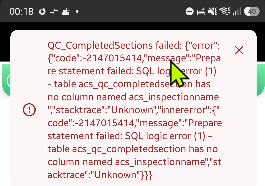
  • table has no column named acs_inspectionname

  • entity with entity set name acs_qc_completedsections not found in offline metadata

  • generic “Network error when using Patch function. An error occurred on the server.”

These errors occurred even for:

  • newly created Dataverse tables

  • newly created text columns

  • very simple Patch statements against a blank table

  • testing from different screens, including LoginScreen

Testing performed
Over the last couple of days, we performed the following troubleshooting:

  1. Initial image/file save design

  • We originally used Power Automate with Dataverse file handling.

  • After repeated failures and complexity, we replaced this with a Dataverse Image column.

  • Direct Patch to Dataverse Image column worked successfully in browser and desktop.

  1. Patch formula validation

  • We simplified the formula to basic Patch operations with only text fields.

  • We tested with and without image fields.

  • We tested separate Patch statements per table.

  • We used IfError, FirstError.Message, Refresh(), and Errors() to capture more detail.

  1. Table and schema checks

  • We refreshed data sources in the app.

  • We removed and re-added Dataverse tables to the app.

  • We republished the app multiple times.

  • We published table customizations in Dataverse.

  • We created a completely new Dataverse table for testing.

  • We created new columns such as MobileDebug for isolated tests.

  • We verified that the columns physically exist in Dataverse and are visible in the table designer.

  1. Client/device testing

  • Tested on laptop in Studio: works

  • Tested in mobile browser: works

  • Tested in Power Apps mobile player on phone: fails

  • Similar behavior observed across mobile player testing on Android and Apple devices

  1. Minimal reproduction
    A very simple test like the below works on laptop and mobile browser, but fails in the Power Apps mobile player:

Set(varDbgResult, Blank());
Set(varDbgError, Blank());

IfError(
    Set(
        varDbgResult,
        Patch(
            QC_CompletedSections,
            Defaults(QC_CompletedSections),
            {
                InspectionName: "PHONE_TEST_" & Text(Now(), "yyyymmdd_hhmmss"),
                MobileDebug: "PHONE_" & Text(Now(), "yyyymmdd_hhmmss")
            }
        )
    ),
    Set(varDbgError, FirstError.Message)
);

Refresh(QC_CompletedSections);

Notify(
    "Result blank? " & Text(IsBlank(varDbgResult)) &
    " | Error: " & Coalesce(varDbgError, "none") &
    " | Errors(): " & Coalesce(First(Errors(QC_CompletedSections)).Message, "none"),
    NotificationType.Information,
    8000
);

Conclusion from our testing
Because:

  • the same app and same Patch logic work in desktop and mobile browser

  • the Dataverse tables and columns are confirmed to exist

  • newly created tables and columns also fail only in the mobile player

  • the mobile player reports “offline metadata” style errors

we believe this is a bug or stale metadata/cache issue in the Power Apps mobile player rather than an application or Dataverse design issue.

Request
Could you please investigate whether there is a known issue with the current Power Apps mobile player related to:

  • stale Dataverse metadata

  • entity set name resolution

  • offline metadata caching

  • Patch operations against newly created or recently modified Dataverse tables/columns

Please also advise whether there is any supported way to fully clear or rebuild the mobile player’s Dataverse metadata cache beyond standard reinstall/sign-out/reopen steps.

If needed, I can provide:

  • screenshots of the exact errors

  • table/column logical names

  • app version details

  • device details

  • additional reproduction steps


Kind regards,

I have the same question (0)
  • Suggested answer
    rezarizvii Profile Picture
    352 on at
    Hi, hope you're doing well.
     
    It seems you’re likely hitting a known gap with how the mobile player refreshes metadata, especially with recently added tables/columns.
     
    A couple of things worth trying (in case you haven’t already):
    • In the mobile app, go to Settings -> Clear cache (this is separate from reinstall)
    • Fully sign out, force close the app, then reopen and sign back in
    • If offline capability is enabled anywhere, turn it off temporarily and retest
    • Make a small schema change (e.g. rename a column, publish, then revert) to force metadata refresh
     
    But to be fair, this doesn't seem like something you can fix from the app side. I’d recommend raising a Microsoft support ticket and including:
    • App ID + environment
    • Table logical names (especially the failing ones)
    • One minimal repro like the Patch you shared
     
    If this reply helped you in any way, please give it a Like 💜 and in case it resolved your issue, please mark it as the Verified Answer ✅.
  • GT-Anatri Profile Picture
    4 on at
    I've done all of the things you have mentioned above Rezarizvii and nothing helped. The ticket is raised with Microsoft support and I'm waiting for them to come back to me but this is what I got from them:
     
    "You’re seeing Dataverse table and column resolution errors in the Power Apps mobile player, even though your Canvas App works as expected in Studio and mobile browsers. The errors like “table has no column named acs_startedon” and “entity with entity set name acs_qc_completedsections not found in offline metadata” point to a mobile-specific failure in how the app resolves Dataverse schema.
    Based on current known issues and recent community reports, this pattern most closely matches a platform-level bug affecting the Power Apps mobile player’s handling of Dataverse metadata and schema resolution. The fact that the same app, tables, and columns work in browser and Studio but fail in the mobile player—across both Android and iOS—strongly suggests the root cause is within the mobile player’s offline metadata or schema cache, not your app logic or Dataverse configuration.
    Primary Root Cause
    The Power Apps mobile player is failing to correctly resolve Dataverse table and column metadata, likely due to a bug in how it loads or caches schema information for offline or hybrid scenarios.
    This is reinforced by similar issues reported for Dataverse image fields not displaying on mobile, where the mobile player fails to resolve certain fields or URLs that work elsewhere. The underlying cause may be related to how the mobile app handles schema, permissions, or metadata refreshes compared to browser-based sessions 1.
    What You Can Safely Try
    Force a Metadata Refresh in the Mobile Player
    Sign out of the Power Apps mobile player on your device.
    Close the app completely (force quit).
    Reopen the app and sign in again.
    Open your Canvas App and test if the error persists.
    This can sometimes clear stale or corrupted metadata caches.
    Re-Publish the App
    In Power Apps Studio, restore the app to a previous version and re-publish it.
    This can trigger a fresh metadata sync for the mobile player 2.
    Check for Known Service Degradation
    If the issue coincides with broader service latency or degradation, it may be a temporary Microsoft-managed incident affecting metadata resolution in the mobile player 3.
    If the Issue Persists
    This is likely a Microsoft-managed platform bug. There is no documented self-service fix for mobile player schema resolution failures of this type.
    You can monitor for updates or workarounds in the Power Apps Known Issues documentation and community forums, as these types of bugs are typically tracked and resolved by the product team 1​3.
    Verification
    After each step, verify by opening the app in the mobile player and attempting a Patch operation.
    If the error remains unchanged, it confirms the issue is not with your app or Dataverse schema, but with the mobile player’s handling of metadata.
    Next Steps
    If you have already tried the above and the issue is still present, please specify if you see the same errors on all devices and user accounts, or only specific ones. This can help further isolate whether the issue is device-specific or tenant-wide.
    Let me know if you’ve already attempted these steps or if you observe any changes after trying them. This will help determine if escalation to the product team is warranted or if additional diagnostics are needed 2​1​3."
  • rezarizvii Profile Picture
    352 on at
    Hi,
     
    For some reason, the response you got from them feels AI-generated. You can try the steps outlined in the response while an actual agent contacts you.
     
    But given everything you’ve tested and what they confirmed, there isn’t really a fix left to try. You’ve already done everything that could be done.
     
    At this point, the only useful additions you can make (to speed them up) are:
    • Confirm it happens across multiple users + devices (which you already hinted at)
    • Share your stripped-down Patch example as a minimal repro app
     
    If I was any help at all in this conversation, please feel free to drop a like and mark my response as "Verified Answer."
     
    Thank you.
  • Ram Prakash Duraisamy Profile Picture
    5,877 Super User 2026 Season 1 on at
     
    Based on the Error screenshot, it clearly states acs_inspectionname is not available in acs_qc_completedsection table.
     
    Please mark as answer if my suggestion helps.
    Subscribe here for More Useful videos : https://www.youtube.com/@rampprakash3991

Under review

Thank you for your reply! To ensure a great experience for everyone, your content is awaiting approval by our Community Managers. Please check back later.

Helpful resources

Quick Links

Season of Sharing Community Challenge Launch!

Jump in, show your community spirit, and win prizes!

Kudos to our 2025 Community Spotlight Honorees

Expanding mentorship, skilling, and AI innovation

Congratulations to the May Top 10 Community Leaders!

These are the community rock stars!

Leaderboard > Power Apps

#1
Valantis Profile Picture

Valantis 424

#2
WarrenBelz Profile Picture

WarrenBelz 355 Most Valuable Professional

#3
11manish Profile Picture

11manish 290

Last 30 days Overall leaderboard