web
You’re offline. This is a read only version of the page.
close
Skip to main content

Announcements

News and Announcements icon
Community site session details

Community site session details

Session Id :
Power Platform Community / Forums / Power Apps / Add incremental ID for...
Power Apps
Suggested Answer

Add incremental ID for each Sub-Category of a Category

(1) ShareShare
ReportReport
Posted on by 14
Hello - I have the below data source, where each new Category has always the same combination of SubCategory (Sub1, Sub2, Sub3):
 
Category SubCategory ID
AAA Sub1 100
AAA Sub2 101
AAA Sub3 102
BBB Sub1 103
BBB Sub2 104
BBB Sub3 105
CCC Sub1  
CCC Sub2  
CCC Sub3  

I'm trying to add an incremental ID for each Sub-Category anytime that a new Category is added (in this case 'CCC'), starting from the current highest ID (105).
This is what I'm using:

Set(Max_ID,Max('My_Data_Source',ID_Field));
ForAll( SubCategory As this,
Patch('My_Data_Source',{
    Category:this.Category,
    SubCategory:this.SubCategory,
    ID: Max_ID+1
    });

The problem with this formula is that it duplicates the new ID for each combination:
Category SubCategory ID
CCC Sub1 106
CCC Sub2 106
CCC Sub3 106

Any help would be much appreciated.
 
Thanks!
I have the same question (0)
  • Suggested answer
    Vish WR Profile Picture
    2,253 on at
     
    Hi
     
    One way to fix this is to use Sequence():
     
    Set(Max_ID, Max('My_Data_Source', ID_Field));
    ForAll(
        Sequence(CountRows(SubCategory)),
        Patch(
            'My_Data_Source',
            Defaults('My_Data_Source'),
            {
                Category: "CCC",
                SubCategory: Last(FirstN(SubCategory, Value)).SubCategory,
                ID: Max_ID + Value
            }
        )
    )
     
    Sequence(n) generates numbers: 1, 2, 3…
    Value acts as your incremental counter
    Max_ID + Value ensures IDs increase per row:
    106, 107, 108
    Last(FirstN(...)) picks the corresponding SubCategory row

    ForAll() does not guarantee sequential execution, so relying on variables like Max_ID + 1 inside the loop will always produce duplicates.

    Below is my Sample test result. I have created a dummy collection to test and validate 
     
    App onStart 
    // Step 1: Create initial dataset
    ClearCollect(
    colMyData,
    { Category: "AAA", SubCategory: "Sub1", ID: 100 },
    { Category: "AAA", SubCategory: "Sub2", ID: 101 },
    { Category: "AAA", SubCategory: "Sub3", ID: 102 },
    { Category: "BBB", SubCategory: "Sub1", ID: 103 },
    { Category: "BBB", SubCategory: "Sub2", ID: 104 },
    { Category: "BBB", SubCategory: "Sub3", ID: 105 }
    );
     
    // Step 2: SubCategories to insert
    ClearCollect(
    colSubCategories,
    { SubCategory: "Sub1" },
    { SubCategory: "Sub2" },
    { SubCategory: "Sub3" }
    );
     
    // Step 3: Add new Category with incremental IDs
    Set(varNewCategory, "CCC");
    Set(varMaxID, Max(colMyData, ID));
     
    ForAll(
    Sequence(CountRows(colSubCategories)),
    Collect(
    colMyData,
    {
    Category: varNewCategory,
    SubCategory: Last(FirstN(colSubCategories, Value)).SubCategory,
    ID: varMaxID + Value
    }
    )
    );
     
     
    Add a label control and add the code below in the Text property 
    Concat(
    colMyData,
    Category & " | " & SubCategory & " | " & Text(ID),
    Char(10)
    )
     
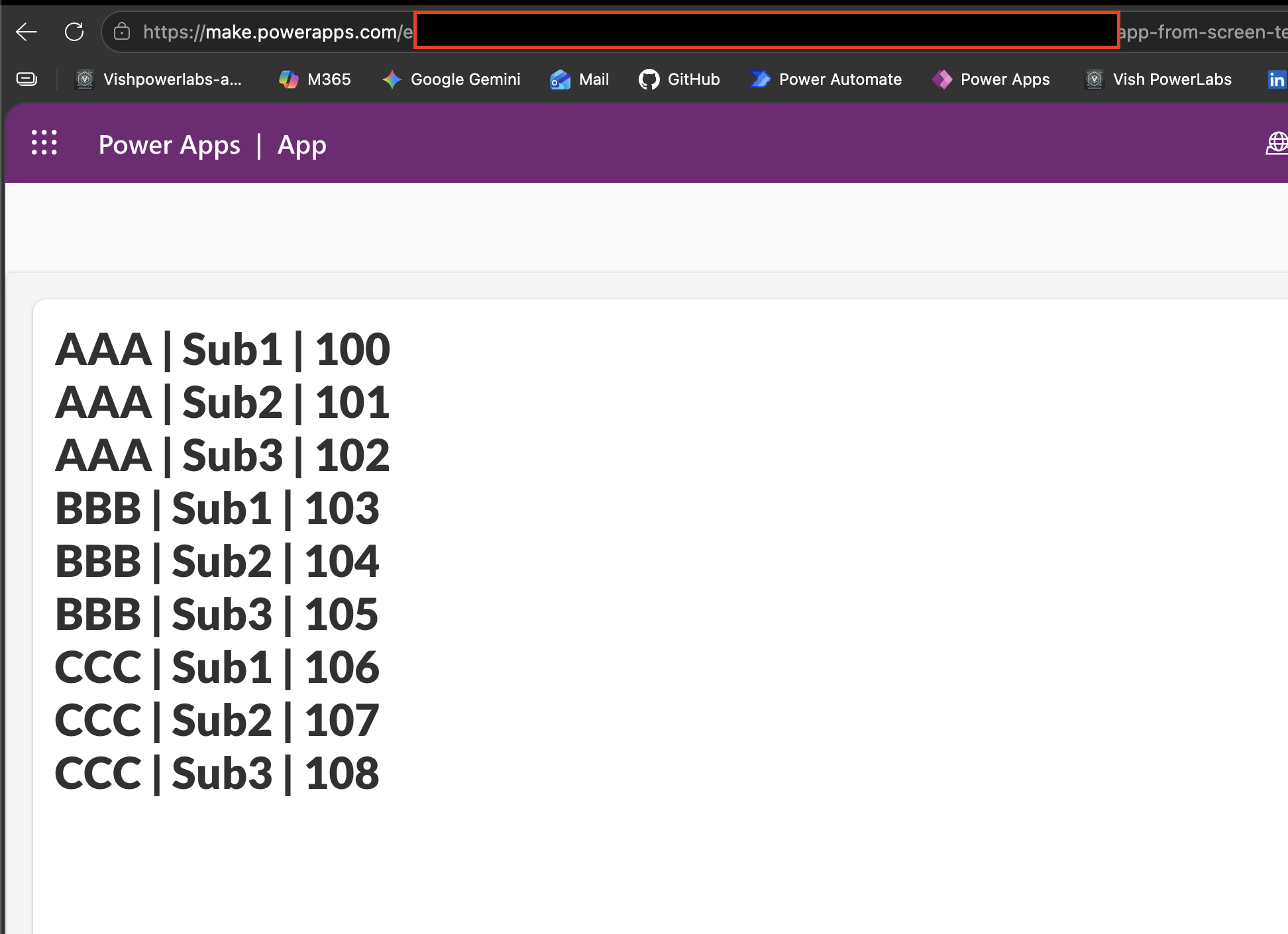
    Result
    AAA | Sub1 | 100
    AAA | Sub2 | 101
    AAA | Sub3 | 102
    BBB | Sub1 | 103
    BBB | Sub2 | 104
    BBB | Sub3 | 105
    CCC | Sub1 | 106
    CCC | Sub2 | 107
    CCC | Sub3 | 108
     
    Please âœ… Does this answer your question if my post helped you solve your issue. This will help others find it more readily. It also closes the item. If the content was useful in other ways, please consider answering Yes to Was this reply helpful? or give it a Like â™¥

    Visit My Blog  My Tech Space    LinkedIn  
  • Suggested answer
    11manish Profile Picture
    1,937 on at
    The best approach is to let the data source generate IDs, instead of creating them in Microsoft Power Apps.
     
     Recommended Options:
    • Use SharePoint auto-generated ID (simplest)
    • Use Auto Number in Microsoft Dataverse (best for enterprise)
    Avoid:
    • Manual ID generation using ForAll, Max(), or counters
    • These can cause duplicate IDs and issues in multi-user scenarios
  • ragnezza Profile Picture
    14 on at
    Thanks for your reply, this is almost working.
     
    By removing "As this" I'm not able to associate a Value to Category (Category: this.Category returns an error), as this value is not hardcoded but it's coming from a field in another Dataverse table. How can I retrieve that 'Category' field?
     
    Thanks
  • Vish WR Profile Picture
    2,253 on at
    If I require a unique running number for a sub-category, how can an auto-generated number be generated for SPO and Dataverse?
     
    if no category, yes, auto number is the best and most efficient option 
  • Vish WR Profile Picture
    2,253 on at
    Hi Ragnezza
     
    Not sure where and how you retrive your category .
     
    You can try the below option

    Category: drpCategory.Selected.Category
     
    or 
    From a lookup (Dataverse relationship)
    Category: LookUp(
    CategoryTable,
    CategoryID = SomeID
    ).Category
     
    Example 
    Set(
        varCategory,
        LookUp(
            CategoryTable,
            CategoryID = varCategoryId
        ).Category
    );
    Set(varMaxID, Max('My_Data_Source', ID_Field));
    ForAll(
        Sequence(CountRows(SubCategory)),
        Patch(
            'My_Data_Source',
            Defaults('My_Data_Source'),
            {
                Category: varCategory,
                SubCategory: Last(FirstN(SubCategory, Value)).SubCategory,
                ID: varMaxID + Value
            }
        )
    );

Under review

Thank you for your reply! To ensure a great experience for everyone, your content is awaiting approval by our Community Managers. Please check back later.

Helpful resources

Quick Links

Introducing the 2026 Season 1 community Super Users

Congratulations to our 2026 Super Users!

Kudos to our 2025 Community Spotlight Honorees

Congratulations to our 2025 community superstars!

Congratulations to the March Top 10 Community Leaders!

These are the community rock stars!

Leaderboard > Power Apps

#1
Vish WR Profile Picture

Vish WR 762

#2
11manish Profile Picture

11manish 640

#3
Valantis Profile Picture

Valantis 548

Last 30 days Overall leaderboard
