web
You’re offline. This is a read only version of the page.
close
Skip to main content

Announcements

News and Announcements icon
Community site session details

Community site session details

Session Id :
Power Platform Community / Forums / Power Automate / How to retrieve multip...
Power Automate
Answered

How to retrieve multiple users from a multiple user field and put in 'Assigned to'?

(0) ShareShare
ReportReport
Posted on by 231

hi all,


I would like to retrieve multiple users from a multiple user field in SharePoint List.

My requirement is very simple:

1. User can new an eForm(SharePoint List Item) and defined multiple approvers in a single person field in the eForm (I am using PowerApps to new an eForm, this part is OK for me)

2. Base on this person field value, MS Flow will assign multiple approval tasks for these approvers at the same time.

3. The flow will waiting for all of approvers to response.


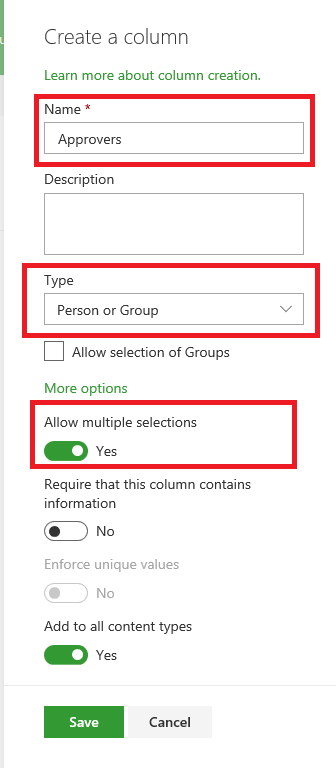
1. I have aPerson column (allow multiple selection)

2. Under the edit Flow page, add "Start and wait for an approval" with the type "Approve/Reject - Everyone must approve", when I select the "Approvers Email" in "Assigned to" field, the "Apply to each" will auto generated and include the "Start and wait for an approval".
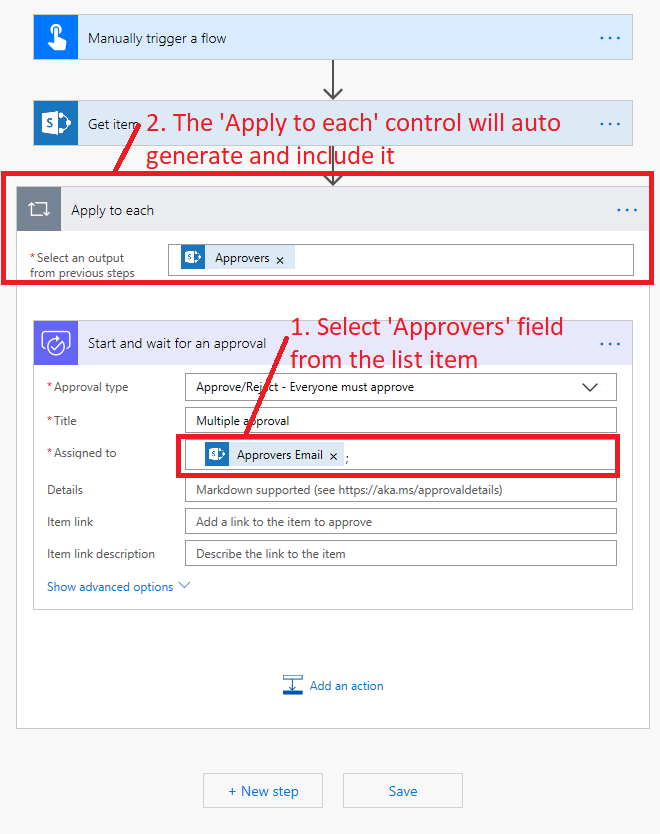
 

3. However, if use "Apply for each", it did not meet our required on "Approve/Reject - Everyone must approve", since each iteration will running on different instance. Our goal is want the Flow can retrieve multiple users from single fields and input in "Assigned to", logically look like this:
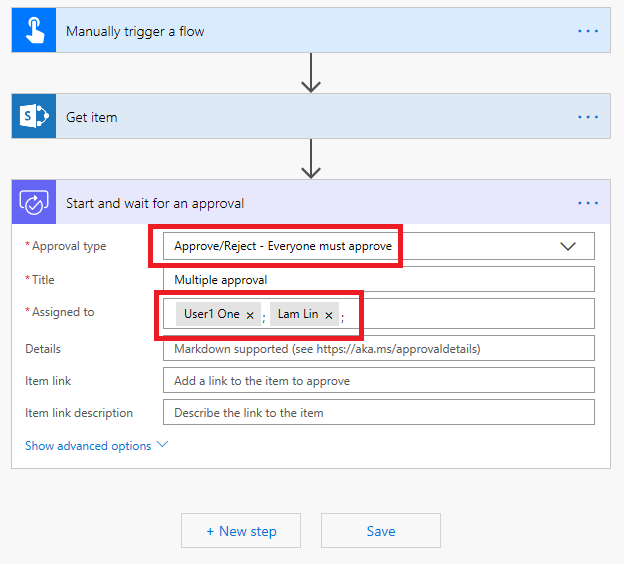
Any function / workaround can do this?


Thanks,


Lam

Categories:
I have the same question (0)
  • Verified answer
    yashag2255 Profile Picture
    24,769 Super User 2024 Season 1 on at

    Hi @Lam01007 


    You can do this by creating an array of all the users and then pass it in the approval and this will ensure that all the users must approve the request.
     
    Please refer to attached screenshot:
     
    Here, testperson is the name of field in SharePoint list. You need to use the Approvers field.
    MicrosoftTeams-image (45).png
     
    Expression Used on Approval:
    join(variables('Users'),';')
    This will concatenate the list of users separated by a semi-colon.
     
    Hope this Helps!
     
    If this reply has answered your question or solved your issue, please mark this question as answered. Answered questions helps users in the future who may have the same issue or question quickly find a resolution via search. If you liked my response, please consider giving it a thumbs up. THANKS!
  • Verified answer
    Lam01007 Profile Picture
    231 on at

    hi yashag2255,


    Thanks for your reply and suggestion, and I found another simple solution for it, just use "Select" as below:

    flow4.png

  • Enriquemmesteo Profile Picture
    4 on at

    Hello Lam,

    I can't get this one working... I think it is because of the Select.

    What do you put inside it exactly? For me it appears the "From" and then for the "Map" there are two fields to fill in.

Under review

Thank you for your reply! To ensure a great experience for everyone, your content is awaiting approval by our Community Managers. Please check back later.

Helpful resources

Quick Links

Season of Sharing Community Challenge Winners!

Congratulations to our community stars!

Kudos to our 2025 Community Spotlight Honorees

Expanding mentorship, skilling, and AI innovation

Congratulations to the June Top 10 Community Leaders!

These are the community rock stars!

Leaderboard > Power Automate

#1
David_MA Profile Picture

David_MA 274 Super User 2026 Season 1

#2
11manish Profile Picture

11manish 175

#3
Haque Profile Picture

Haque 166

Last 30 days Overall leaderboard