web
You’re offline. This is a read only version of the page.
close
Skip to main content

Notifications

Announcements

Community site session details

Community site session details

Session Id :
Power Platform Community / Forums / Power Automate / Get files (properties ...
Power Automate
Unanswered

Get files (properties only): include nested items does'nt work

(1) ShareShare
ReportReport
Posted on by 2

Hi,

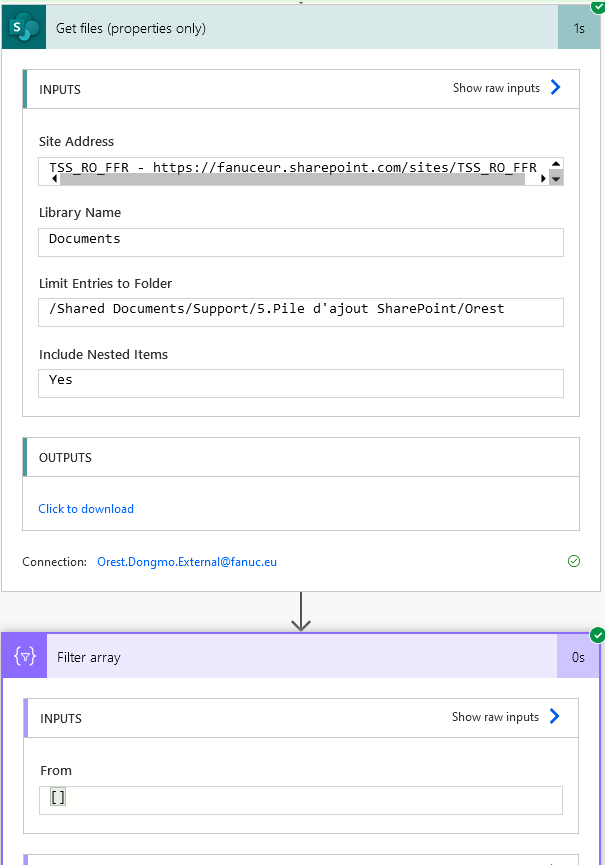
I’ve been trying to use the "Include Nested Items" option in Power Automate, but every time I set it to "Yes," it doesn’t return anything from the subfolders or even from the top folder.

Is there any configuration or setup required to make it work as expected? Interestingly, when I set it to "No," I get all the files from the top folder.

Looking forward to your guidance.

Best regards,
Orest


Categories:
Capture d'écran 2...

Your file is currently under scan for potential threats. Please wait while we review it for any viruses or malicious content.

I have the same question (0)
  • David_MA Profile Picture
    12,966 Super User 2025 Season 2 on at
    Please upload the image of your flow again. It doesn't appear to have been successfully attached.
  • OD-21011040-0 Profile Picture
    2 on at
  • Suggested answer
    KVStheArtist Profile Picture
    5 on at
     
    Looks like we need to go into the "Settings" of the "Get files (properties only)" action and under "Networking" turn on "Pagination" and set the "Threshold" to 5000. I just tried this in my flow, and it worked!
     

Under review

Thank you for your reply! To ensure a great experience for everyone, your content is awaiting approval by our Community Managers. Please check back later.

Helpful resources

Quick Links

Forum hierarchy changes are complete!

In our never-ending quest to improve we are simplifying the forum hierarchy…

Ajay Kumar Gannamaneni – Community Spotlight

We are honored to recognize Ajay Kumar Gannamaneni as our Community Spotlight for December…

Leaderboard > Power Automate

#1
Michael E. Gernaey Profile Picture

Michael E. Gernaey 522 Super User 2025 Season 2

#2
Tomac Profile Picture

Tomac 364 Moderator

#3
abm abm Profile Picture

abm abm 243 Most Valuable Professional

Last 30 days Overall leaderboard