web
You’re offline. This is a read only version of the page.
close
Skip to main content

Announcements

News and Announcements icon
Community site session details

Community site session details

Session Id :
Power Platform Community / Forums / Power Apps / Collection is not init...
Power Apps
Answered

Collection is not initialised at App’s OnStart and Screen’s OnVisible event.

(1) ShareShare
ReportReport
Posted on by 2,883
Hi All,
 
Out of curiosity - I have read in many places that collection can be initialised and data cane be populated in different actions/events of the PowerApps. I want to pre-populate a veritcal gallery when the app runs and screen is visible - but can't find it easily.
 
Here is my question and I need to know why in two places the collection is not created and data is not populated. Here is my explanation: 
 
Object for stationery.
Fig: Stationery collection data
 
OnStart initialization
I tried to initialise the collection at the “OnStart” event of the App.
 
 
No data in the Table view.
Fig: Variable is created but data is not populated
 
No data in the table view
 
Empty vertical gallery on the screen (After running the app), since there is no data, hence it’s not showing anything!
 
Then I moved the stationery collection variable initialisation from App’s OnStart event to Screen’s OnVisible event like below:
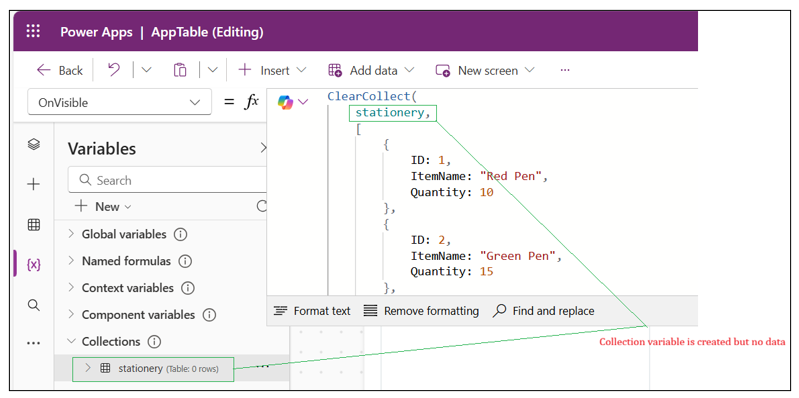
Moved to OnVisible action
When I run the app, still I see no data is filled in the collection, but variable is created.


OnSelect of Button's event.
I moved the collection initialisation at OnSelect event of a button and run the application it works (data is populated and vertical gallery shows the data) when I click the button.
 
 
Data is populated.
 
I need to know – why in the App’s OnStart event, and Screen’s OnVisible event collection data is not populated but variable is created. And what I need to do to initialise the gallery at the application start time. Please make me sage.
 
Thanks in advance.


Categories:
I have the same question (0)
  • Verified answer
    Sam_Fawzi Profile Picture
    902 Super User 2026 Season 1 on at
    Nothing “wrong” with ClearCollect here — it’s mostly how Power Apps Studio shows collections.
     
    Why it looks empty in OnStart / OnVisible
    • Collections only fill at runtime. In the editor (Variables pane / View Table) you often just see the collection name + schema, but 0 rows until the app actually runs that formula.
    • OnStart doesn’t run automatically in Studio unless you:
    • play/preview the app, and
    • run App → Run OnStart (or reopen/refresh the preview).
    • OnVisible only runs when that screen becomes visible in preview. If you never navigate to that screen (or it’s not the start screen), it won’t fire.
    Why the Button works
    • Because clicking the button forces the formula to execute right then, so you see the rows immediately.
    What to do (simple)
    • Put your ClearCollect(stationery, …) in App.OnStart
    • In Studio, click App → Run OnStart (or fully restart preview)
    • Make sure your gallery’s Items = stationery
     
  • Haque Profile Picture
    2,883 on at
     
    Thanks a lot, good insights! The magic one is "In Studio, click App → Run OnStart (or fully restart preview)".


Under review

Thank you for your reply! To ensure a great experience for everyone, your content is awaiting approval by our Community Managers. Please check back later.

Helpful resources

Quick Links

Introducing the 2026 Season 1 community Super Users

Congratulations to our 2026 Super Users!

Kudos to our 2025 Community Spotlight Honorees

Congratulations to our 2025 community superstars!

Congratulations to the April Top 10 Community Leaders!

These are the community rock stars!

Leaderboard > Power Apps

#1
Vish WR Profile Picture

Vish WR 1,055

#2
Valantis Profile Picture

Valantis 666

#2
11manish Profile Picture

11manish 666

Last 30 days Overall leaderboard
