web
You’re offline. This is a read only version of the page.
close
Skip to main content

Announcements

News and Announcements icon
Community site session details

Community site session details

Session Id :
Power Platform Community / Forums / Copilot Studio / How to get Agent to an...
Copilot Studio
Answered

How to get Agent to analyze word document provided by the user

(1) ShareShare
ReportReport
Posted on by 8
Hi all,
 
I am currently working on an agent to analyze a word document and determine a template that best matches the scenario described in the document. I am having trouble sending the contents of the document to the agent prompt in order for it to make the decision. Has anyone built an agent similar or have any tips to help me? Thanks in advance!
I have the same question (0)
  • dlorenzo Profile Picture
    14 on at
    Hello mate,
     
    you need to create a Topic that gets triggered by the agent when you request to analyze the document (put a match prompt on the topic trigger).
     
    then in the trigger add a tool where you call the AI Prompt, that must have a file as input parameter.
    in the tool input parameter use a PowerFX formula with First(System.Activity.Attachments).Content expression.
    This will send your file to the AI Prompt.
    Hope it helps 
     
    best
  • DM-18021906-0 Profile Picture
    8 on at
    Hi,

    Thank you for the helpful reply! I currently have the set up for the Topic to trigger when the user asks for a document. I am stuck at the part of what tool I should use to call the AI prompt. I am currently struggling to find one that takes in an input. Do you have any specific tool recommendations? Thanks again!
  • Verified answer
    Romain The Low-Code Bearded Bear Profile Picture
    2,575 Super User 2026 Season 1 on at
    hello
     
    There are two way to achieve this : 
     
    1 : first with native capacity  (i will explain below) 
    Pro : easy with few initial setup
    Cons : limited to the global prompt
     
    2 : As lorenzo said with "prompt" from the tool tab (also call AI builder prompt)
    Pro : strong
    Cons : you need some power platform skill because you will need some technical skill in low code to make everything "ok"
     
    Detail version for case 1 (i reccomand to try this one first) 
     
    For easy document analyze you have the native document capacity of the agent, you could see in the settings this toggle : 

    As you see word are not by design , by default supported but there are work arround. (and 15mb limit file size)
    Just under this one, it's possible you have another toggle if you'r power platform admin didn't disable it : 
    https://learn.microsoft.com/en-us/microsoft-copilot-studio/code-interpreter-for-prompts
     
    whe the code interpreter is enable you could then process more advanced document natively in the chat
     
     
    This way you could use the global prompt of the agent to use the input to look for another similar document in the knowledge base you linked here 


    Detail version for case 2 (with Ai builder) 
     
    I will suppose you already added like previous screen a sharepoint knowledge folder containing the template you wan't to use for compare
    create a topic
     
    Click the "+" to add a new prompt
     
     
    Switch to gpt  5 chat because 4.1 mini will be not enough 
     
     
    Switch then to code interpreter because word are not supported by default : click on the "..." and settings
     
    enable code interpret 
     
     
    Then click middle screen little cross to back on the prompt screen
     
    then add a prompt like this one :  "use this document wich is a Word Office document and product a summarize of this document" : this part is mega important "wich is a Word Office document" : it will know it has to use some "code" for reading word


    how do you obtain a "document input" : i just pressed " / " and then a pop up appear and i select "document input"
     
    Then choose the document and click test


    Replace custom prompt by a name "test custom prompt" or whatever and save
     
    you'r screen will look like this : 
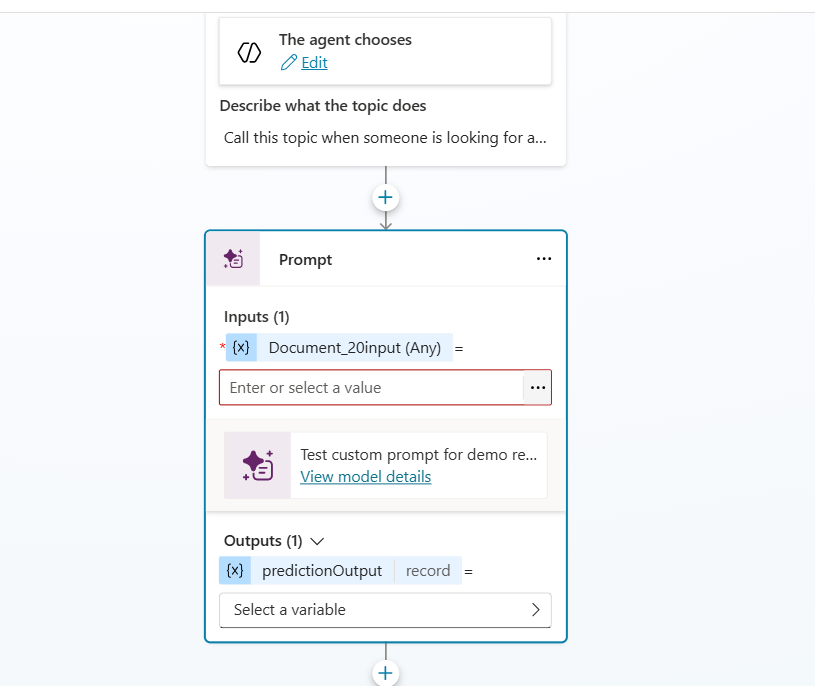
     
    In input click on ... and then fx and add : 
    First(System.Activity.Attachments).Content
     
    in out put create a new var , call it whatever you want
     
     
    First : test it with a simple message box 
     
     
    you should have something very ugly prooving it worked


    Then : it's ugly ^^ you wan't to control the search
     
    go back to tthe topic : the "cool content" is in this part of the resultat variable :  
    Topic.Var1.text
     
    what you want is to force the agent to do what you want. here you could use only the "global prompt" but you can do deeper and manualy force the agent
     
    - Select a knowledge source with the document to compare
    - force it to search only in it
     
    So remove the message and add the "generative answer" node
     
     
    add this kind of formula : 
    "Provide me the template that could match this description" & Topic.Var1.text
     
     
    edit data source to filter on the data source wich containt file to compare : 
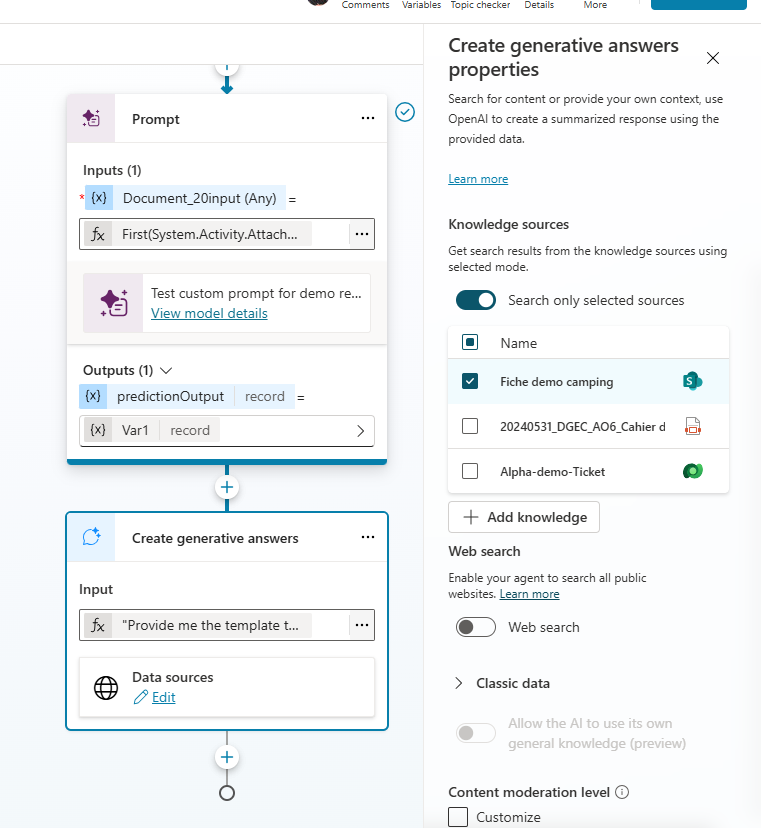
     
    and let's go :)

    Please if this help you to solve the case it's important to mark the checkbox as answered to mark green the answer, it's very important for the community and search engine :) very important 

Under review

Thank you for your reply! To ensure a great experience for everyone, your content is awaiting approval by our Community Managers. Please check back later.

Helpful resources

Quick Links

Introducing the 2026 Season 1 community Super Users

Congratulations to our 2026 Super Users!

Kudos to our 2025 Community Spotlight Honorees

Congratulations to our 2025 community superstars!

Congratulations to the April Top 10 Community Leaders!

These are the community rock stars!

Leaderboard > Copilot Studio

#1
Valantis Profile Picture

Valantis 895

#2
Vish WR Profile Picture

Vish WR 337

#3
Haque Profile Picture

Haque 276

Last 30 days Overall leaderboard
