Announcements
I would like to specifiy the endpoint of the connector inside the flow.
This should work, as you could provide an action which can be executed on any server the user specifies.
Is there any way other than hardcoding the host?
I'm facing the same issue. Any look using the host url as a param?
Hi @JoshuaR,
Are you trying to register a custom connector to Microsoft flow?
Please check the following doc for a reference:
Create a custom connector in Microsoft Flow to call the K2 Workflow REST API
https://help.k2.com/kb002870
Connect to custom on-premises APIs using data gateway
https://flow.microsoft.com/en-us/blog/on-premise-apis/
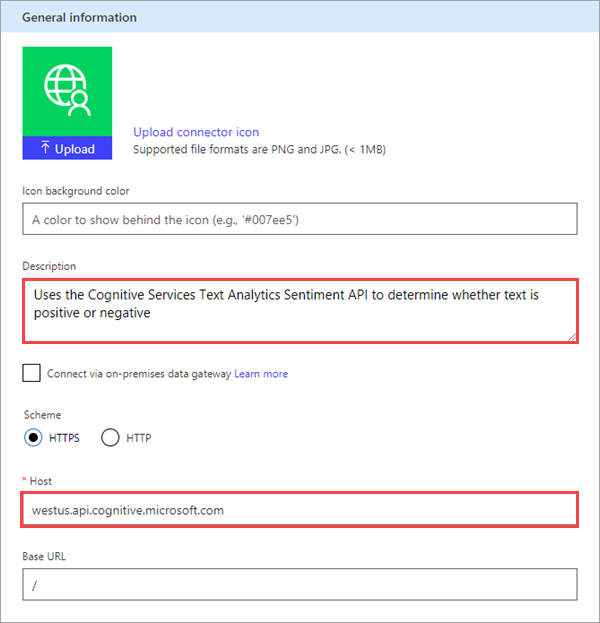
About Host, from the doc we know that we have to update host to the address for the Text Analytics API. The connector uses the API host and the base URL to determine how to call the API.
Best regards,
Mabel
Also facing same issue, would be amazing if it became possible to use enviromental variables as host url
The accepted answer the doesn't answer the question of dynamically change the host and base url in custom connector. If it is possible, we will be able to create custom connectors for "Current Environment" without duplicating it for each Dev, UAT, Prod environment.
@khoait
Please check this documentation on dynamic host url: https://docs.microsoft.com/en-us/connectors/custom-connectors/policy-templates/dynamichosturl/dynamichosturl
If this reply answers your question or solves your issue, please ACCEPT AS SOLUTION ☑️. If you find this reply helpful, please consider giving it a LIKE 👍.
thanks @murshed, it is what I am looking for 🙏
Under review
Thank you for your reply! To ensure a great experience for everyone, your content is awaiting approval by our Community Managers. Please check back later.
Congratulations to our community stars!
Expanding mentorship, skilling, and AI innovation
These are the community rock stars!
Stay up to date on forum activity by subscribing.
David_MA 262 Super User 2026 Season 1
11manish 167
Haque 154