To find the specific cause of a "Network error" without rebuilding your form, you should focus on the Monitor tool and a few specific Data Schema mismatches.
1. Use the Monitor Tool (The "X-Ray")
The Monitor is the most reliable way to see the exact column causing the failure. It captures the raw communication between Power Apps and your data source.
How to use it:
1. In the Power Apps Studio, click the Advanced Tools or App Checker icon (stethoscope) on the left and select Open monitor.
2. Keep that tab open, go back to your app, and click your Save button to trigger the error.
3. Return to the Monitor tab and look for a row with a red status (usually 400 Bad Request).
4. Click that row — a Details panel opens on the right side, and this is where the gold is. 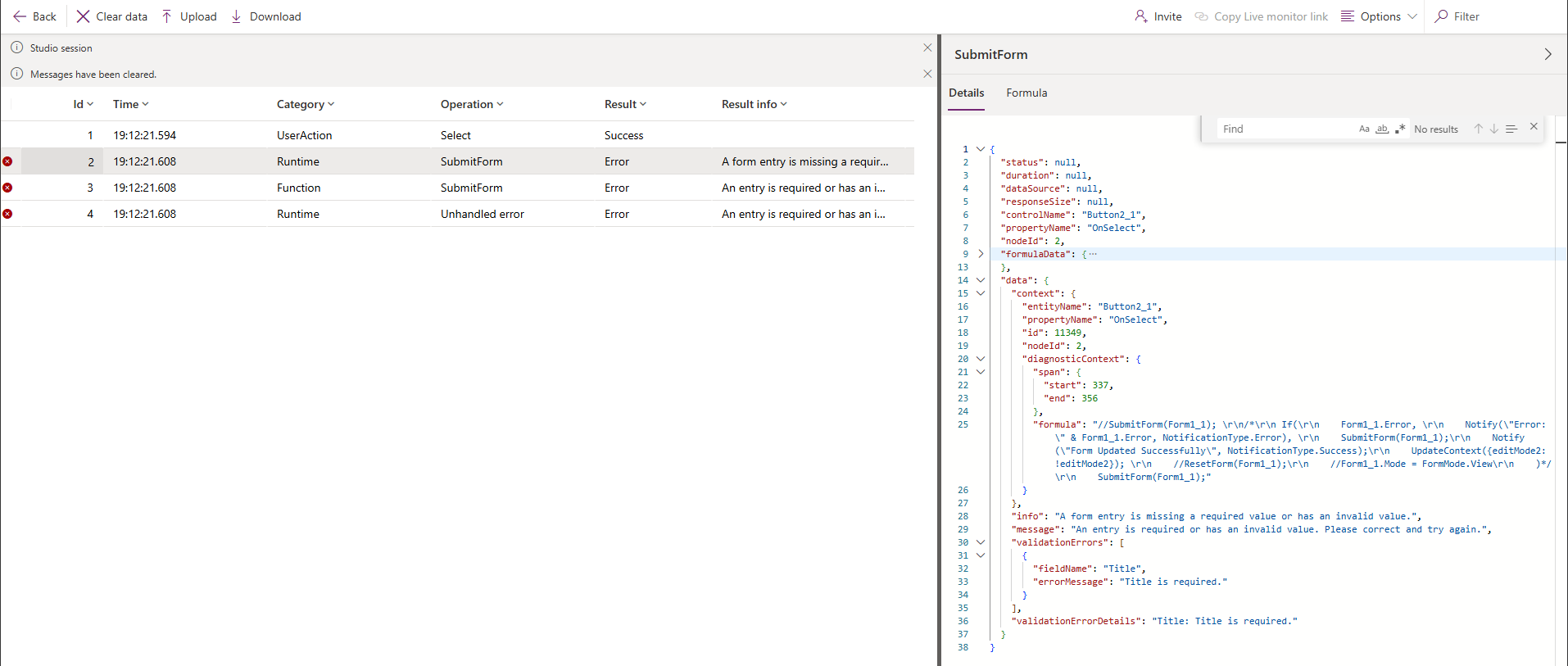
What you'll see in the Details panel:
- Control name and property — it tells you exactly which button/control fired and on which property (e.g.,
Button2_1 → OnSelect), so you know the exact trigger.
- The formula — it shows the full formula text and even highlights the specific span of the formula that produced the error, so you can pinpoint which
SubmitForm or Patch call failed if you have multiple in the same property.
- The actual error message — not the generic toast, but the real one from the data source. Something like "A form entry is missing a required value or has an invalid value."
- Validation error details — this is the most important part. It will list the specific field name and exactly what went wrong. For example:
Title: Title is required.
This tells you immediately that the "Title" column is the problem — maybe the card is hidden, removed from the form, or its Update property is returning blank.
So in short, the Monitor doesn't just show you that something failed — it shows you the which control, which formula, and which field caused it, all in one place. It's often a 30-second fix once you have that information.
2. Check for "Hidden" Schema Culprits
If you recently modified your SharePoint list or Dataverse table, the form may be sending data that the server no longer accepts.
-
Newly Required Columns: If you made a column "Required" in the data source settings but that column is hidden or missing from your Power Apps form, the SubmitForm will fail because it is sending a null value to a mandatory field.
-
Deleted Columns: If you deleted a column from your data source but the DataCard for that column is still present in your form (even if it's invisible), the app may still be trying to "Patch" data to a field that no longer exists.
-
Refresh the Data Source: Power Apps does not always automatically detect changes to your table structure.
- Go to the Data tab on the left.
- Click the three dots (...) next to your data source.
- Select Refresh.
Tip: After refreshing, look for yellow warning triangles on your DataCards. These often indicate that a field name has changed or a required property is missing.
If this helps resolve your issue, please consider marking the response as Verified so it can help others facing a similar scenario.
If you found this helpful, you can also click “Yes” on “Was this reply helpful?” or give it a Like.


