web
You’re offline. This is a read only version of the page.
close
Skip to main content

Announcements

News and Announcements icon
Community site session details

Community site session details

Session Id :
Power Platform Community / Forums / Power Automate / How can I filter out e...
Power Automate
Suggested Answer

How can I filter out emails with no category assigned after using the "Get emails (V3)" action?

(1) ShareShare
ReportReport
Posted on by 2

I'm working on a Power Automate flow where I use the "Get emails (V3)" action to retrieve emails from an Outlook inbox.

Each email may or may not have a category assigned to it in Outlook. I would like to filter out the emails that do not have any categories assigned, so I can process only the categorized ones.

I understand that the categories field is returned as an array in each email item. However, I’m unsure how to properly filter the emails that have at least one category and exclude the ones with no category (i.e., where categories is null or an empty array).

Could someone guide me on how to set this up correctly using a Filter array or a Condition block within an "Apply to each" loop?

I'm particularly interested in:

  • The right expression to check for non-empty categories

  • Avoiding template errors when the field is null

  • Best practices for handling this scenario

Thanks in advance!

Screenshot 2025-05-22 101558.png
Categories:
I have the same question (0)
  • Suggested answer
    Nived_Nambiar Profile Picture
    18,138 Super User 2026 Season 1 on at
     
    Try this graph api approach to filter out email details which does not have categories assigned
     
     
    URL - https://graph.microsoft.com/v1.0/me/messages?$filter=not categories/any()


    Thanks & Regards,
    Nived N

    Stay connected:
    LinkedIn | YouTube | Blogs

    Was this answer helpful?
    If yes, please mark it as the solution by selecting the checkbox in the discussion thread.
    Your feedback motivates me to keep contributing. Thank you!

  • Suggested answer
    stampcoin Profile Picture
    5,158 Super User 2026 Season 1 on at
    @CU22050441-2 Hi there,
     
    Since you already know categories is an array, especially the empty array ( no category), the action has to be separated.

    1.To answer your first question: 
        You need 'Send an HTTP request' action within Outlook 365 connector.
        After that, In any condition express use empty to apply it, then compare to true/false, or      use not, For exa
    mple , use 'Filter array' as below not(empty()).
    {
      "type": "Query",
      "inputs": {
        "from": "@body('Send_an_HTTP_request')?['value']",
        "where": "@not(empty(item()?['categories']))"
      },
      "runAfter": {
        "Send_an_HTTP_request": [
          "Succeeded"
        ]
      }
    }
     

    2. To answer your 2nd question:

        empty function will take care null; empty(null array) is equal to true, you can use if                condition here.

    3. To answer your 3rd question: (for your reference)

    When you handle array, for example attachments, categories, etc.

    1. Always remind you that might be empty value exist.
    2. empty(), length(), coalesce() will you top 3 function in your list.
    3. When you have loop, note that if you have any empty/null value invoked.
    4. Not, true and false is top 3 when you compare empty/null value in power automate.
    5. Before create robust flow, test each scenario.
    6. Parameterization as much as you can.
    7. Always consider API consumption.

    Share my screenshot which filter non-categorized email, and assign categories to those.
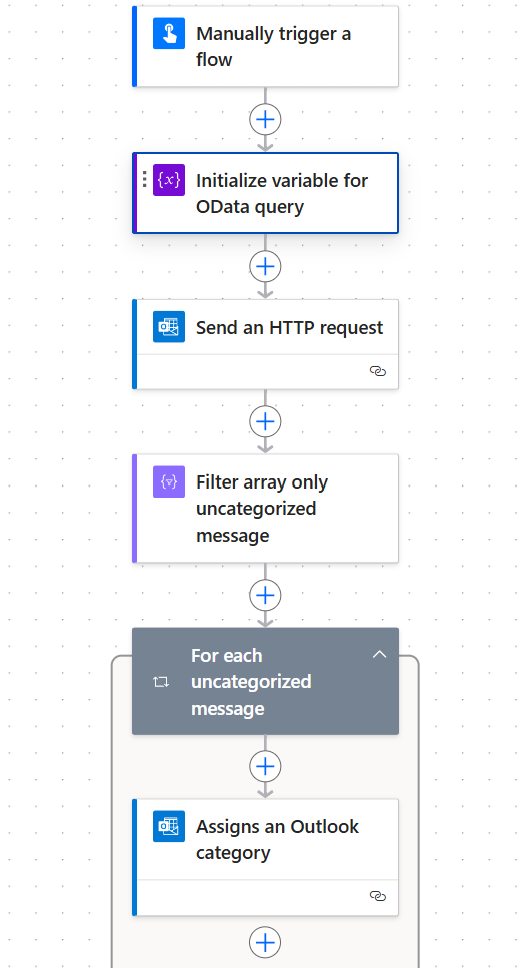

    Enjoy Power Platform and have a great day 🚀 |  My LinkedIn

    If the answer helps, please consider 👍, Thanks.

  • stampcoin Profile Picture
    5,158 Super User 2026 Season 1 on at
    @CU22050441-2 Hi again,
    I double checked the logic, also mentioned by @Nived_Nambiar, if you purely want to filter out non-categories email on the top, this is a way to go on the filter: not categories/any()
    for example query against your email account.
    "https://graph.microsoft.com/v1.0/me/mailFolders/{Foler_Variable}/messages
    ?$filter=not categories/any()
    //You can add more filter here.
    // ?$filter=not categories/any() and subject eq '{projectNumber_varibale}'
    When you need both ( categorized and non-categorized) for different actions, the filter has to be taken after Send an HTTP request
    below is a not good  example, it demonstrate that when replies on Get emails V3,  for each email id check the categories.


  • VictorIvanidze Profile Picture
    13,081 on at
     
    could you please stop sending wrong recommendations?
    If you are using "Send an HTTP request" action, you don't need to use "Get emails" at all.
    The combination of both actions in one flow looks illogical.
  • stampcoin Profile Picture
    5,158 Super User 2026 Season 1 on at
    Thanks for your comment, I am kind of agree with you that use Send an http request might be enough for most cases.
    That's why I uploaded one of my bad example for reference(Maybe I should use comparison ). You may misunderstand what I commented.
    anyway, thanks again.
  • VictorIvanidze Profile Picture
    13,081 on at
     
    did you solve the problem?

Under review

Thank you for your reply! To ensure a great experience for everyone, your content is awaiting approval by our Community Managers. Please check back later.

Helpful resources

Quick Links

Introducing the 2026 Season 1 community Super Users

Congratulations to our 2026 Super Users!

Kudos to our 2025 Community Spotlight Honorees

Congratulations to our 2025 community superstars!

Congratulations to the April Top 10 Community Leaders!

These are the community rock stars!

Leaderboard > Power Automate

#1
Vish WR Profile Picture

Vish WR 801

#2
Valantis Profile Picture

Valantis 602

#3
Haque Profile Picture

Haque 581

Last 30 days Overall leaderboard
