web
You’re offline. This is a read only version of the page.
close
Skip to main content

Notifications

Announcements

Community site session details

Community site session details

Session Id :
Power Platform Community / Forums / Power Automate / When an item or file i...
Power Automate
Answered

When an item or file is modified trigger not working

(1) ShareShare
ReportReport
Posted on by 104
Hi.
We have a SharePoint site with lots of pages that we use to create Knowledge Base articles.
I created a flow to pick up changes and send an email when the review date is modified, 
 
But it is not working.
1. it should trigger when a file is modified, but it doesn't. I noticed that when i switch it off and back on, that is when it runs, but not when a change is made
2. it has a condition "has column Review date changed" and if it changed, it should send an email. But it has been sending emails even when the review date has not been modified.
In fact, for some reason when I check the flow and see the "get changes for an item" part it shows "yes" though it hasn't
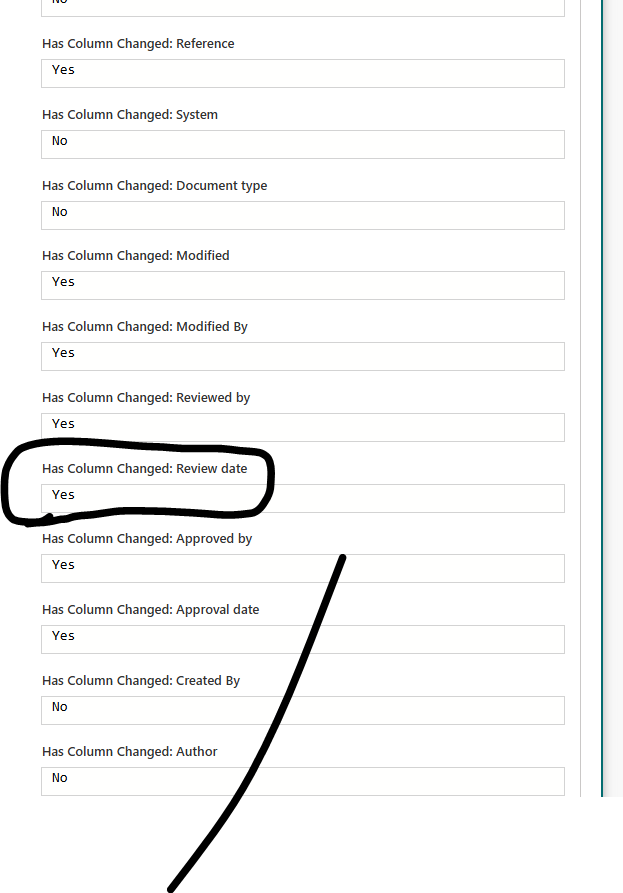
 
 
Not sure what is going on here. Anybody had anything like this happening?
 
thank you
Categories:
I have the same question (0)
  • Verified answer
    Expiscornovus Profile Picture
    33,195 Most Valuable Professional on at
     
    Under the advanced options you should have an option include minor versions option. The default setting is No. If that is the case for you it would never pick up your updates because most saves are minor versions.
     
    Can you make sure that is set to Yes and try again?


    Happy to help out 😁

    I share more #PowerAutomate and #SharePointOnline content on my Blog, Bluesky profile or Youtube Channel
  • DJ_Jamba Profile Picture
    2,837 Super User 2025 Season 2 on at
    This is a waste of flow runs.
    If I'm understanding correctly, your flow will run every time a modification is made and then you perform a check to see if the review date has changed and maybe terminate the flow if the review date hasn't changed.
    I.e. Your flow could run 20 times but the review date changed twice.

    If this doesn't bother you, ignore me and this message.
    Otherwise, there are far better & optimised ways of achieving the goal and if you're interested, let me know and I'll post an optimised solution.

Under review

Thank you for your reply! To ensure a great experience for everyone, your content is awaiting approval by our Community Managers. Please check back later.

Helpful resources

Quick Links

Forum hierarchy changes are complete!

In our never-ending quest to improve we are simplifying the forum hierarchy…

Ajay Kumar Gannamaneni – Community Spotlight

We are honored to recognize Ajay Kumar Gannamaneni as our Community Spotlight for December…

Leaderboard > Power Automate

#1
Michael E. Gernaey Profile Picture

Michael E. Gernaey 519 Super User 2025 Season 2

#2
Tomac Profile Picture

Tomac 296 Moderator

#3
abm abm Profile Picture

abm abm 232 Most Valuable Professional

Last 30 days Overall leaderboard
