web
You’re offline. This is a read only version of the page.
close
Skip to main content

Notifications

Announcements

Community site session details

Community site session details

Session Id :
Power Platform Community / Forums / Power Automate / Browser Automation - OCR
Power Automate
Unanswered

Browser Automation - OCR

(0) ShareShare
ReportReport
Posted on by 4

Hi All,

I'm working on browser automation using PAD and trying to click on the "ALL" text. However, the "Move mouse to text on screen (OCR)" activity is failing to recognize the text, preventing the mouse from moving to it. This was working fine until yesterday.

I also tried using the "Move mouse to image" activity, but it occasionally throws an error, and the UI element is not recognized for that specific text.

Could you please help me resolve this issue?

Thank you!

I have the same question (0)
  • Suggested answer
    Nived_Nambiar Profile Picture
    18,129 Super User 2025 Season 2 on at
    Hi,
     
    Just want to check - normal selector approach not working ?
     
    Also why you have used \bALL\b here - did you tried using ALL as text without regex ?
     

    Thanks & Regards,
    Nived N

    Stay connected:
    LinkedIn | YouTube | Blogs

    Was this answer helpful?
    If yes, please mark it as the solution by selecting the checkbox in the discussion thread.
    Your feedback motivates me to keep contributing. Thank you!

  • Suggested answer
    eetuRobo Profile Picture
    4,204 Super User 2025 Season 2 on at
    If that's a public site or you know a similar public site and it can be used as a visitor then share a link so we could troubleshoot the problem more reliably. 

    You can try this regex: [A-Z]+(?<=ALL)


    That worked for me great when I tested with a dummy site.

    I also tested with this: (?:^|\W)ALL(?:$|\W)
    That worked but for some reason it always goes to the one word above the "ALL" word. So in this case "*Messages"
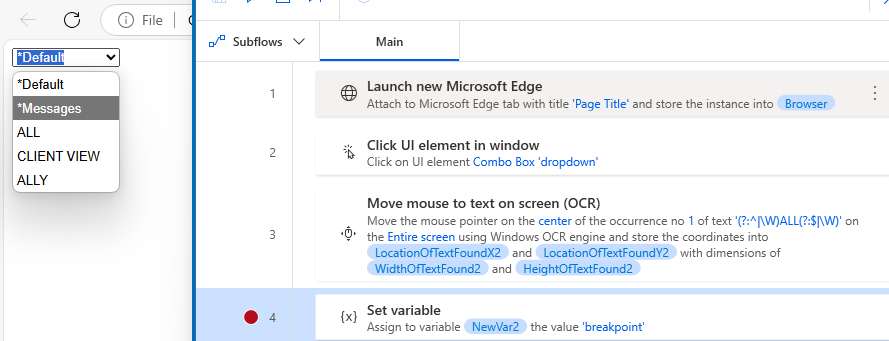
    Even if I changed the OCR to find "ALLY" then the mouse hovered over "CLIENT VIEW". Same thing happened if I didn't use regex but just had spaces surrounding all. Like so:


    I don't know if its some weird bug in PAD. My version is 2.52.6225009.
    If you were to use this then you would want to add Offset Y: to something like 15 so it goes that many pixels down. Not the most reliable solution I know.


    With Move mouse to image the image has to be exactly as you have captured it. So you have to take the ALL (and some space around it so it doesn't match lets say "MALL" or "ALLY" if there could be those capitalized words on the screen with same font and font size. 
    Like so:

    But if you capture it like this for example:
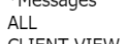
    Then if the *Messages is not there sometimes or CLIEN VIEW is different then it will fail. You might have already known this and the image ocr is just being unstable.

    Is there no way to use browser actions? If not have you tried UI automation actions? Sometimes those work even on websites. Even if it only gives you the overall Pane -element and not the specific items you would choose from the drop-down. Open the dropdown first and then use "Set drop-down list value in window" -action and select options by name and use the "ALL"
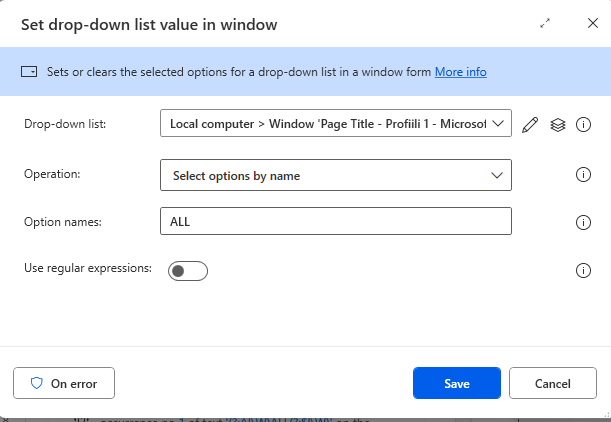
    Like so:


    That would be more reliable since OCR with text or image is always bit unreliable.

Under review

Thank you for your reply! To ensure a great experience for everyone, your content is awaiting approval by our Community Managers. Please check back later.

Helpful resources

Quick Links

Forum hierarchy changes are complete!

In our never-ending quest to improve we are simplifying the forum hierarchy…

Ajay Kumar Gannamaneni – Community Spotlight

We are honored to recognize Ajay Kumar Gannamaneni as our Community Spotlight for December…

Leaderboard > Power Automate

#1
Michael E. Gernaey Profile Picture

Michael E. Gernaey 538 Super User 2025 Season 2

#2
Tomac Profile Picture

Tomac 405 Moderator

#3
abm abm Profile Picture

abm abm 252 Most Valuable Professional

Last 30 days Overall leaderboard
