web
You’re offline. This is a read only version of the page.
close
Skip to main content
Community site session details

Community site session details

Session Id :
Power Automate - Building Flows
Unanswered

Microsoft Entra ID steps using Azure Active Directory PowerShell resourses that will be deprecated?

(0) ShareShare
ReportReport
Posted on by
Hello everyone,

Got a recommendation from Microsoft, saying to ‘Migrate Service Principals from the retiring Azure AD Graph APIs to Microsoft Graph’ so went into it, to see where it was being used, and noticed a “Azure Active Directory PowerShell”.

From within, can see 4 operation names, and last request dates. From these dates, I was able to ping point with last runs related with power automate flows. If I click on Resource name to have a better insight, it doesn’t open. From Azure Registered apps and Enterprise apps, there’s no app with this “Azure Active Directory PowerShell” name:
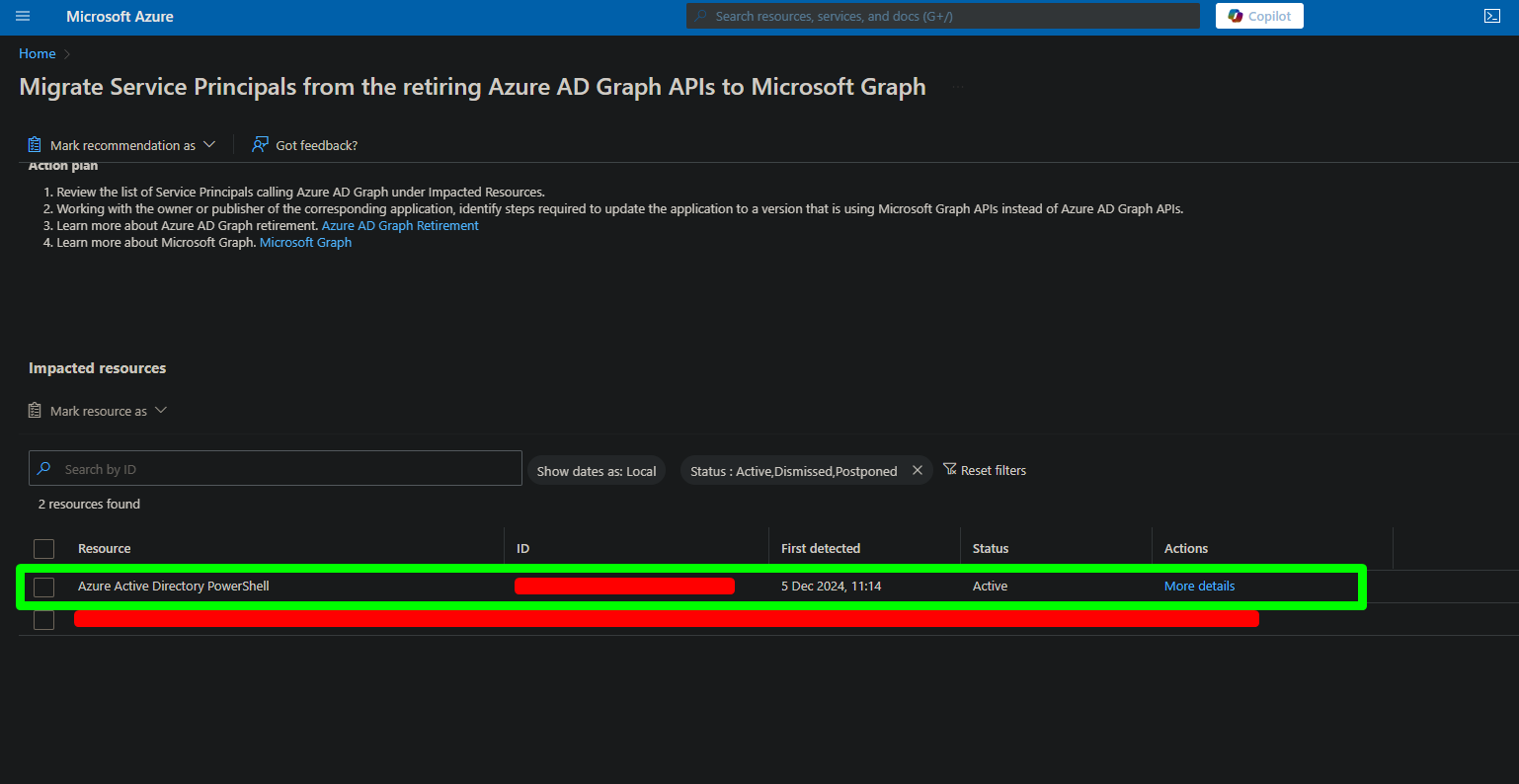
 

So went into those Power Automate flows, to see if there was some warnings popup, and even tried to add a new step related with Microsoft Entra ID, and didn’t got any warning or message about it.

But within these Power Automate flows, I also have steps related with Power Automate Desktop, and from within these, I am using powershell scripts that are running under user account to perform authentications on Azure AD, and getting data from it, but nothing being done over HTTP that I think that it’s the main issue here.

Did a search about this subject and haven’t found anything so far.

So my question is, could this be related with Microsoft Entra ID connector on Power Automate?
 
I have the same question (0)
  • StephanG1 Profile Picture
    4 on at
    Microsoft Entra ID steps using Azure Active Directory PowerShell resourses that will be deprecated?
    Did you find an answer to this? I am currently struggling with the same question.
    My last connection was on Friday - could be some old script someone (hopefully IT) was using - but how do i find out?
    --
    I found mine with this KQL
    DeviceEvents
    | where ActionType contains "PowerShellCommand" and AdditionalFields contains "AzureAD"
    | sort by Timestamp desc
     
    But - it only works if you have Defender deployed on all endpoints.

Under review

Thank you for your reply! To ensure a great experience for everyone, your content is awaiting approval by our Community Managers. Please check back later.

Helpful resources

Quick Links

Responsible AI policies

As AI tools become more common, we’re introducing a Responsible AI Use…

Chiara Carbone – Community Spotlight

We are honored to recognize Chiara Carbone as our Community Spotlight for November…

Leaderboard > Power Automate

#1
Michael E. Gernaey Profile Picture

Michael E. Gernaey 535 Super User 2025 Season 2

#2
Tomac Profile Picture

Tomac 348 Moderator

#3
developerAJ Profile Picture

developerAJ 262

Last 30 days Overall leaderboard







