I'm trying to connect to an on-premises SQL Server instance using the SQL Server connector in Power Automate within a Power Platform environment linked to an Azure Virtual Network (VNET). Microsoft documentation reference
The purpose of VNET is to securely connect to Azure resources (Storage account, Key Vault, Azure SQL etc.,) from VNET without exposing the resource publicly.
After setting up the VNET connectivity I was able to securely connect to Services in Azure.
But the issue is, I'm unable to connect to an On premises SQL Server using the On-prem gateway. I tried get rows v2 method using Windows authentication, the server, database and tables list the values, but when I save the flow I get the error below.
The SQL connector document says On-premise data gateway is not supported https://learn.microsoft.com/en-au/connectors/sql/
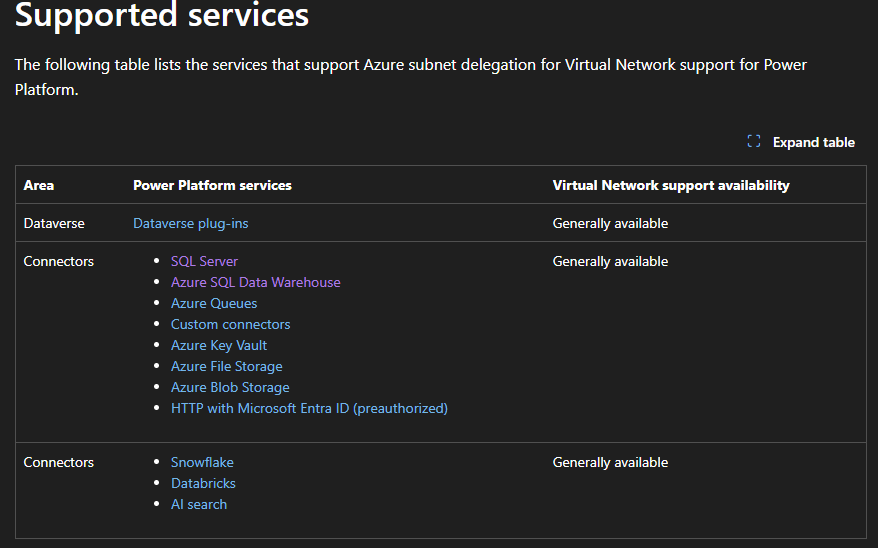
In Power Platform VNET document SQL Server is listed in the list of supported services
{
  "error": {
    "code": 500,
    "source": "e4ab17db-*********.14.common.australia.azure-apihub.net",
    "clientRequestId": "00000000-0000-0000-0000-000000000000",
    "message": "BadGateway",
    "innerError": {
      "status": 500,
      "message": "System.ArgumentException: Format of the initialization string does not conform to specification starting at index 0.\n   at Microsoft.Azure.Connectors.Sql.NativeExecutor.SqlNativeExecutor.ExecuteAndReadResultSetsInnerAsync(ISqlConnectionCredentials credentials, IReadOnlyDictionary`2 formalParameters, IReadOnlyDictionary`2 actualParameters, String query, Int32 maxResultSets, CancellationToken cancellationToken)\n   at Microsoft.Azure.Connectors.Sql.PlexExtension.Operations.NativeExecutorOperations.ExecuteAndReadResultSetsAsync(RequestWrapper`1 wrapper, CancellationToken cancellationToken) in C:\\__w\\1\\s\\src\\Connectors\\FirstParty\\sql\\PlexExtension\\Operations\\NativeExecutorOperations.cs:line 84\n   at Microsoft.Azure.Connectors.Common.SubnetDelegation.PlexExtension.PlexExtension.ExecuteAsync(ExtensionRequest extensionRequest, IExtensionServiceProvider serviceProvider, CancellationToken cancellationToken)\nclientRequestId: 00000000-0000-0000-0000-000000000000",
      "error": {
        "message": "System.ArgumentException: Format of the initialization string does not conform to specification starting at index 0.\n   at Microsoft.Azure.Connectors.Sql.NativeExecutor.SqlNativeExecutor.ExecuteAndReadResultSetsInnerAsync(ISqlConnectionCredentials credentials, IReadOnlyDictionary`2 formalParameters, IReadOnlyDictionary`2 actualParameters, String query, Int32 maxResultSets, CancellationToken cancellationToken)\n   at Microsoft.Azure.Connectors.Sql.PlexExtension.Operations.NativeExecutorOperations.ExecuteAndReadResultSetsAsync(RequestWrapper`1 wrapper, CancellationToken cancellationToken) in C:\\__w\\1\\s\\src\\Connectors\\FirstParty\\sql\\PlexExtension\\Operations\\NativeExecutorOperations.cs:line 84\n   at Microsoft.Azure.Connectors.Common.SubnetDelegation.PlexExtension.PlexExtension.ExecuteAsync(ExtensionRequest extensionRequest, IExtensionServiceProvider serviceProvider, CancellationToken cancellationToken)"
      },
      "source": "sql-ae.azconn-ae-001.p.azurewebsites.net"
    }
  }
}


