web
You’re offline. This is a read only version of the page.
close
Skip to main content

Notifications

Announcements

Community site session details

Community site session details

Session Id :
Power Platform Community / Forums / Power Automate / Struggling with Empty ...
Power Automate
Answered

Struggling with Empty syntax using new expression builder

(0) ShareShare
ReportReport
Posted on by

Hi all,


I'm a bit of a beginner trying to replicate the flow @JamieMcAllister kindly demonstrated in this video https://www.youtube.com/watch?v=qxuTVjQbECo 


I can't seem to figure out how the syntax should be input using the new expression editor. There isn't an advanced mode available yet so I can't add the expression @Empty(body('Get_items')!['value']) . I'm sure I must be missing something obvious but can't work out what it is.


Any help would be much appreciated!


Categories:
I have the same question (0)
  • Verified answer
    AlanPs1 Profile Picture
    2,471 on at

    Please check here or here for a solution.

    "Enter your expression on the left side of the row. Then, select Equals to and enter true."


    So what used to be:
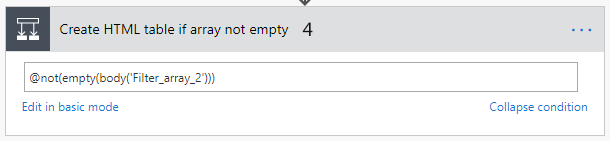
     

    Has now become:
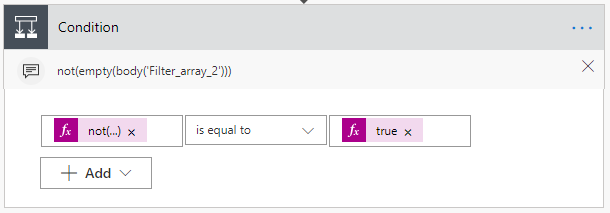
    If you found as helpful please mark as thumbs up.

    If this is the solution, please mark as the solution.

    Any other questions, just ask.

    Thanks, Alan

  • Community Power Platform Member Profile Picture
    on at

    Thanks so much Alan! 


    Not sure how I missed your post in the first place but thanks for sharing it yesterday!

  • AlanPs1 Profile Picture
    2,471 on at

    No problem at all @Anonymous, you are most welcome!


    Definitely have a read at the official comms I linked you from the 6th of February and also ...


    Have a look @faustocapellanj's post here. His post takes what i have highlighted a little further and it's useful to get your head round I'd say. Thanks to Fausto for his detailed post!


    If you found this helpful please mark as thumbs up. 

    Thanks, Alan

  • Community Power Platform Member Profile Picture
    on at

    Thanks again! Will check out those posts for sure

Under review

Thank you for your reply! To ensure a great experience for everyone, your content is awaiting approval by our Community Managers. Please check back later.

Helpful resources

Quick Links

Forum hierarchy changes are complete!

In our never-ending quest to improve we are simplifying the forum hierarchy…

Ajay Kumar Gannamaneni – Community Spotlight

We are honored to recognize Ajay Kumar Gannamaneni as our Community Spotlight for December…

Leaderboard > Power Automate

#1
Michael E. Gernaey Profile Picture

Michael E. Gernaey 501 Super User 2025 Season 2

#2
Tomac Profile Picture

Tomac 323 Moderator

#3
abm abm Profile Picture

abm abm 237 Most Valuable Professional

Last 30 days Overall leaderboard



