web
You’re offline. This is a read only version of the page.
close
Skip to main content

Announcements

News and Announcements icon
Community site session details

Community site session details

Session Id :
Power Platform Community / Forums / Power Automate / Send Outlook Email One...
Power Automate
Unanswered

Send Outlook Email One Hour prior to SharePoint Calendar Event

(0) ShareShare
ReportReport
Posted on by Microsoft Employee

Hi All,


I'm trying to set up a Microsoft Flow that basically grabs all the 'SharePoint Calendar List' events and emails the specified user when the event is set to 'Start Time' one hour before the event.


This is the error that I am currently stuck on when Testing

InvalidTemplate. Unable to process template language expressions for action 'Apply_to_each' at line '1' and column '2580': 'The template language function 'utcNow' expects its parameter to be of type string. The provided value is of type 'Integer'. Please see https://aka.ms/logicexpressions#utcnow for usage details.'.

Here is what my current setup currently looks like, please make any adjustments that you deem might be necessary.
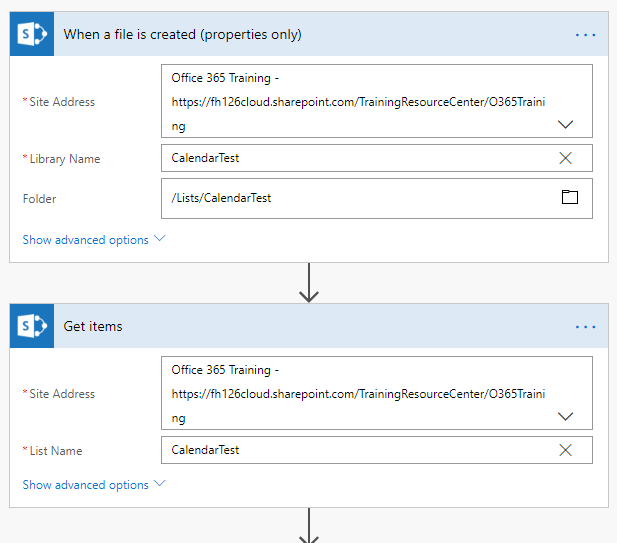
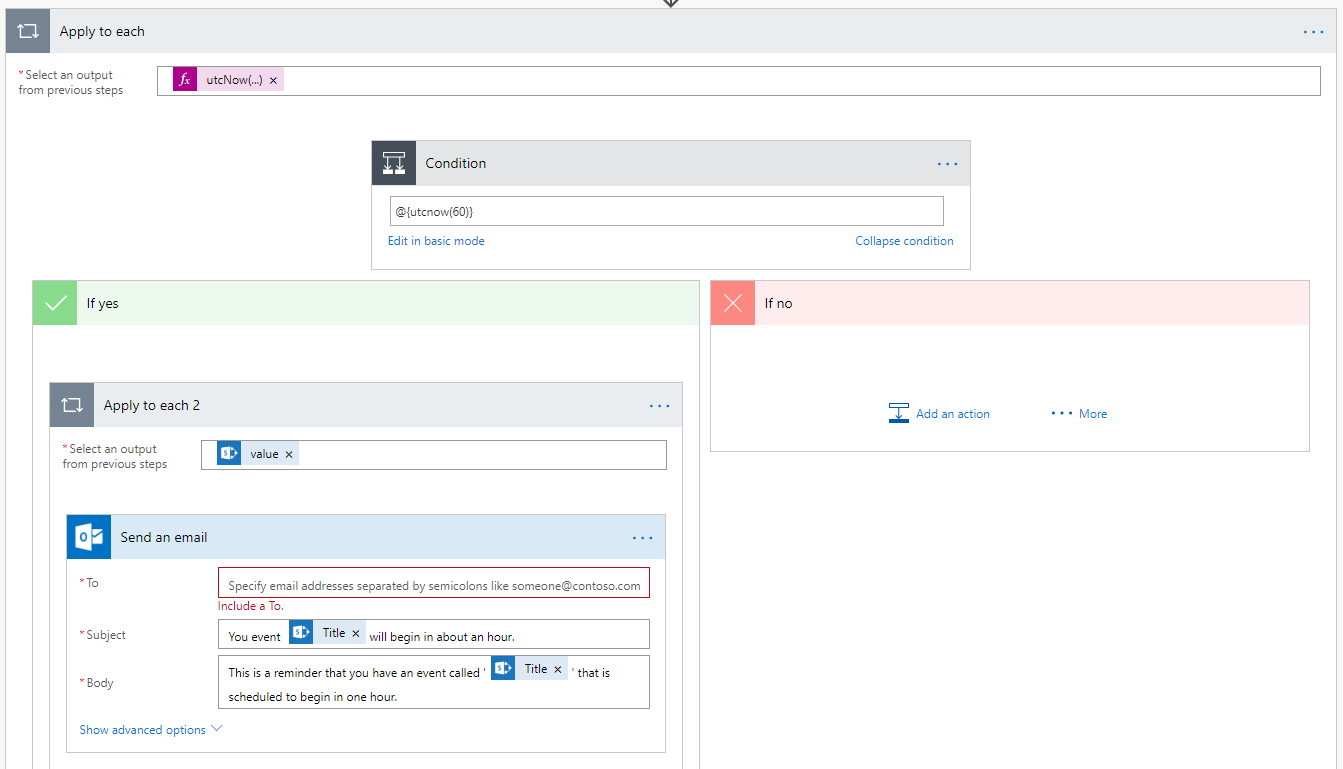
 

Please let me know if this is not the correct formating.

Categories:
I have the same question (0)
  • PieterVeenstra Profile Picture
    33 on at

    I think that your condition should look like this:


    @equals(triggerBody()['key-button-date'], addHours(utcNow(), 1))


    where triggerBody()['key-button-date'] is the date that you are comparing against.

  • Community Power Platform Member Profile Picture
    Microsoft Employee on at

    I've tried this, but sadly it hasn't worked so far - Just tosses the 'This isn't a condition' error.

  • v-yuazh-msft Profile Picture
    Microsoft Employee on at

    Hi @Anonymous,


    Could you please share more details about the SharePoint Calendar List?

    Why are you use the trigger "when a file is created" instead of the "When an item is created"?

    Could you please share more details about the expression in the Input field of the Apply to each?

    Could you please share a screenshot of the run history when the flow run failed with error that you mentioned?


    Please share more details so we could try to provide a proper workaround for you.


    Best regards,

    Alice

  • Community Power Platform Member Profile Picture
    Microsoft Employee on at

    @v-yuazh-msft,


    Sorry! Here are the updated pictures where I'm still having the problems sadly. It's erroring out on the get event action.


    1.png2.png

Under review

Thank you for your reply! To ensure a great experience for everyone, your content is awaiting approval by our Community Managers. Please check back later.

Helpful resources

Quick Links

Introducing the 2026 Season 1 community Super Users

Congratulations to our 2026 Super Users!

Kudos to our 2025 Community Spotlight Honorees

Congratulations to our 2025 community superstars!

Congratulations to the April Top 10 Community Leaders!

These are the community rock stars!

Leaderboard > Power Automate

#1
Vish WR Profile Picture

Vish WR 959

#2
Valantis Profile Picture

Valantis 872

#3
Haque Profile Picture

Haque 589

Last 30 days Overall leaderboard
