web
You’re offline. This is a read only version of the page.
close
Skip to main content

Announcements

News and Announcements icon
Community site session details

Community site session details

Session Id :
Power Platform Community / Forums / Power Automate / Power Automate Desktop...
Power Automate
Suggested Answer

Power Automate Desktop Version Mismatch Issue — Solution ZIP Import Fails Due to Higher Version

(1) ShareShare
ReportReport
Posted on by 12

Hi everyone, I’m facing a version compatibility issue with Power Automate Desktop.

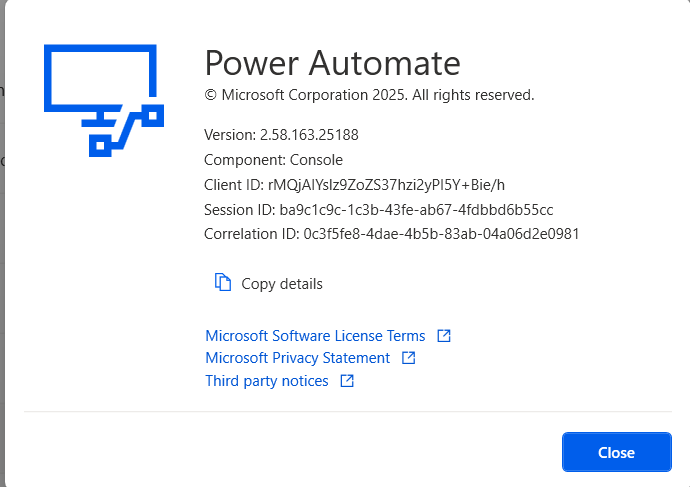
On my machine, the version installed is 2.58.163.25188.


On my client’s machine (US region), the version is 2.57.184.25154.

I created a desktop flow using version 2.58, exported it as a solution (ZIP file), and shared it with the client.
 

  • The solution (ZIP) was imported successfully into Power Automate cloud.

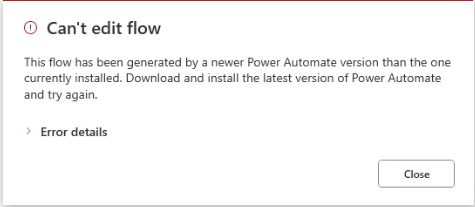
  • But while opening the desktop flow inside Power Automate Desktop (PAD), the error appears.


  •  

"Your ZIP file is from a newer version of Power Automate Desktop than the installed version."
 

When they check for updates, it says:

"No new updates. The latest version is already installed."

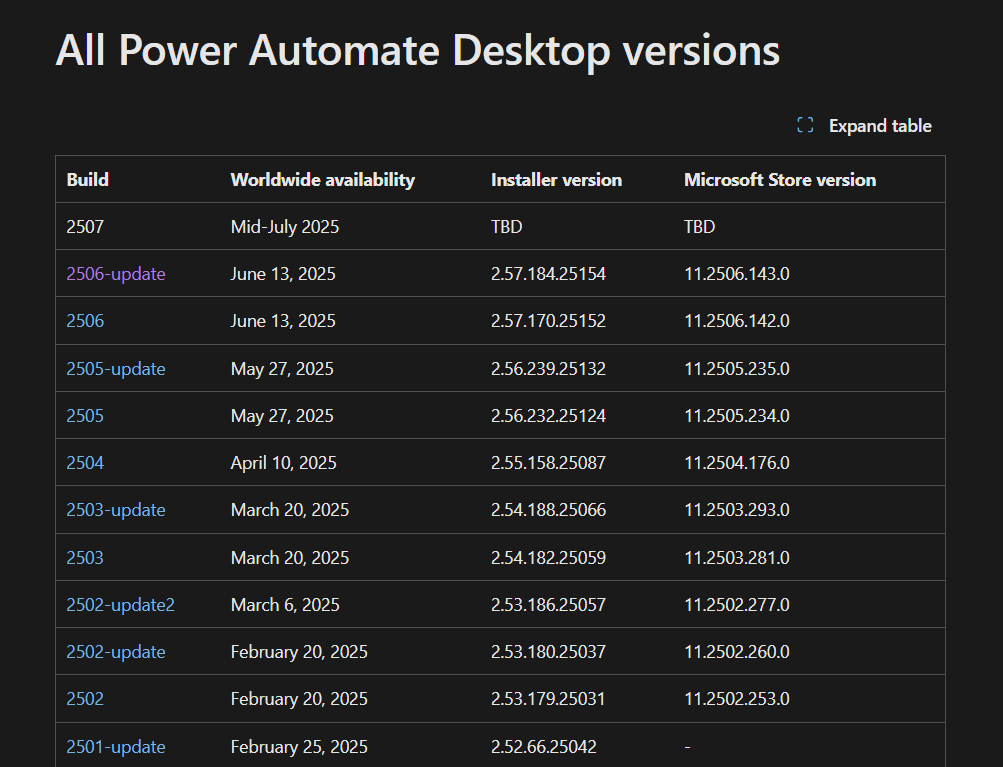
I also noticed version 2.58.163.25188 is not listed on the official release notes page.
 

My Questions:

1. Is version 2.58.163.25188 a phased rollout or a preview release?

2. How can I downgrade my Power Automate Desktop version to match 2.57.184.25154?

3. Is there any official download link for older versions of Power Automate Desktop?


Any guidance from the community or MVPs would be appreciated.

Thank you!

I have the same question (0)
  • Suggested answer
    trice602 Profile Picture
    16,244 Super User 2026 Season 1 on at
     
    From my experience is doesn't happen often.  My recommendation is to not downgrade your own version but upgrade your client version.  For the most part, going forward, the releases have been very stable and efficient, and typically they solve previous issues in previous versions.  So don't downgrade, upgrade!
     
    If you can, move your client version to the store version, they will also get the latest updates.
     

    ------------------------------------------------


    ⭐ If this was helpful, please like and check the box below "Does this answer your question" to help others find this too!


    Always glad to help! 💯💯💯💯💯


    Tom


    Follow me on LinkedIn - Thomas Rice, PMP | LinkedIn

  • Suggested answer
    eetuRobo Profile Picture
    4,535 Super User 2026 Season 1 on at
    You mentioned that the client has US as their region. This would make you think that they have the Preview region which gets the first updates. But they are not getting the newest 2.58.163.25188 update on their PAD


    https://learn.microsoft.com/en-us/power-platform/released-versions/power-automate-desktop
     
    It could be that their environment does not have "Get new features early" -setting enabled when they set up their environment


    https://learn.microsoft.com/en-us/power-platform/admin/create-environment?tabs=new

    So this would be why they are not getting the update. Also the released versions page is not always accurate and patch notes are released very late.

    So either you need to wait for some days/week or two so the client gets the update or downgrade your PAD back to 2.57.184.25154. You can download it here: https://github.com/jfevia/Power-Automate-Desktop/releases?page=1
     
    But since you will be getting the same error as your client you will need to first save all the flow actions into a text file in your current newest version of PAD and after you have downgraded your PAD create a new flow and paste the actions to that flow.

    I recommend not updating to the newest version on your dev environment. Flows created in older versions can be imported to a newer designer but if you have developed flows in newer version than the environment you are importing into you will face this issue.

Under review

Thank you for your reply! To ensure a great experience for everyone, your content is awaiting approval by our Community Managers. Please check back later.

Helpful resources

Quick Links

Introducing the 2026 Season 1 community Super Users

Congratulations to our 2026 Super Users!

Kudos to our 2025 Community Spotlight Honorees

Congratulations to our 2025 community superstars!

Congratulations to the April Top 10 Community Leaders!

These are the community rock stars!

Leaderboard > Power Automate

#1
Vish WR Profile Picture

Vish WR 791

#2
Valantis Profile Picture

Valantis 582

#3
Haque Profile Picture

Haque 529

Last 30 days Overall leaderboard



