

web
You’re offline. This is a read only version of the page.
close
Skip to main content

Notifications

Announcements

Community site session details

Community site session details

Session Id :
Power Platform Community / Forums / Power Automate / Power Automate still s...
Power Automate
Unanswered

Power Automate still sending approval flow for old items

(0) ShareShare
ReportReport
Posted on by
I have a scheduled automated flow (named 'Confirm completion of Action Items') running weekly (see below). The flow basically gets items from a SharePoint list, filters the item further, and updates the SharePoint list based on the approval flow response.
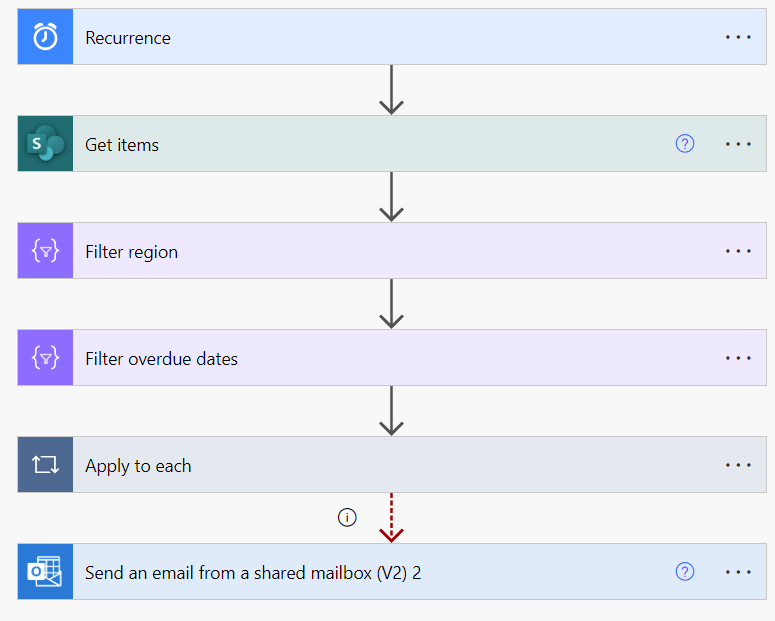
My 'Get items' has a filter query as below: (idbw is 'Issue Status' column)
Apply to each action looks like below:
Recently, we had an issue where the flow is sending an approval notice for really old items. Items that are no longer in the 'Actions in Progress' status. The weirdest thing here is that an approval notice is being sent out that wasn't captured in the week's run of the automated flow. So I really can't backtrack where the approval notice is being sent from. The only thing that comes to mind is that the approval action's approval type is 'Custom Responses - wait for one response'. So the weekly run looks like this:
And each run looks like this:
So basically the 'apply to each' action is ongoing until all items have a response. Even if only 1 item was not responded to, the entire flow will time out after 30 days. But the actions for the rest will still go through. Any thoughts on what's causing the phantom approval notices being sent out?
Categories:
I have the same question (0)
  • David_MA Profile Picture
    12,982 Super User 2025 Season 2 on at
    To prevent timeout issues with approvals in an Apply to each action in Power Automate, you can move the logic inside the Apply to each action into a new manually triggered flow. This new flow should be part of the same solution as your original flow. If your original flow is not already in a solution, you will need to move it into one.

    In your original flow, replace the Apply to each action with a Call child flow action. This way, each approval runs in its own instance, preventing a single timeout from affecting all approvals. If there are actions that need to run after each approval, include them in the child flow to ensure the flow continues for each item as soon as the approval response is received.

    Make sure the Apply to each action is the last step in your original flow to avoid encountering the same timeout issue. By following these steps, you can mitigate the risk of timeouts and ensure that each approval process runs independently.


Under review

Thank you for your reply! To ensure a great experience for everyone, your content is awaiting approval by our Community Managers. Please check back later.

Helpful resources

Quick Links

Forum hierarchy changes are complete!

In our never-ending quest to improve we are simplifying the forum hierarchy…

Ajay Kumar Gannamaneni – Community Spotlight

We are honored to recognize Ajay Kumar Gannamaneni as our Community Spotlight for December…

Leaderboard > Power Automate

#1
Michael E. Gernaey Profile Picture

Michael E. Gernaey 525 Super User 2025 Season 2

#2
Tomac Profile Picture

Tomac 324 Moderator

#3
abm abm Profile Picture

abm abm 232 Most Valuable Professional

Last 30 days Overall leaderboard


