there finally is an answer after back and forth.
Somehow there seems to be a policy which I haven't been aware of and I am not able to see in the admin center.
You can find the id of the blocking policy in your network traces.
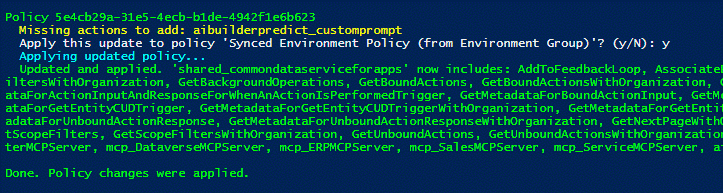
Once you gathered this you can run the following PS script to identify the ACP and turn Ai builder back on, not possible via the UI at the moment.
I also have never seen a policy called something like that. Seems to be something in Microsofts's Backend.
The clientId has been provided by microsoft. You will need a User with Power Platform Admin to execute the script.
<#
.SYNOPSIS
    Ensures the Dataverse (Common Data Service for Apps) connector in a specific Power
    Platform Advanced Connector Policy allows the AI Builder prediction actions.

.DESCRIPTION
    Prompts for (or accepts) an Advanced Connector Policy id, signs the user in via the
    browser, and downloads that policy directly.

    If the policy's ConnectorManagement rule set contains a connector entry for
    "/providers/Microsoft.PowerApps/apis/shared_commondataserviceforapps" that is restricted
    to a specific set of actions (AllowedActionsMode = "SomeAllowed") and is missing any of:

        aibuilderpredict_customprompt, Predict, PredictV2, PredictByReference

    the missing actions are added and the policy is applied back to the tenant.

.PARAMETER PolicyId
    The id (GUID) of the Advanced Connector Policy to check/update.
    If omitted, you are prompted for it.

.PARAMETER ClientId
    Entra ID (Azure AD) public client application id used for the interactive browser sign-in.
    Defaults to the well-known Azure PowerShell first-party client. Override with your own
    app registration (public client, redirect URI http://localhost) if your tenant does not
    allow the default client to obtain Power Platform API tokens.

.PARAMETER TenantId
    Tenant to authenticate against. Defaults to "organizations".

.PARAMETER Force
    Apply the changes without prompting for confirmation.

.EXAMPLE
    .\Update-AdvancedConnectorPolicy.ps1

.EXAMPLE
    .\Update-AdvancedConnectorPolicy.ps1 -PolicyId "11111111-2222-3333-4444-555555555555" -Force
#>
[CmdletBinding()]
param(
    [string]$PolicyId,
    [string]$ClientId = '1950a258-227b-4e31-a9cf-717495945fc2',
    [string]$TenantId = 'organizations',
    [switch]$Force
)

$ErrorActionPreference = 'Stop'
Set-StrictMode -Version Latest

# ---- Constants ----------------------------------------------------------------
$ApiBase        = 'https://api.powerplatform.com'
$ApiVersion     = '2024-10-01'
$Resource       = 'https://api.powerplatform.com'
$TargetConnector = 'shared_commondataserviceforapps'
$RequiredActions = @('aibuilderpredict_customprompt', 'Predict', 'PredictV2', 'PredictByReference')

# ---- Helpers ------------------------------------------------------------------

function ConvertTo-Base64Url {
    param([byte[]]$Bytes)
    [Convert]::ToBase64String($Bytes).TrimEnd('=').Replace('+', '-').Replace('/', '_')
}

function Get-AccessTokenInteractive {
    <#
        Performs an interactive Authorization Code + PKCE flow against Entra ID using a local
        HttpListener as the redirect target, so no extra PowerShell modules are required.
    #>
    param(
        [string]$ClientId,
        [string]$TenantId,
        [string]$Resource
    )

    # PKCE
    $rng = [System.Security.Cryptography.RandomNumberGenerator]::Create()
    $verifierBytes = New-Object 'byte[]' 32
    $rng.GetBytes($verifierBytes)
    $codeVerifier = ConvertTo-Base64Url -Bytes $verifierBytes
    $sha256 = [System.Security.Cryptography.SHA256]::Create()
    $challengeBytes = $sha256.ComputeHash([System.Text.Encoding]::ASCII.GetBytes($codeVerifier))
    $codeChallenge = ConvertTo-Base64Url -Bytes $challengeBytes

    $stateBytes = New-Object 'byte[]' 16
    $rng.GetBytes($stateBytes)
    $state = ConvertTo-Base64Url -Bytes $stateBytes

    # Start a local listener on a free port (127.0.0.1).
    $listener = [System.Net.HttpListener]::new()
    $port = $null
    foreach ($candidate in 8400..8420) {
        try {
            $listener.Prefixes.Clear()
            $listener.Prefixes.Add("http://localhost:$candidate/")
            $listener.Start()
            $port = $candidate
            break
        }
        catch {
            # port in use, try the next one
        }
    }
    if (-not $port) { throw 'Could not open a local port (8400-8420) for the sign-in redirect.' }

    $redirectUri = "http://localhost:$port/"
    $scope = [Uri]::EscapeDataString("$Resource/.default offline_access openid profile")

    $authUrl = "https://login.microsoftonline.com/$TenantId/oauth2/v2.0/authorize" +
        "?client_id=$ClientId" +
        "&response_type=code" +
        "&redirect_uri=$([Uri]::EscapeDataString($redirectUri))" +
        "&response_mode=query" +
        "&scope=$scope" +
        "&state=$state" +
        "&code_challenge=$codeChallenge" +
        "&code_challenge_method=S256" +
        "&prompt=select_account"

    Write-Host 'Opening your browser to sign in...' -ForegroundColor Cyan
    Start-Process $authUrl | Out-Null

    # Wait for the redirect with the authorization code.
    $context = $listener.GetContext()
    $request = $context.Request
    $code  = $request.QueryString['code']
    $rstate = $request.QueryString['state']
    $err   = $request.QueryString['error']
    $errDesc = $request.QueryString['error_description']

    $html = '<html><body style="font-family:Segoe UI,Arial,sans-serif;padding:2rem"><h3>Sign-in complete.</h3><p>You can close this tab and return to the terminal.</p></body></html>'
    $buffer = [System.Text.Encoding]::UTF8.GetBytes($html)
    $context.Response.ContentType = 'text/html'
    $context.Response.OutputStream.Write($buffer, 0, $buffer.Length)
    $context.Response.OutputStream.Close()
    $listener.Stop()

    if ($err) { throw "Sign-in failed: $err - $errDesc" }
    if ($rstate -ne $state) { throw 'Sign-in failed: state mismatch (possible interception).' }
    if (-not $code) { throw 'Sign-in failed: no authorization code was returned.' }

    $tokenBody = @{
        client_id     = $ClientId
        grant_type    = 'authorization_code'
        code          = $code
        redirect_uri  = $redirectUri
        code_verifier = $codeVerifier
        scope         = "$Resource/.default offline_access openid profile"
    }

    $token = Invoke-RestMethod -Method Post `
        -Uri "https://login.microsoftonline.com/$TenantId/oauth2/v2.0/token" `
        -ContentType 'application/x-www-form-urlencoded' `
        -Body $tokenBody

    return $token.access_token
}

function Invoke-PpApi {
    param(
        [Parameter(Mandatory)][string]$Method,
        [Parameter(Mandatory)][string]$Path,
        [string]$Token,
        $Body
    )
    $uri = "$ApiBase$Path"
        $sep = if ($uri.Contains('?')) { '&' } else { '?' }
    $uri += "${sep}api-version=$ApiVersion"
    $headers = @{ Authorization = "Bearer $Token" }
    $params = @{ Method = $Method; Uri = $uri; Headers = $headers }
    if ($null -ne $Body) {
        $params.ContentType = 'application/json'
        $params.Body = ($Body | ConvertTo-Json -Depth 30)
    }
    return Invoke-RestMethod @params
}

# ---- Main ---------------------------------------------------------------------

if (-not $PolicyId) {
    $PolicyId = Read-Host 'Enter the Advanced Connector Policy id'
}

if ($PolicyId -notmatch '^[0-9a-fA-F]{8}-[0-9a-fA-F]{4}-[0-9a-fA-F]{4}-[0-9a-fA-F]{4}-[0-9a-fA-F]{12}$') {
    throw "'$PolicyId' does not look like a valid policy id (expected a GUID)."
}

$token = Get-AccessTokenInteractive -ClientId $ClientId -TenantId $TenantId -Resource $Resource
Write-Host 'Signed in.' -ForegroundColor Green

$policyIds = @($PolicyId)
$anyUpdated = $false

foreach ($policyId in $policyIds) {
    Write-Host ""
    Write-Host "Policy $policyId" -ForegroundColor Green

    $policy = Invoke-PpApi -Method Get -Token $token -Path "/governance/ruleBasedPolicies/$policyId"

    if (-not $policy.PSObject.Properties['ruleSets'] -or -not $policy.ruleSets) {
        Write-Host '  No rule sets in policy; skipping.'
        continue
    }

    $connectorRuleSet = $policy.ruleSets | Where-Object { $_.id -eq 'ConnectorManagement' } | Select-Object -First 1
    if (-not $connectorRuleSet) {
        Write-Host '  No ConnectorManagement rule set; skipping.'
        continue
    }

    $inputs = $connectorRuleSet.inputs
    if (-not $inputs -or -not $inputs.PSObject.Properties['AllowedConnectorList'] -or -not $inputs.AllowedConnectorList) {
        Write-Host '  No AllowedConnectorList; skipping.'
        continue
    }

    $entry = $inputs.AllowedConnectorList |
        Where-Object { $_.AllowedConnector -and ($_.AllowedConnector -match "/$TargetConnector`$") } |
        Select-Object -First 1

    if (-not $entry) {
        Write-Host "  Connector '$TargetConnector' is not present in this policy; skipping."
        continue
    }

    $mode = if ($entry.PSObject.Properties['AllowedActionsMode']) { $entry.AllowedActionsMode } else { $null }

    if ($mode -eq 'AllAllowed' -or -not $entry.PSObject.Properties['AllowedActions'] -or -not $entry.AllowedActions) {
        Write-Host "  '$TargetConnector' allows all actions (AllowedActionsMode=$mode); the required actions are already permitted. No change."
        continue
    }

    $current = @($entry.AllowedActions)
    $missing = @($RequiredActions | Where-Object { $current -cnotcontains $_ })

    if ($missing.Count -eq 0) {
        Write-Host "  '$TargetConnector' already includes all required actions. No change."
        continue
    }

    Write-Host "  Missing actions to add: $($missing -join ', ')" -ForegroundColor Yellow

    if (-not $Force) {
        $answer = Read-Host "  Apply this update to policy '$($policy.name)'? (y/N)"
        if ($answer -notmatch '^(y|yes)$') {
            Write-Host '  Skipped by user.'
            continue
        }
    }

    $entry.AllowedActions = @($current + $missing)

    $updateBody = @{
        name     = $policy.name
        ruleSets = $policy.ruleSets
    }

    Write-Host '  Applying updated policy...' -ForegroundColor Cyan
    Invoke-PpApi -Method Put -Token $token -Path "/governance/ruleBasedPolicies/$policyId" -Body $updateBody | Out-Null
    Write-Host "  Updated and applied. '$TargetConnector' now includes: $($entry.AllowedActions -join ', ')" -ForegroundColor Green
    $anyUpdated = $true
}

Write-Host ""
if ($anyUpdated) {
    Write-Host 'Done. Policy changes were applied.' -ForegroundColor Green
} else {
    Write-Host 'Done. No policy changes were needed.' -ForegroundColor Green
}


